Agents are getting capable enough to actually do work. They read your docs, call your APIs, write to Notion, charge cards on Stripe. To do any of that, they need credentials.
That's where things get uncomfortable. If your agent calls Stripe with a real API key, two things have just happened that you probably do not want:
- the LLM has seen the secret — it's in context, it can be quoted back in a tool call, it can leak into a log
- end users of the agent have seen it too — anyone who can read the chat transcript or the tool I/O can pull the key out
You can drop the secret into an environment variable inside the sandbox, but the moment the agent reads a config file or runs printenv, you're back where you started. The model is in the loop.
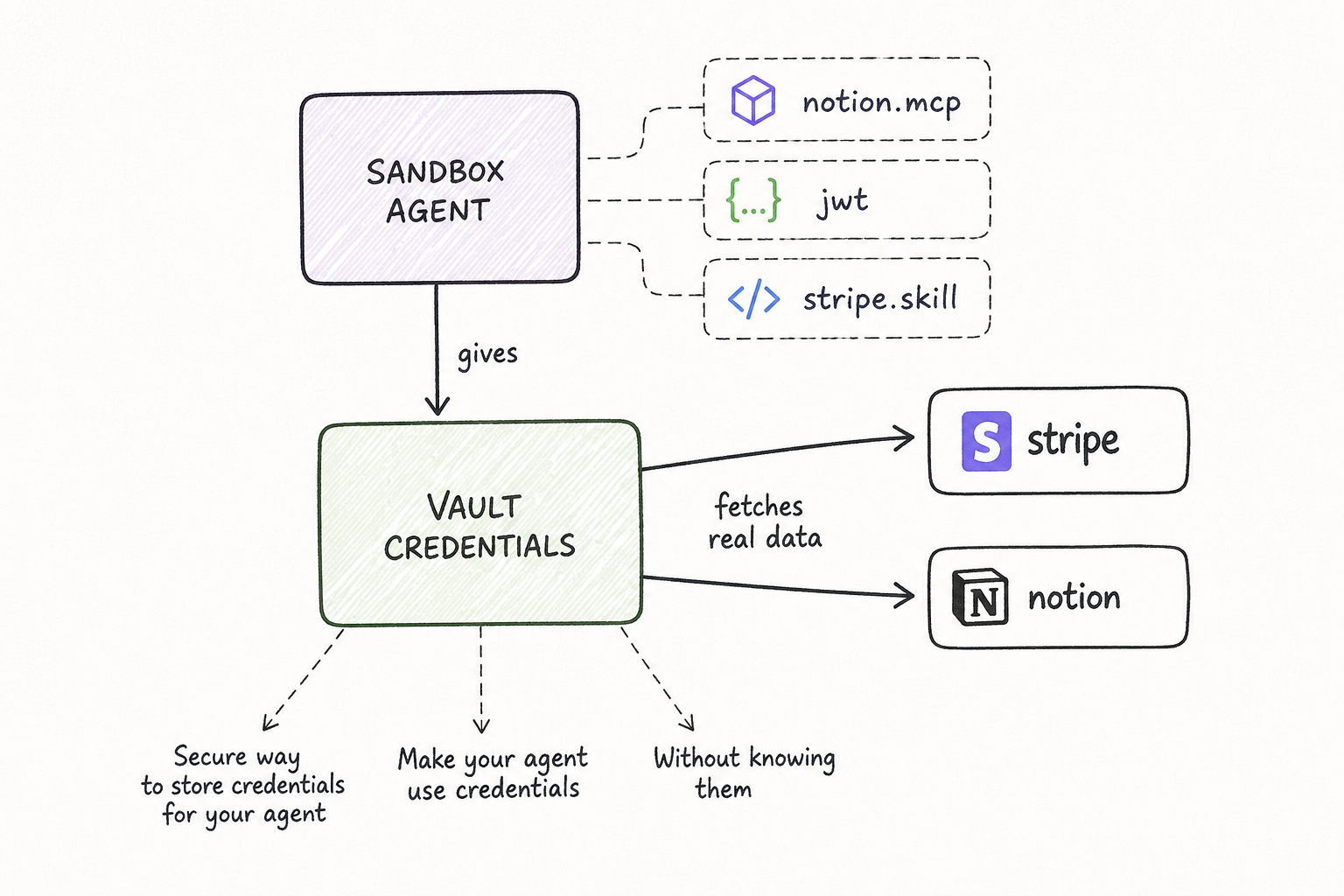
Credential Vaults are how we get the model out of that loop. You store the secret once, give your agent the right to use it, and the secret itself never enters the sandbox.
What a vault is
A vault is a team-scoped container of credentials. Inside it, you put one credential per service you want your agents to call — notion.mcp, stripe, your internal billing API, whatever. Each credential captures three things:
- the service — the host the credential is allowed to be used against
- the auth — Bearer token, OAuth2 client, or HTTP Basic
- the inject rule — how the auth should be applied: as a header, a query parameter, in the URL path, or as Basic auth
That last part matters. Real APIs don't agree on how to take a key. Stripe wants Authorization: Bearer .... Notion wants the same plus a Notion-Version header. Some legacy APIs want ?api_key=... in the URL. The vault stores the rule once, in the right shape, and applies it consistently for every call.
Vaults are shared across the team by design. Credentials rotate in one place, and every agent on the team picks up the new value on its next request. No re-deploy.
How to use it
Three steps, no SDK changes:
- Create a vault. Pick a name. The vault appears for everyone on your team in the Vaults tab.
- Add a credential. A 3-step wizard — pick the service from a registry (or paste a URL), choose Bearer or OAuth, fill in the token, then review the auto-generated injection rule (
Will be sent as: Authorization: Bearer ...). Save. - Pin the vault to your agent. When you deploy or run an agent, attach one or more vaults to it. Done.
Your agent code calls https://api.stripe.com/v1/charges like any other HTTP request. It does not know there's a vault. It does not know there's a key. It does not know there's a proxy. The request goes out, the response comes back, the work gets done.
How it works under the hood
This is the part that earns the safety claim, so it's worth the detail.
Every 21st sandbox ships with a CA certificate baked into its trust store, plus environment variables that route all outbound HTTPS through a service we call the vault proxy. When the agent makes a request, the proxy terminates the TLS connection, looks at the URL, and decides whether the team's pinned vaults have a credential that matches the host.
If there's a match, the proxy:
- Decrypts the credential server-side. Real secrets live encrypted in our database — they never sit in the sandbox.
- Applies the inject rule. The original request is rewritten with the right header, query parameter, or Basic auth attached.
- Re-encrypts and forwards the request upstream over real provider TLS.
- Scans the request body for stray
vault:placeholder literals before sending — a backstop in case the agent tried to template a credential reference into a payload.
The agent only sees the response — the same shape it would see if it had the real key.
Three properties fall out of this:
- The model never sees the bytes. Even if you ask the LLM to "log the Stripe key", there's nothing to log. The key is added one hop later, by code the LLM cannot reach.
- End users never see the bytes. The token is not in the chat transcript, not in the tool output, not in the request log we surface back to the chat UI.
- You rotate in one place. Update the credential in the vault and every agent on the team picks up the new value on the next request.
What's covered today
Vaults cover all outbound HTTP and HTTPS from the sandbox. That includes:
- direct API calls (
fetch,requests,curl— anything that respectsHTTPS_PROXY) - MCP servers reached over HTTP / SSE
- skills that hit external services
What's not in scope yet: gRPC, WebSocket-only services, and anything that bypasses the OS proxy. Those are next.
Why we built it
Two motivations, one for each side of the agent.
For you, the agent author: the more your agent can do, the more painful it is to put a real key in front of an LLM. We wanted a clean shape — keys in one place, agents in another, and a small auditable boundary between them. You write your agent like the credentials are simply available, because they are.
For the end user of your agent: when an agent runs on someone else's data — their Notion, their Stripe, their internal API — they need a story they can trust. "Your secrets never enter the model's context, never enter the chat transcript, and never sit on disk in a sandbox" is a story we can actually back with the architecture, not just with policy.
That's the real point of vaults. Not "encrypted secret storage" — there are a hundred of those. The point is that an agent can use a secret without anyone in the loop ever seeing it.
Open the Vaults tab in your team workspace and create your first one. If you have feedback or a service you'd like in the registry, ping us.