Beautiful flight visualizations for React.
Routes, live tracking, networks, trails and satellite orbits — built with MapLibre and mapcn.
npx shadcn@latest add @flightcn/flight
flightcn gives you flight visualization components you own. Start with two IATA codes, add airport labels, animate an aircraft, or build a complete route network.
Highlights
- Built to work with
mapcn
- Type-compatible with both maplibre-gl v5 and v6
- Render airports and routes directly from IATA codes like
TPE, HND, and LAX
- Great-circle arc rendering with antimeridian handling
- Support for single routes, multiple routes, and multi-leg journeys
- Controlled live-flight tracking with completed and remaining route segments
- Weighted flight networks, geodesic range bands, and route annotations
- Recorded aircraft trails with recent-position emphasis and animated traffic flow
- Globe-based satellite orbit overlays with ground tracks and animated markers
- Custom satellite SVG marker support for orbital visualizations
- Optional airport labels, hover states, and route animation
- Built-in airport registry with
code, name, city, country, latitude, and longitude
- 12 prebuilt blocks — dashboards, route pickers, traffic flows, and orbit trackers — installable with one shadcn command
- Interactive playground for composing visualizations and copying the generated React code
- Step-by-step recipes — live flight tracker, airline route map, and flight history map, each with a demo and full code
- A free flight passport — paste your flights to get a lifetime map, travel stats, and a year in review you can share
Install
Flight
Add the flight components from the shadcn registry:
npx shadcn@latest add @flightcn/flight
The registry item depends on mapcn, so the required map component will also be pulled in through the registry dependency chain.
Installed files:
components/ui/flight.tsxcomponents/ui/flight-airports.tscomponents/ui/flight-airports-utils.tscomponents/ui/flight-visualizations.tsx
Satellite
Add the satellite overlay component from the shadcn registry:
npx shadcn@latest add @flightcn/satellite
Installed files:
components/ui/satellite-orbit.tsx
Quick Start
After installing from the shadcn registry, import the generated local Map and FlightRoute components, then render a route with airport markers:
import { Map } from "@/components/ui/map";
import { FlightRoute } from "@/components/ui/flight";

export default function Demo() {
  return (


  );
}
Components
FlightAirport
Render a single airport marker from an IATA code or custom coordinates.
FlightRoute
Render one route between two airports. Use this for the common point-to-point case.
FlightRoutes
Render multiple independent routes in one map. Use this when each route should remain separate.
FlightMultiRoute
Render a single journey across multiple waypoints. Use this when one trip should connect several legs in sequence.
FlightTracker
Track one flight with controlled progress, split completed/remaining paths, aircraft heading, and operational details.
FlightRouteLabel
Place fixed labels at a percentage along a great-circle route, or use mode="aircraft" to show a plane with a horizontal label that follows it along the route. Supports optional route-aligned rotation and sm, md, or lg sizing.
FlightNetwork
Render a weighted airport network with scalable routes and nodes plus connected-route focus interactions. Each route's optional value is a relative weight: higher values produce thicker routes and contribute more to the size of both connected airport nodes. It defaults to 1.
FlightRange
Draw one or more true geodesic distance bands from an airport or coordinate. Use a globe projection for long ranges when geographic shape matters; Mercator intentionally distorts high-latitude circles.
AircraftTrail
Draw ordered recorded positions as a fading actual flight path with a current-aircraft marker, optional smooth altitudeColorStops, and a dashed continuation to a destination or explicit planned waypoints. Automatic destination routes support adjustable plannedCurvature.
FlightFlow
Show multiple aircraft sharing weighted routes as either a live animated traffic flow or a static traffic snapshot. Route value controls relative aircraft density, while an optional per-route aircraftCount sets an exact count.
SatelliteOrbit
Render a single globe-based orbital path with an animated satellite marker, ground track, and optional custom SVG icon.
SatelliteOrbits
Render multiple orbital overlays from one dataset while sharing animation, connector, and label behavior.
Blocks
Prebuilt, full-page examples composed from flightcn components. Browse them at flightcn.yencheng.dev/blocks, then install any block with the shadcn CLI:
npx shadcn@latest add @flightcn/flight-tracker-dashboard
| Block | Description |
|---|
flight-route-picker | Search airports, explore featured routes, and arrange multi-stop journeys with distance and time estimates |
flight-tracker-dashboard | Live flight progress beside an operations card with altitude, speed, and a playback scrubber |
airline-network-dashboard | Weighted hub-and-spoke network with a ranked destination sidebar and two-way highlighting |
airport-search-map | Searchable panel over the built-in airport database with fly-to markers |
aircraft-trail-replay | Recorded track replay with an altitude-graded trail and dashed planned continuation |
flight-ops-overview | Operations dashboard with live KPI cards, a multi-flight map, and an en-route sidebar |
live-traffic-flow | Animated aircraft flowing along weighted global corridors with density presets |
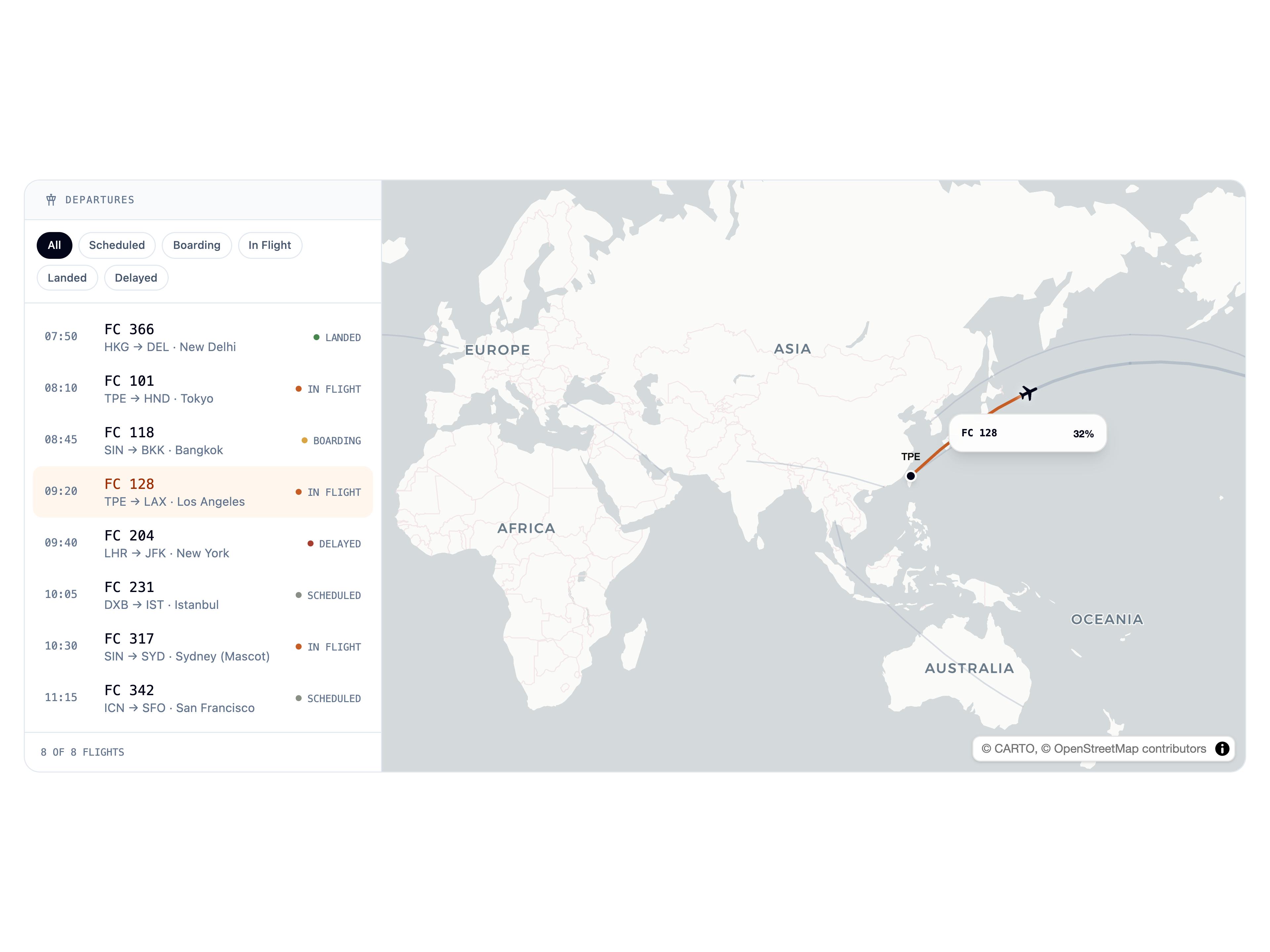
departures-board | Status-filterable departure list that draws the selected flight on the map |
aircraft-range-explorer | Compare aircraft reach from a departure airport with labeled range boundaries |
network-coverage-grid | Region-filtered coverage map with two-way selection between stat cards and markers |
flight-passport | Personal flight history from a pasted log, with lifetime stats and a month-by-month year in review |
satellite-orbit-tracker | Multi-satellite constellation on a globe with visibility toggles and orbital metadata |
Recipes
Step-by-step guides for the things people actually build with flightcn — each ships a live demo, the data format, and the full component to copy:
Playground
Compose visualizations live at flightcn.yencheng.dev/playground — stack routes, trackers, networks, and trails on one map, tune every prop, and copy the generated React code. Share any composition with a copyable view-only link, or tune orbits in the satellite playground.
Airport Data
The built-in dataset is sourced from OurAirports and bundled locally in this project.
Current AirportInfo fields:
codenamecitycountrylatitudelongitude
The flight passport page also loads a larger OurAirports list on demand (src/data/airports-extended.json, built by scripts/build-airports-extended.mjs). Its share images draw land from Natural Earth (public domain) and flags from Twemoji (CC-BY 4.0).
Docs
Local Development
For local development:
pnpm install
pnpm dev
Useful commands:
pnpm lint
pnpm build
pnpm registry:build
pnpm format
License
MIT License - see the LICENSE file for details.