Credential vaults
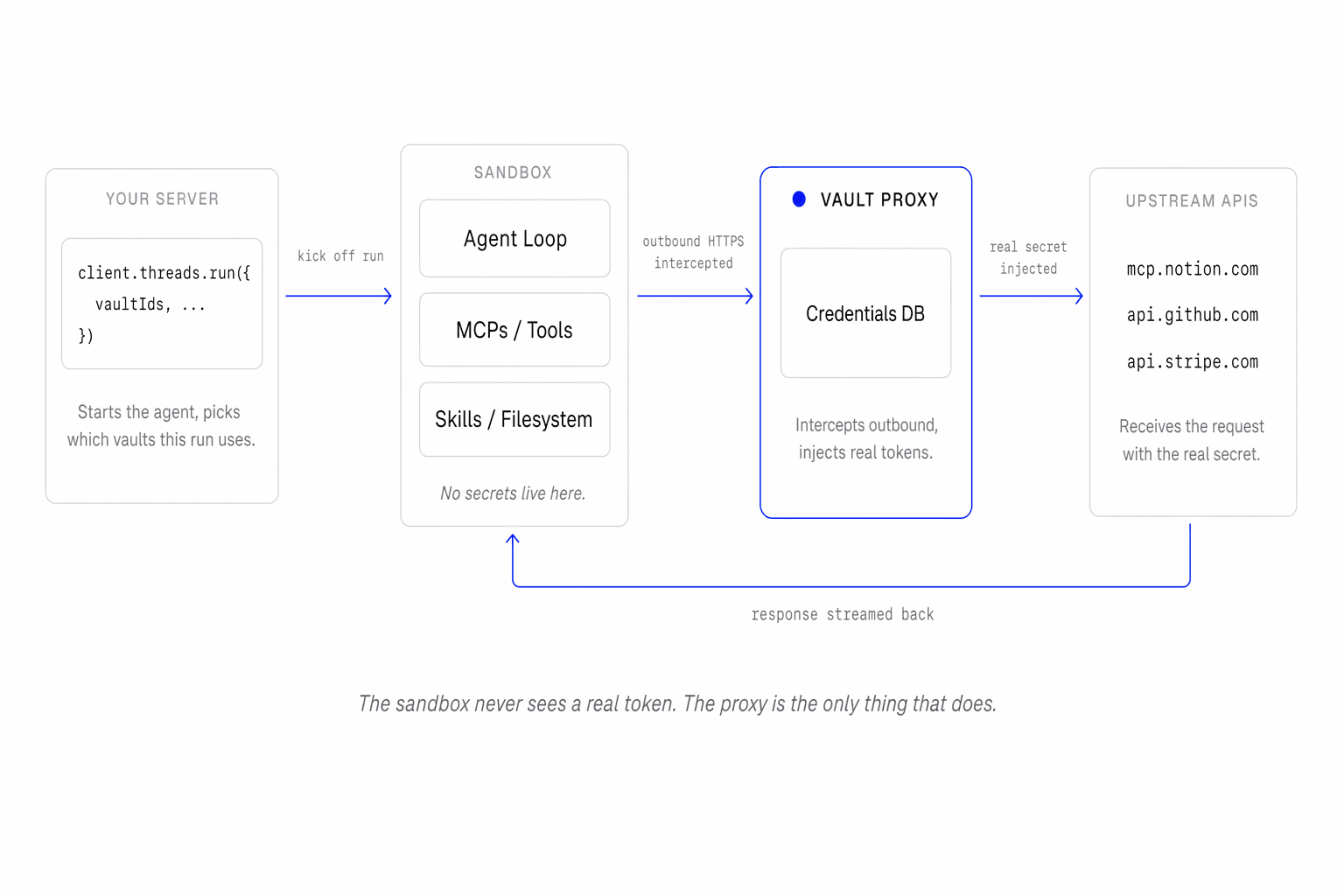
Your agent will eventually need to call something that needs a secret — Notion, GitHub, Stripe, any MCP server. Vaults are how 21st Agents delivers those secrets without ever putting them inside the sandbox.
Vault
A vault is a named container for your credentials. Whenever your agent wants to make an authenticated request, the vault is where the token lives.
You can create multiple vaults and pick which one applies the moment you start an agent run — on the fly, no redeploy. Common patterns are one vault per team, one per end user, or both stacked.
Credentials
A credential answers three questions about a secret: which host it authenticates, where in the request it goes, and what the secret itself is. The proxy matches outbound requests against the host, injects the secret at the declared site, and forwards upstream.
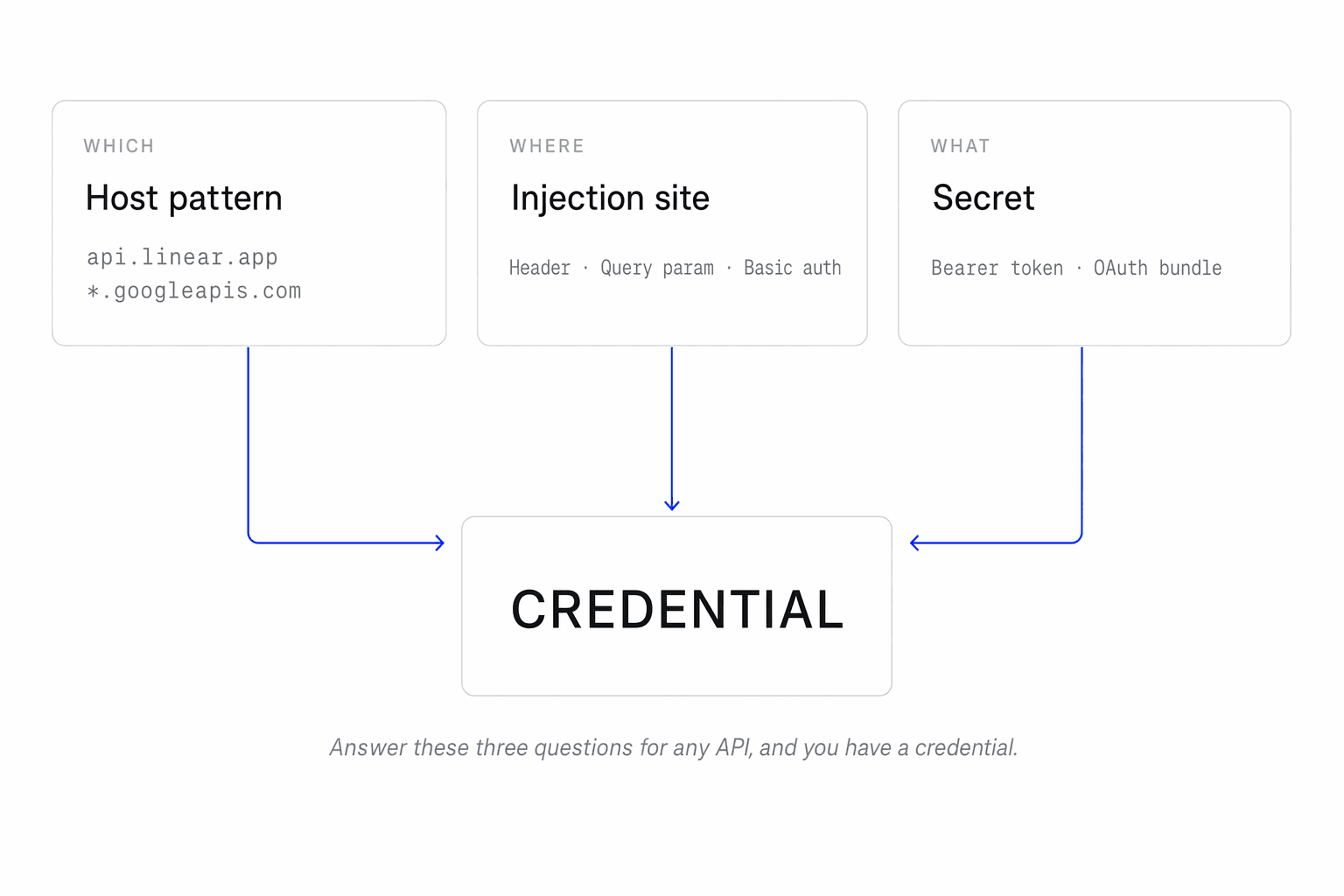
Authorization: Bearer <token>, which covers MCP and most APIs. For custom headers (Brave's X-Subscription-Token) or query-param auth (Google's ?key=), configure the inject rule — see the Vaults API reference.Runtime flow per tool call
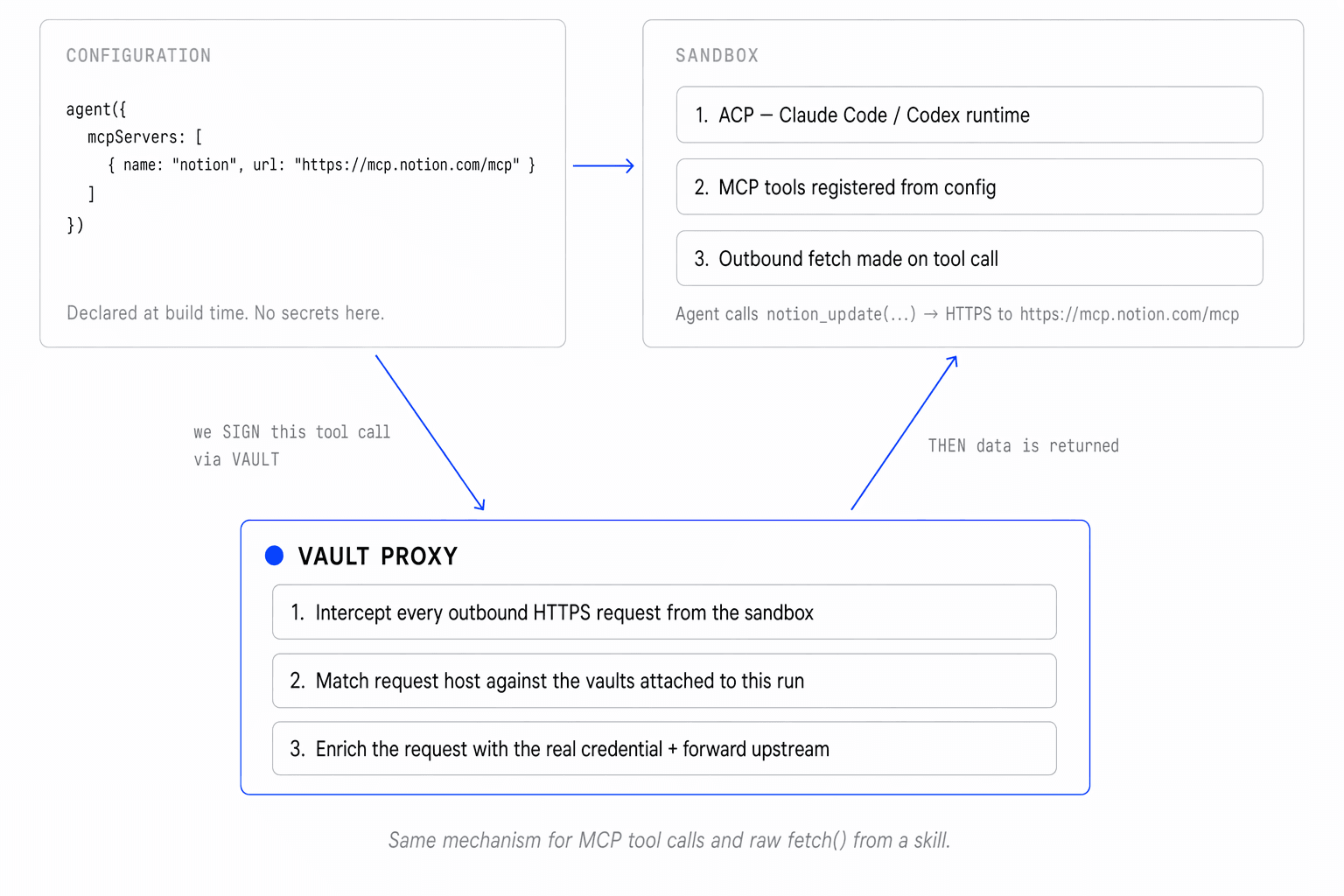
Zoomed in from the architecture above, here's what happens the moment the agent makes a tool call that hits the network:
MCPs
You can connect any HTTPS-based MCP server to your agent. Declare the server inline in the agent definition; the vault supplies the credential at runtime. Your agent code never touches a real token.
import { agent } from "@21st-sdk/agent"

export default agent({
  model: "claude-sonnet-4-6",
  mcpServers: [
    { name: "notion", url: "https://mcp.notion.com/mcp" },
    { name: "linear", url: "https://mcp.linear.app/mcp" },
  ],
})
Attach the vault with the right credentials on the call:
import { AgentClient } from "@21st-sdk/node"

const client = new AgentClient({ apiKey: process.env.AGENTS_API_KEY! })

// Pick which vaults apply on the fly, per run.
await client.threads.run({
  agent: "my-agent",
  sandboxId: "sbx_123",
  vaultIds: ["vault_123"],
  messages: [
    { role: "user", parts: [{ type: "text", text: "Search Brave for agent news." }] },
  ],
}).mcp.json compatibility.Skills
Skills are custom TypeScript / Python files that live next to your agent. Drop them in a skills/ folder and they're auto-attached; list them explicitly in the agent config if you want to be specific.
agents/
└── my-agent/
    ├── index.ts           # agent definition
    └── skills/
└── brave-search.ts # auto-attachedimport { agent } from "@21st-sdk/agent"
export default agent({
model: "claude-sonnet-4-6",
mcpServers: [
{ name: "notion", url: "https://mcp.notion.com/mcp" },
],
// Skills in ./skills/ are auto-attached. You can also list them explicitly.
skills: ["brave-search"],
})Inside a skill, you write a normal fetch(). The vault proxy intercepts the request, matches the host, and injects the credential — same mechanism as MCP tool calls.
// agents/my-agent/skills/brave-search.ts
export async function search(query: string) {
  const res = await fetch(
    `https://api.search.brave.com/res/v1/web/search?q=${encodeURIComponent(query)}`,
    { headers: { "X-Subscription-Token": "placeholder" } },
  )
  return res.json()
}
Known limitations
- HMAC-signed requests (e.g. AWS SigV4, Stripe webhook verification). The proxy injects credentials; it doesn't sign payloads.
- Env-var-only secrets. A secret your code needs locally — for HMAC signing inside a tool, a TCP database driver, a non-HTTPS SDK — can't be delivered via the proxy. Use the agent's regular env-var mechanism for those.
Next
More resources
- Vaults API reference — REST endpoints for vault + credential CRUD.
- Tools and MCPs — MCP server declaration and legacy
.mcp.jsoncompatibility. - Skills — custom TypeScript / Python files attached to the agent.
- Sandbox — the runtime credentials are injected into.
- Backend Integration — calling
threads.runwithvaultIdsfrom a server.