
About
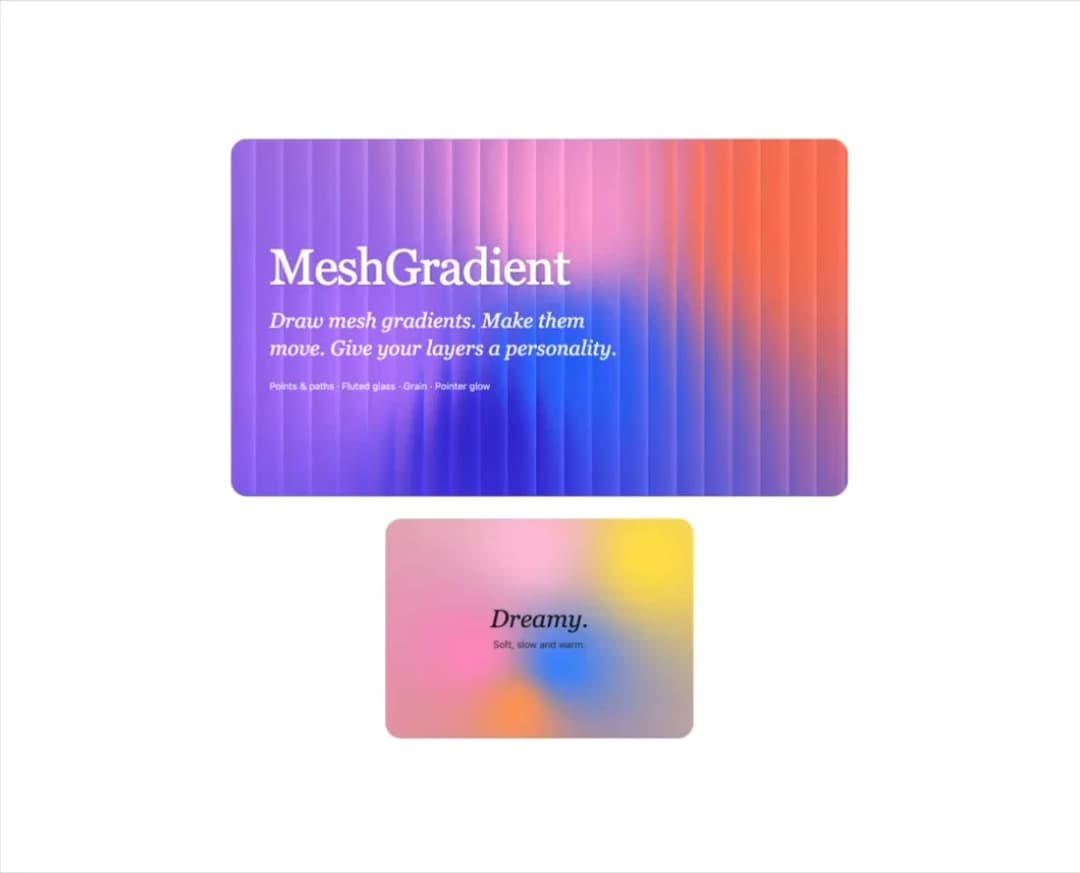
Live, animated mesh gradient background with drifting colour points, grain and a pointer-following glow (WebGL, CSS fallback).
Built with React and Tailwind. Copy the prompt and paste it into Claude Code, Cursor or Lovable: your agent adds Mesh Gradient to your project and fits it to your theme.
Code
How Mesh Gradient is used: the demo's code. The component's own source comes with a free account.
Usage.tsx
import { MeshGradient } from "@/components/ui/mesh-gradient";
// The cover look: fluted glass over a slow electric gradient. Move the pointer over it to steer the glow.
export function GlassHero() {
return (
<MeshGradient
colors={["#FF7A59", "#B57BFF", "#2D6BFF", "#FFA2D6", "#3B2BD9"]}
background="#C9A0FF"
glass={0.9}
ribs={22}
speed={0.6}
className="flex min-h-[520px] w-full max-w-4xl flex-col items-start justify-center rounded-3xl p-10 text-white sm:p-14"
>
<h1 className="font-serif text-6xl leading-none tracking-tight drop-shadow-sm sm:text-7xl">MeshGradient</h1>
<p className="mt-5 max-w-lg font-serif text-2xl italic leading-snug opacity-95 sm:text-3xl">
Draw mesh gradients. Make them move. Give your layers a personality.
</p>
<p className="mt-6 text-sm opacity-80">Points & paths · Fluted glass · Grain · Pointer glow</p>
</MeshGradient>
);
}
// A soft pastel card with dark text, still and grain-free.
export function DreamyCard() {
return (
<MeshGradient
colors={["#FFE14D", "#FF8FC2", "#3E8BFF", "#FFC2DA", "#FF9E5E"]}
background="#FFF6EC"
speed={0.4}
sharpness={2.4}
grain={0}
className="flex min-h-[320px] w-full max-w-md items-center justify-center rounded-3xl p-8 text-center text-neutral-900"
>
<div>
<p className="font-serif text-4xl italic">Dreamy.</p>
<p className="mt-2 text-sm text-neutral-700">Soft, slow and warm.</p>
</div>
</MeshGradient>
);
}
// 21st renders the default export: both examples, stacked.
export default function MeshGradientDemo() {
return (
<div className="flex w-full flex-col items-center gap-8 p-6">
<GlassHero />
<DreamyCard />
</div>
);
}
More in Shaders
View all
Glass Fold
187

Neural Noise
711

Line Shader Homlu UI
48
Black Hole
20
Oceanic
160
animated pattern cloud
615

Raidal 2
156
Voice Orb
6


