
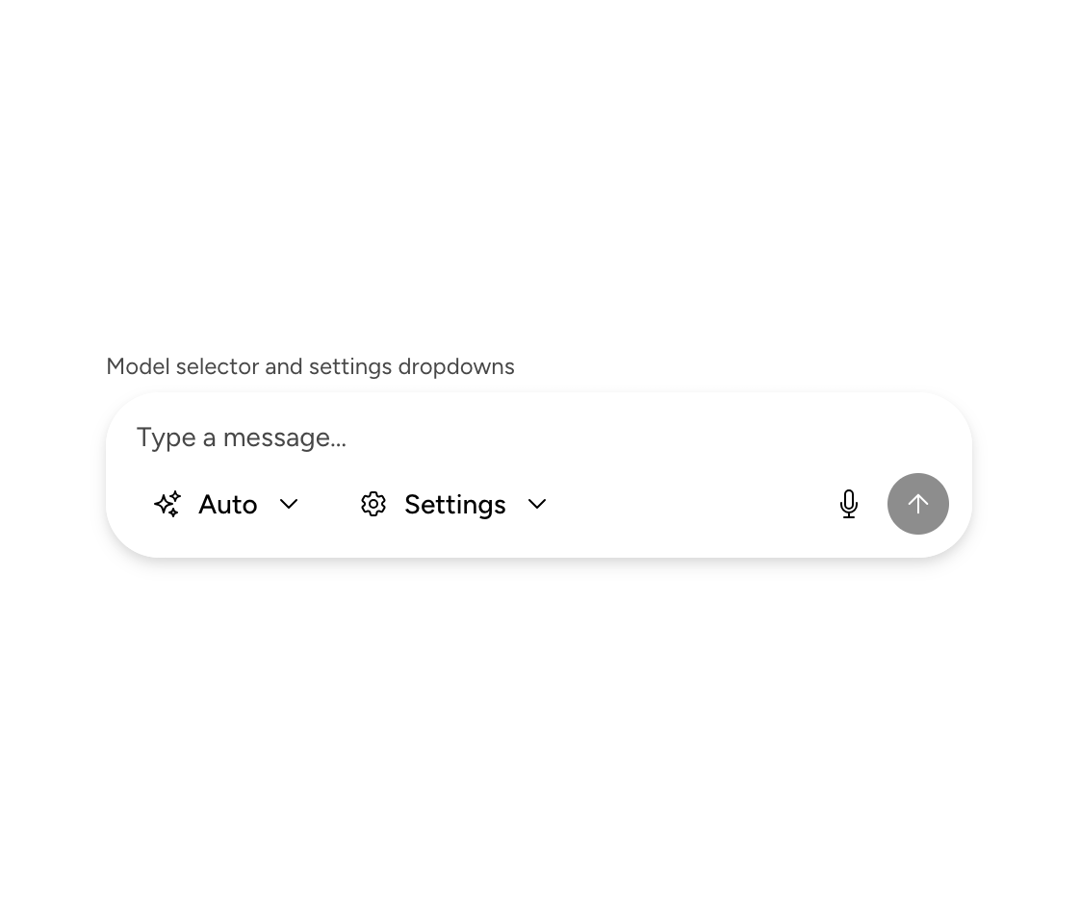
About
An Astryx chat-composer shell arranging input, drawer, header, footer, send actions, status, and keyboard focus behavior.
Built with React and Tailwind. Copy the prompt and paste it into Claude Code, Cursor or Lovable: your agent adds Astryx Chat Composer to your project and fits it to your theme.
Code
How Astryx Chat Composer is used: the demo's code. The component's own source comes with a free account.
Usage.tsx
'use client';

import {ChatComposer} from '@/components/ui/astryx-chat-composer';
import {Button} from '@astryxdesign/core/Button';
import {DropdownMenu} from '@astryxdesign/core/DropdownMenu';
import {Icon} from '@astryxdesign/core/Icon';
import {Stack} from '@astryxdesign/core/Layout';
import {Text} from '@astryxdesign/core/Text';
import {
  Cog6ToothIcon,
  MicrophoneIcon,
  SparklesIcon,
} from '@heroicons/react/24/outline';

function ChatComposerFooterActions() {
  return (
    <Stack direction="vertical" gap={4} width={450} maxWidth="100%">
      <Stack direction="vertical" gap={1}>
        <Text type="supporting" color="secondary">
          Model selector and settings dropdowns
        </Text>
        <ChatComposer
          onSubmit={value => {
            console.log('Sent:', value);
          }}
          footerActions={
            <>
              <DropdownMenu
                button={{
                  label: 'Auto',
                  variant: 'ghost',
                  size: 'md',
                  icon: <Icon icon={SparklesIcon} size="sm" />,
                  children: 'Auto',
                }}
                menuWidth={200}
                items={[
                  {label: 'Auto', onClick: () => {}},
                  {label: 'Model A', onClick: () => {}},
                  {label: 'Model B', onClick: () => {}},
                  {label: 'Model C', onClick: () => {}},
                ]}
              />
              <DropdownMenu
                button={{
                  label: 'Settings',
                  variant: 'ghost',
                  size: 'md',
                  icon: <Icon icon={Cog6ToothIcon} size="sm" />,
                  children: 'Settings',
                }}
                menuWidth={200}
                items={[
                  {label: 'Preferences', onClick: () => {}},
                  {label: 'Keyboard shortcuts', onClick: () => {}},
                  {label: 'About', onClick: () => {}},
                ]}
              />
            </>
          }
          sendActions={
            <Button
              label="Microphone"
              variant="ghost"
              size="md"
              icon={<Icon icon={MicrophoneIcon} />}
              isIconOnly
            />
          }
        />
      </Stack>
    </Stack>
  );
}

export default function ChatComposerFooterActionsDemo() {
  return (
    <div
      data-astryx-theme="neutral"
      data-theme="light"
      style={{colorScheme: 'light', display: 'contents'}}>
      <ChatComposerFooterActions />
    </div>
  );
}
Dependencies
More by Astryx
View all

Astryx Banner
56
Astryx Avatar
28
Astryx Aspect Ratio
28
Astryx Badge
25
Astryx Button Group
23
Astryx Toggle Button
16
Astryx Avatar Group
8
Astryx Chat Composer Drawer
6