
About
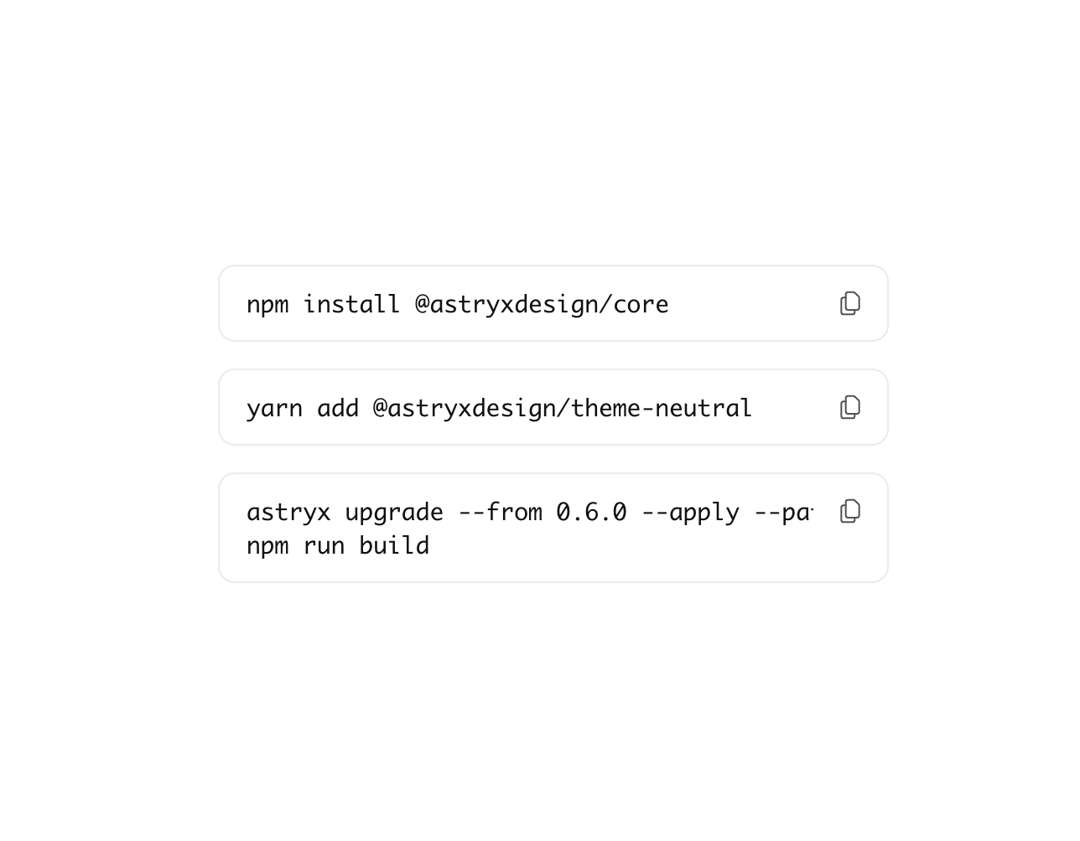
Fenced code block with syntax highlighting. Use for multi-line code snippets.
Built with React and Tailwind. Copy the prompt and paste it into Claude Code, Cursor or Lovable: your agent adds Astryx Code Block to your project and fits it to your theme.
Code
How Astryx Code Block is used: the demo's code. The component's own source comes with a free account.
Usage.tsx
'use client';

import {CodeBlock} from '@/components/ui/astryx-code-block';
import {VStack} from '@astryxdesign/core/Stack';

function CodeBlockBashCommand() {
  return (
    <VStack gap={4} style={{width: '100%', maxWidth: 400}}>
      <CodeBlock
        code="npm install @astryxdesign/core"
        language="bash"
        hasLanguageLabel={false}
        style={{width: '100%'}}
      />
      <CodeBlock
        code="yarn add @astryxdesign/theme-neutral"
        language="bash"
        hasLanguageLabel={false}
        style={{width: '100%'}}
      />
      <CodeBlock
        code={
          'astryx upgrade --from 0.6.0 --apply --path apps/web/src --install-deps\nnpm run build'
        }
        language="bash"
        hasLanguageLabel={false}
        style={{width: '100%'}}
      />
    </VStack>
  );
}

export default function CodeBlockBashCommandDemo() {
  return (
    <div
      data-astryx-theme="neutral"
      data-theme="light"
      style={{colorScheme: 'light', display: 'contents'}}>
      <CodeBlockBashCommand />
    </div>
  );
}
Dependencies
More by Astryx
View all

Astryx Banner
56
Astryx Aspect Ratio
29
Astryx Avatar
28
Astryx Badge
25
Astryx Button Group
23
Astryx Chat Composer Drawer
16
Astryx Toggle Button
16
Astryx Avatar Group
8