
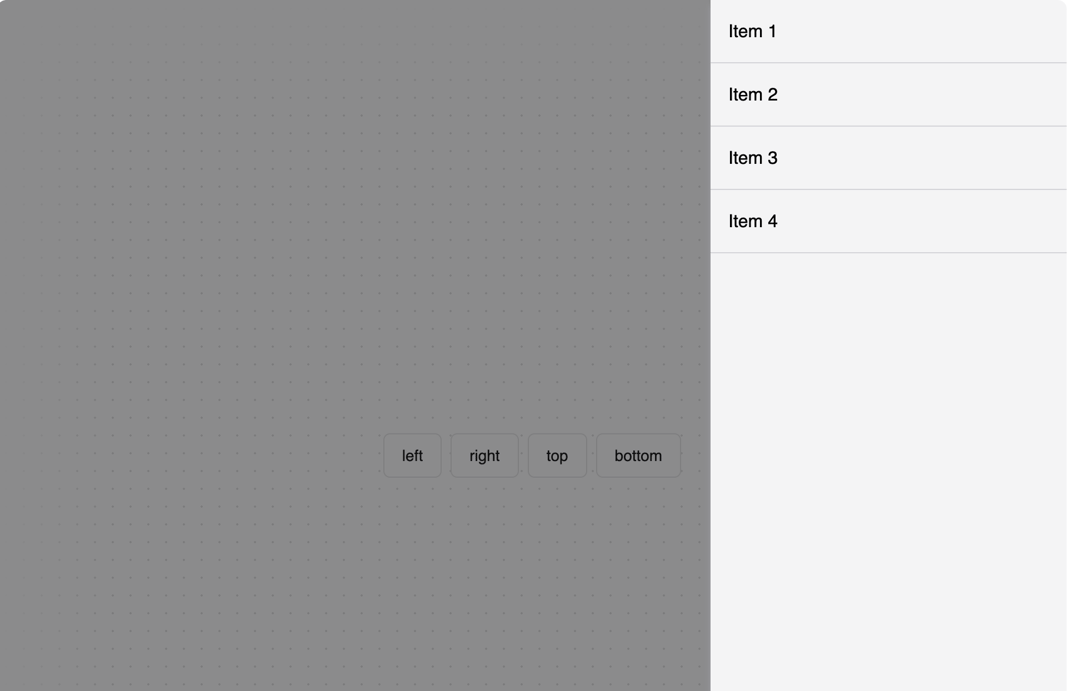
A drawer component that slides in from the edge of the screen. Built on top of Radix UI's Dialog primitive. Features - Four positions: left, right, top, and bottom - Smooth animations and transitions - Keyboard accessibility (Esc to close) - Dark mode support - Responsive design Configuration Add these animations to your tailwind.config.js: module.exports = { theme: { extend: { keyframes: { "fade-in": { from: { opacity: 0 }, to: { opacity: 1 }, }, "fade-out": { from: { opacity: 1 }, to: { opacity: 0 }, }, }, animation: { "fade-in": "fade-in 0.2s ease-out", "fade-out": "fade-out 0.2s ease-out", }, }, }, }
Built with React and Tailwind. Copy the prompt and paste it into Claude Code, Cursor or Lovable: your agent adds Drawer to your project and fits it to your theme.
Code
How Drawer is used: the demo's code. The component's own source comes with a free account.
Usage.tsx
"use client"

import { useState } from "react"
import { Drawer, DrawerContent } from "@/components/ui/drawer"
import { Button } from "@/components/ui/button"

type Side = "left" | "right" | "top" | "bottom"

function DrawerDemo() {
  const [open, setOpen] = useState(false)
  const [side, setSide] = useState<Side>("left")

  const items = ["Item 1", "Item 2", "Item 3", "Item 4"]
  const buttons: Side[] = ["left", "right", "top", "bottom"]

  return (
    <div className="flex flex-col gap-4">
      <div className="flex gap-2">
        {buttons.map((button) => (
          <Button
            key={button}
            variant="outline"
            onClick={() => {
              setSide(button)
              setOpen(true)
            }}
          >
            {button}
          </Button>
        ))}
      </div>

      <Drawer open={open} onOpenChange={setOpen}>
        <DrawerContent side={side}>
          <ul className="h-full bg-zinc-100 shadow-md shadow-zinc-400 dark:bg-zinc-900 dark:shadow-zinc-950">
            {items.map((item) => (
              <li
                key={item}
                className="cursor-pointer border-b border-b-zinc-300 p-4 hover:bg-zinc-200 dark:border-b-zinc-800 dark:hover:bg-zinc-800"
              >
                {item}
              </li>
            ))}
          </ul>
        </DrawerContent>
      </Drawer>
    </div>
  )
}

function SimpleDrawerDemo() {
  const [open, setOpen] = useState(false)

  return (
    <div>
      <Button onClick={() => setOpen(true)}>Open Drawer</Button>
      <Drawer open={open} onOpenChange={setOpen}>
        <DrawerContent>
          <div className="p-4">
            <h3 className="text-lg font-semibold">Simple Drawer</h3>
            <p className="mt-2">This is a basic drawer example.</p>
          </div>
        </DrawerContent>
      </Drawer>
    </div>
  )
}

export { DrawerDemo, SimpleDrawerDemo }
Dependencies
More by Edil Ozi
View all
Scroll Velocity
457
Horizontal Scroll Carousel
109
Custom Checkbox
95
Toggle
73
Pricing Card
30
Accordion
11
Infinite Scroll
9