
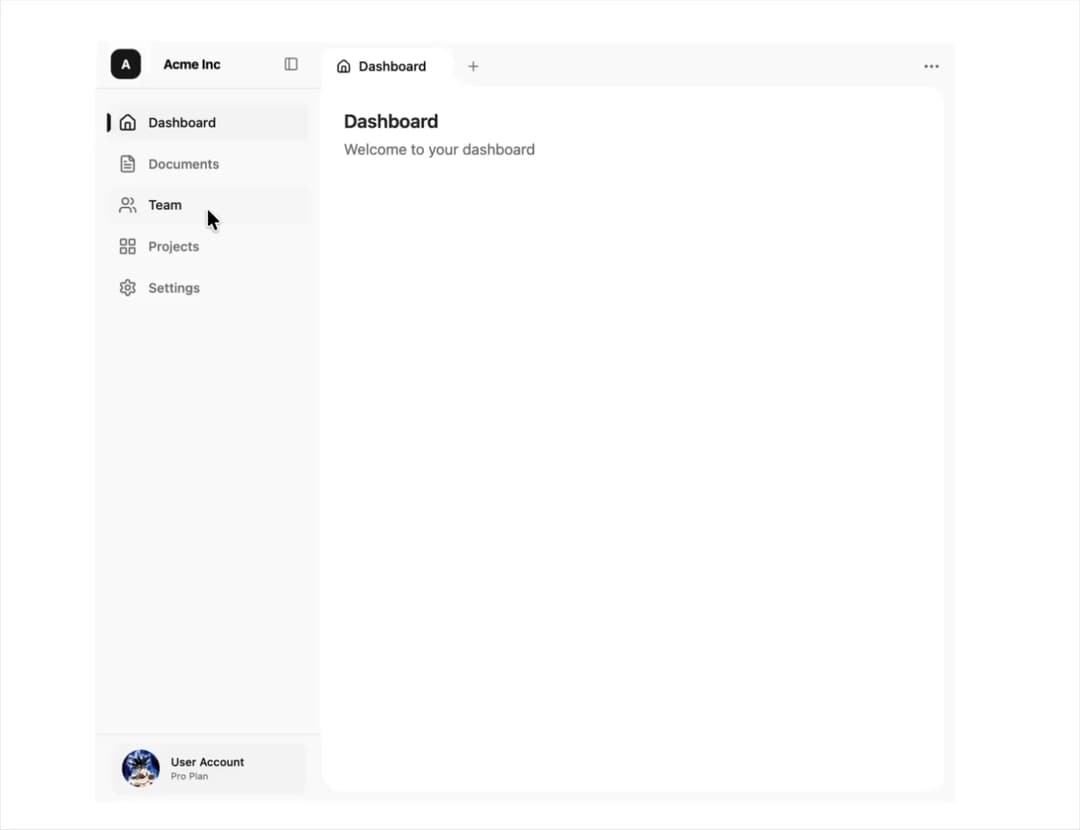
A production-ready navigation layout that combines a collapsible sidebar with a robust, browser-style tab system. Designed for complex dashboards where users need to multitask and maintain context across different views. Features 📑 Chrome-like Tab System: Fully functional tab interface with support for dynamic creation, deletion, and reordering (state logic). 🖱️ Power User Context Menus: Right-click tabs to access advanced actions: Close Other Tabs Close Tabs to the Right Close Tabs to the Left 💾 State Persistence: Automatically saves open tabs and the active selection to localStorage, restoring the user's session instantly active refreshing. ✨ Fluid Animations: Built with Framer Motion for smooth layout transitions, collapsible sidebar effects (spring physics), and "magic move" active state indicators. 📱 Fully Responsive: Collapsible desktop sidebar (expands/contracts). Native-feeling mobile drawer (Sheet). Horizontal scrollable tab bar on mobile. ⌨️ Keyboard & Accessibility: built on accessible primitives (Radix UI / shadcn/ui).
Built with React and Tailwind. Copy the prompt and paste it into Claude Code, Cursor or Lovable: your agent adds Sidebar with Browser like Tabs to your project and fits it to your theme.
Code
How Sidebar with Browser like Tabs is used: the demo's code. The component's own source comes with a free account.
Usage.tsx
'use client';

import * as React from 'react';
import { Home, FileText, Settings, Users, LayoutGrid } from 'lucide-react';
import { SidebarWithTabs, NavItem } from '@/components/ui/sidebar-with-chrome-like-tabs';

import { Avatar, AvatarFallback, AvatarImage } from '@/components/ui/avatar';

const navItems: NavItem[] = [
  { id: 'dashboard', label: 'Dashboard', icon: Home },
  { id: 'documents', label: 'Documents', icon: FileText },
  { id: 'team', label: 'Team', icon: Users },
  { id: 'projects', label: 'Projects', icon: LayoutGrid },
  { id: 'settings', label: 'Settings', icon: Settings },
];

function DashboardContent() {
  return (
    <div className='p-6'>
      <h1 className='text-xl font-semibold text-stone-800 dark:text-stone-100'>
        Dashboard
      </h1>
      <p className='text-stone-500 dark:text-stone-400 mt-1'>
        Welcome to your dashboard
      </p>
    </div>
  );
}

function DocumentsContent() {
  return (
    <div className='p-6'>
      <h1 className='text-xl font-semibold text-stone-800 dark:text-stone-100'>
        Documents
      </h1>
      <p className='text-stone-500 dark:text-stone-400 mt-1'>
        Manage your documents
      </p>
    </div>
  );
}

function TeamContent() {
  return (
    <div className='p-6'>
      <h1 className='text-xl font-semibold text-stone-800 dark:text-stone-100'>
        Team
      </h1>
      <p className='text-stone-500 dark:text-stone-400 mt-1'>
        Manage your team members
      </p>
    </div>
  );
}

function ProjectsContent() {
  return (
    <div className='p-6'>
      <h1 className='text-xl font-semibold text-stone-800 dark:text-stone-100'>
        Projects
      </h1>
      <p className='text-stone-500 dark:text-stone-400 mt-1'>
        Manage your projects
      </p>
    </div>
  );
}

function SettingsContent() {
  return (
    <div className='p-6'>
      <h1 className='text-xl font-semibold text-stone-800 dark:text-stone-100'>
        Settings
      </h1>
      <p className='text-stone-500 dark:text-stone-400 mt-1'>
        Manage your settings
      </p>
    </div>
  );
}

const contentMap: Record<string, React.ReactNode> = {
  dashboard: <DashboardContent />,
  documents: <DocumentsContent />,
  team: <TeamContent />,
  projects: <ProjectsContent />,
  settings: <SettingsContent />,
};

export default function HomePage() {
  const renderContent = (navId: string) => {
    return contentMap[navId] || <DashboardContent />;
  };

  return (
    <SidebarWithTabs
      companyName='Acme Inc'
      navItems={navItems}
      renderContent={renderContent}
      defaultNavId='dashboard'
      footer={
        <div className='flex items-center gap-3 px-3 py-2 rounded-lg bg-sidebar-accent w-full'>
          <Avatar>
            <AvatarImage
              src='https://cdn.21st.dev/assets/mirror/cf/cf584ee772c86d215d79d167b1dd9c273489838c0315e2a795d77dd089808f71.jpg'
              alt='@Arunachalam0606'
              className='object-cover'
            />
            <AvatarFallback>UA</AvatarFallback>
          </Avatar>
          <div className='min-w-0 flex-1 overflow-hidden'>
            <p className='text-xs font-medium text-sidebar-foreground truncate whitespace-nowrap'>
              User Account
            </p>
            <p className='text-[10px] text-muted-foreground truncate whitespace-nowrap'>
              Pro Plan
            </p>
          </div>
        </div>
      }
    />
  );
}
Dependencies
More by Arunachalam
View all
Scroll media expansion hero
10.6K
Profile Card Testimonial Carousel
1.2K
Modern Animated Sign In
1.1K
Bottom Nav Bar
802
Toast
659
Adaptive Notch Navigation Bar
657
Connected Carousel
378
Animated File Tree
336
More in Dashboards
View all
Dashboard with Collapsible Sidebar
2.4K

Sidebar
230

SaaS Template
2.4K

Chat template
597

Financial Bento Grid
70
Stats Bento
1.1K

Statistics Card 2
263
Stats cards with links
39


