
About
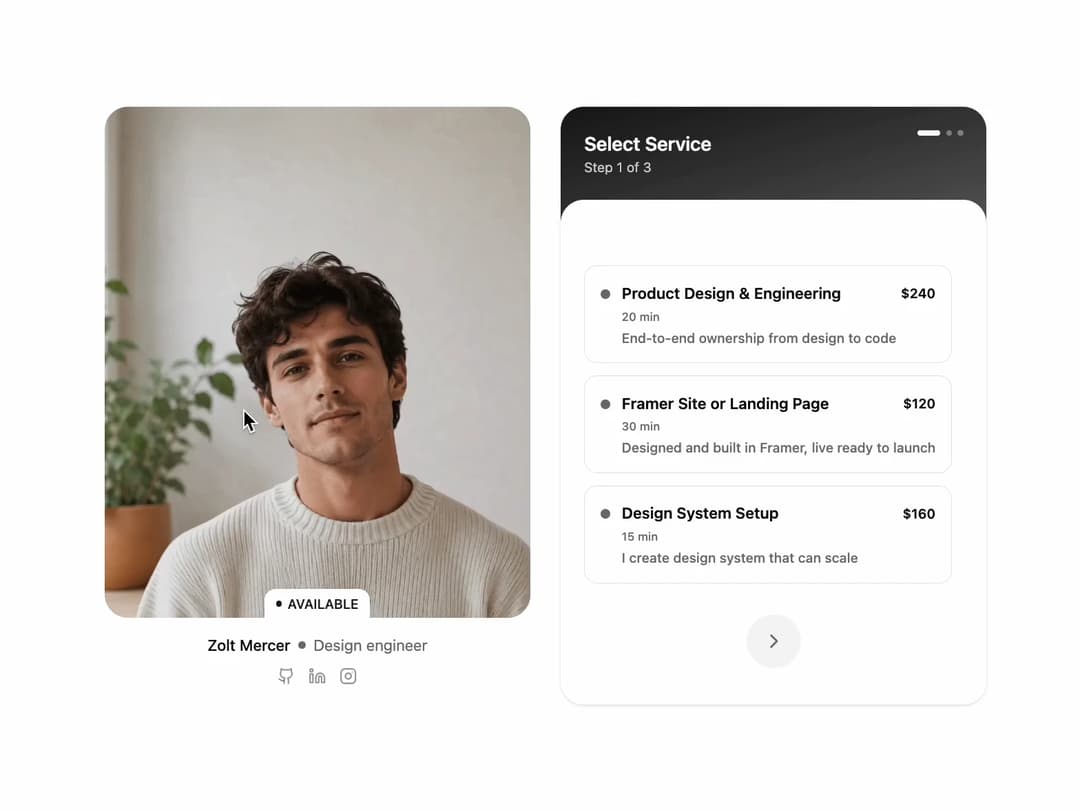
Multi-step appointment booking widget by Shadcn Studio with service picker, availability calendar, time slots and details form.
Built with React and Tailwind. Copy the prompt and paste it into Claude Code, Cursor or Lovable: your agent adds User Schedule to your project and fits it to your theme.
Code
How User Schedule is used: the demo's code. The component's own source comes with a free account.
Usage.tsx
import UserSchedule03 from '@/components/ui/shadcn-studio-user-schedule-03'
import type {
  ScheduleProfile,
  ScheduleService
} from '@/components/ui/shadcn-studio-user-schedule-03'

const GithubIcon = ({ className }: { className?: string }) => (
  <svg
    xmlns='http://www.w3.org/2000/svg'
    viewBox='0 0 24 24'
    fill='none'
    stroke='currentColor'
    strokeWidth='2'
    strokeLinecap='round'
    strokeLinejoin='round'
    className={className}
    aria-hidden='true'
  >
    <path d='M15 22v-4a4.8 4.8 0 0 0-1-3.5c3 0 6-2 6-5.5.08-1.25-.27-2.48-1-3.5.28-1.15.28-2.35 0-3.5 0 0-1 0-3 1.5-2.64-.5-5.36-.5-8 0C6 2 5 2 5 2c-.3 1.15-.3 2.35 0 3.5A5.403 5.403 0 0 0 4 9c0 3.5 3 5.5 6 5.5-.39.49-.68 1.05-.85 1.65-.17.6-.22 1.23-.15 1.85v4' />
    <path d='M9 18c-4.51 2-5-2-7-2' />
  </svg>
)

const LinkedinIcon = ({ className }: { className?: string }) => (
  <svg
    xmlns='http://www.w3.org/2000/svg'
    viewBox='0 0 24 24'
    fill='none'
    stroke='currentColor'
    strokeWidth='2'
    strokeLinecap='round'
    strokeLinejoin='round'
    className={className}
    aria-hidden='true'
  >
    <path d='M16 8a6 6 0 0 1 6 6v7h-4v-7a2 2 0 0 0-2-2 2 2 0 0 0-2 2v7h-4v-7a6 6 0 0 1 6-6z' />
    <rect width='4' height='12' x='2' y='9' />
    <circle cx='4' cy='4' r='2' />
  </svg>
)

const InstagramIcon = ({ className }: { className?: string }) => (
  <svg
    xmlns='http://www.w3.org/2000/svg'
    viewBox='0 0 24 24'
    fill='none'
    stroke='currentColor'
    strokeWidth='2'
    strokeLinecap='round'
    strokeLinejoin='round'
    className={className}
    aria-hidden='true'
  >
    <rect width='20' height='20' x='2' y='2' rx='5' ry='5' />
    <path d='M16 11.37A4 4 0 1 1 12.63 8 4 4 0 0 1 16 11.37z' />
    <line x1='17.5' x2='17.51' y1='6.5' y2='6.5' />
  </svg>
)

const profile: ScheduleProfile = {
  name: 'Zolt Mercer',
  role: 'Design engineer',
  imageSrc: 'https://cdn.21st.dev/assets/mirror/55/55afbc823acbb206ca57bac009d2a5c107a28a27143f1960d97c6da7ab4800b4.png',
  backgroundSrc: 'https://cdn.21st.dev/assets/mirror/3d/3d9e3a555367c89992414f7f607462d4b2e68cb3840649bcad4321fc712c2bbd.png',
  availabilityLabel: 'Available',
  socials: [
    { label: 'Github', href: '#', icon: <GithubIcon /> },
    { label: 'LinkedIn', href: '#', icon: <LinkedinIcon /> },
    { label: 'Instagram', href: '#', icon: <InstagramIcon /> }
  ]
}

const services: ScheduleService[] = [
  {
    id: 'product-design-engineering',
    title: 'Product Design & Engineering',
    price: '$240',
    duration: '20 min',
    description: 'End-to-end ownership from design to code'
  },
  {
    id: 'framer-site-or-landing-page',
    title: 'Framer Site or Landing Page',
    price: '$120',
    duration: '30 min',
    description: 'Designed and built in Framer, live ready to launch'
  },
  {
    id: 'design-system-setup',
    title: 'Design System Setup',
    price: '$160',
    duration: '15 min',
    description: 'I create design system that can scale'
  }
]

const morningSlots = ['9:00 AM', '9:30 AM', '10:00 AM', '10:30 AM', '11:00 AM', '11:30 AM']

const afternoonSlots = [
  '12:00 PM',
  '12:30 PM',
  '1:00 PM',
  '1:30 PM',
  '2:00 PM',
  '2:30 PM',
  '3:00 PM',
  '3:30 PM',
  '4:00 PM',
  '4:30 PM',
  '5:00 PM',
  '5:30 PM'
]

const UserSchedulePage = () => {
  return (
    <div className='py-8 sm:py-16 lg:py-24'>
      <div className='mx-auto max-w-5xl px-4 sm:px-6 lg:px-8'>
        <UserSchedule03
          profile={profile}
          services={services}
          morningSlots={morningSlots}
          afternoonSlots={afternoonSlots}
        />
      </div>
    </div>
  )
}

export default UserSchedulePage
Dependencies
More by Clevision
View all

Syntra Hero
138
Calendar
111
Card Studio
107
Hero Section 41
50
Agency Hero
44
Collapsible
43
Hero Section 01
42
Logo Cloud
41