
About
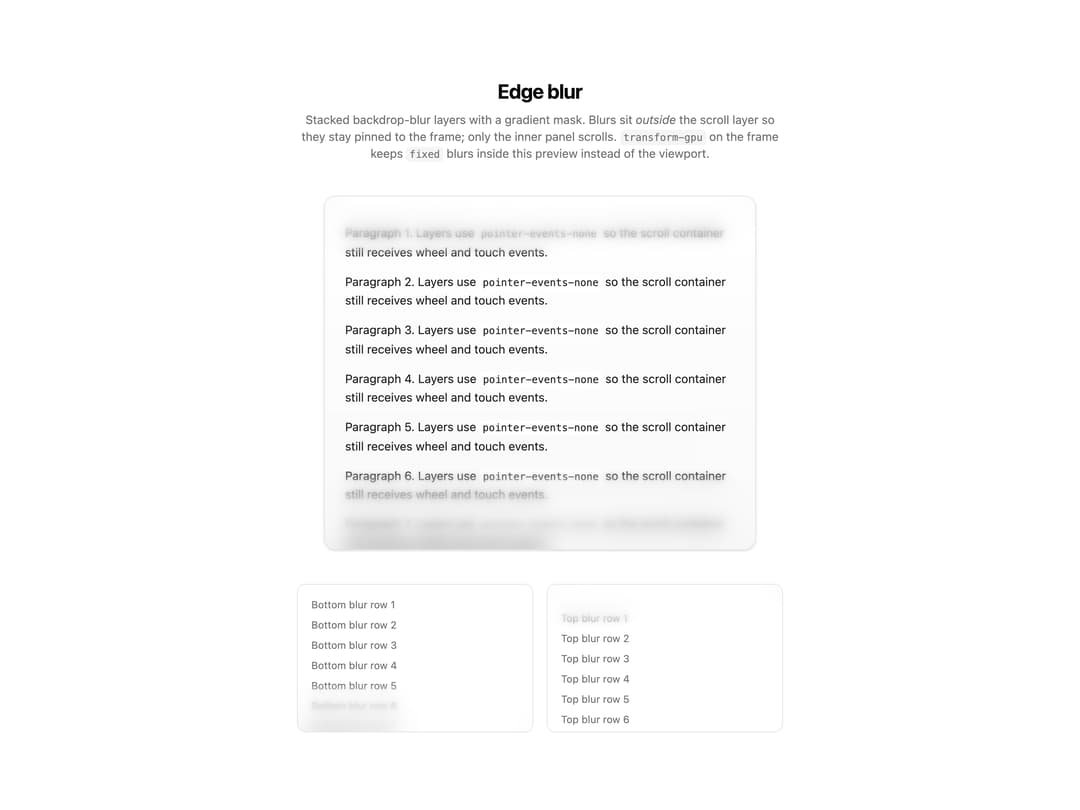
Stacked backdrop-blur layers with a gradient mask that create soft, fading blur along the top or bottom edge of a scrollable panel or screen.
Built with React and Tailwind. Copy the prompt and paste it into Claude Code, Cursor or Lovable: your agent adds Edge Blur to your project and fits it to your theme.
Code
How Edge Blur is used: the demo's code. The component's own source comes with a free account.
Usage.tsx
"use client";

import { BottomBlur, EdgeBlur, TopBlur } from "@/components/ui/edge-blur";

const SCROLL_PARAGRAPH_KEYS = [
  "s-a",
  "s-b",
  "s-c",
  "s-d",
  "s-e",
  "s-f",
  "s-g",
  "s-h",
  "s-i",
  "s-j",
  "s-k",
  "s-l",
] as const;

const SMALL_ROW_KEYS = [
  "b-1",
  "b-2",
  "b-3",
  "b-4",
  "b-5",
  "b-6",
  "b-7",
  "b-8",
] as const;

export default function EdgeBlurDemo() {
  return (
    <div className="dark:bg-stone-950 flex flex-col items-center gap-10 rounded-md px-4 py-6 md:px-0">
      <div className="max-w-xl space-y-2 text-center">
        <h2 className="text-foreground text-2xl font-bold tracking-tight">
          Edge blur
        </h2>
        <p className="text-muted-foreground text-sm">
          Stacked backdrop-blur layers with a gradient mask. Blurs sit{" "}
          <em>outside</em> the scroll layer so they stay pinned to the frame;
          only the inner panel scrolls.{" "}
          <code className="bg-muted rounded px-1 py-0.5 text-xs">
            transform-gpu
          </code>{" "}
          on the frame keeps{" "}
          <code className="bg-muted rounded px-1 py-0.5 text-xs">fixed</code>{" "}
          blurs inside this preview instead of the viewport.
        </p>
      </div>

      <div className="relative isolate h-[420px] w-full max-w-lg transform-gpu overflow-hidden rounded-xl border bg-muted/30 shadow-sm">
        <div className="absolute inset-0 z-0 overflow-y-auto">
          <div className="from-background via-muted/40 to-background min-h-[700px] space-y-3 bg-gradient-to-b p-6 pb-28 pt-8">
            {SCROLL_PARAGRAPH_KEYS.map((key, i) => (
              <p
                key={key}
                className="text-foreground/90 text-sm leading-relaxed"
              >
                Paragraph {i + 1}. Layers use{" "}
                <code className="bg-background/80 rounded px-1 py-0.5 text-xs">
                  pointer-events-none
                </code>{" "}
                so the scroll container still receives wheel and touch events.
              </p>
            ))}
          </div>
        </div>
        <EdgeBlur position="top" height={72} />
        <EdgeBlur position="bottom" height={96} />
      </div>

      <div className="grid w-full max-w-2xl grid-cols-1 gap-4 sm:grid-cols-2">
        <div className="relative isolate h-44 transform-gpu overflow-hidden rounded-lg border bg-card">
          <section
            aria-label="Demo panel with bottom edge blur"
            className="absolute inset-0 z-0 overflow-y-auto p-4 text-xs text-muted-foreground"
          >
            {SMALL_ROW_KEYS.map((key, i) => (
              <p key={key} className="mb-2">
                Bottom blur row {i + 1}
              </p>
            ))}
          </section>
          <BottomBlur height={56} />
        </div>
        <div className="relative isolate h-44 transform-gpu overflow-hidden rounded-lg border bg-card">
          <section
            aria-label="Demo panel with top edge blur"
            className="absolute inset-0 z-0 overflow-y-auto p-4 pt-8 text-xs text-muted-foreground"
          >
            {SMALL_ROW_KEYS.map((key, i) => (
              <p key={`top-${key}`} className="mb-2">
                Top blur row {i + 1}
              </p>
            ))}
          </section>
          <TopBlur height={56} />
        </div>
      </div>
    </div>
  );
}
More by cult/ui
View all
3D Carousel
2.5K
Logo Carousel
1.1K
Feature Carousel
510
Popover Form
420
Floating Panel
250
Expandable
131
Dock
120
Hero Liquid Metal
105