
About
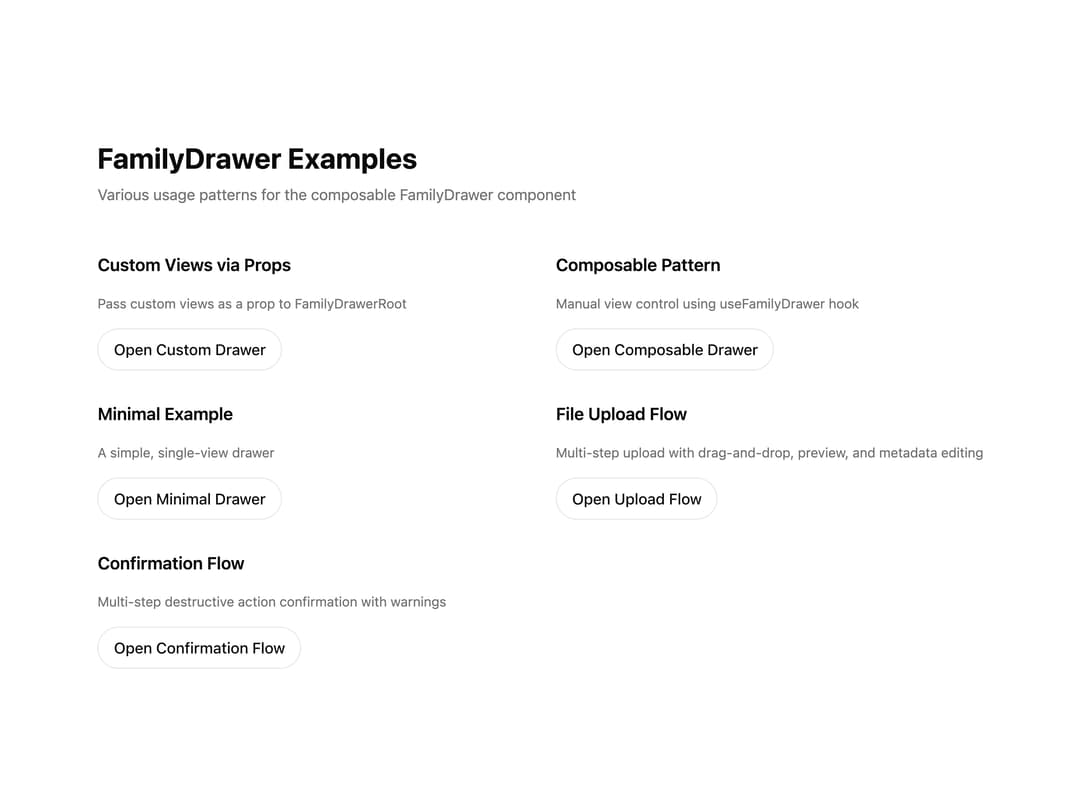
A composable multi-view drawer that animates height and cross-fades between stacked content views for multi-step flows.
Built with React and Tailwind. Copy the prompt and paste it into Claude Code, Cursor or Lovable: your agent adds Family Drawer to your project and fits it to your theme.
Code
How Family Drawer is used: the demo's code. The component's own source comes with a free account.
Usage.tsx
"use client";
import {
FamilyDrawerAnimatedContent,
FamilyDrawerAnimatedWrapper,
FamilyDrawerButton,
FamilyDrawerClose,
FamilyDrawerContent,
FamilyDrawerHeader,
FamilyDrawerOverlay,
FamilyDrawerPortal,
FamilyDrawerRoot,
FamilyDrawerSecondaryButton,
FamilyDrawerTrigger,
FamilyDrawerViewContent,
useFamilyDrawer,
type ViewsRegistry,
} from "@/components/ui/family-drawer";
import { useCallback, useEffect, useId, useRef, useState } from "react";
import {
AlertTriangle,
ArrowLeft,
ArrowRight,
CheckCircle,
File,
Image,
Trash,
Upload,
XCircle,
} from "lucide-react";
// ============================================================================
// Example 2: Custom Views via Props
// ============================================================================
function CustomDefaultView() {
const { setView } = useFamilyDrawer();
return (
<>
<header className="mb-4 flex h-[72px] items-center border-b border-border pl-2">
<h2 className="text-[19px] font-semibold text-foreground md:font-medium">
Custom Menu
</h2>
</header>
<div className="space-y-3">
<FamilyDrawerButton onClick={() => setView("settings")}>
⚙️ Settings
</FamilyDrawerButton>
<FamilyDrawerButton onClick={() => setView("profile")}>
👤 Profile
</FamilyDrawerButton>
<FamilyDrawerButton onClick={() => setView("about")}>
ℹ️ About
</FamilyDrawerButton>
</div>
</>
);
}
function CustomSettingsView() {
const { setView } = useFamilyDrawer();
return (
<div>
<div className="px-2">
<FamilyDrawerHeader
icon={<span className="text-4xl">⚙️</span>}
title="Settings"
description="Configure your preferences and application settings."
/>
<div className="mt-6 space-y-4 border-t border-border pt-6">
<div className="flex items-center justify-between">
<span className="text-[15px] font-semibold text-foreground md:font-medium">
Notifications
</span>
<input type="checkbox" defaultChecked />
</div>
<div className="flex items-center justify-between">
<span className="text-[15px] font-semibold text-foreground md:font-medium">
Dark Mode
</span>
<input type="checkbox" />
</div>
</div>
</div>
<div className="mt-7 flex gap-4">
<FamilyDrawerSecondaryButton
onClick={() => setView("default")}
className="bg-secondary text-secondary-foreground"
>
Back
</FamilyDrawerSecondaryButton>
<FamilyDrawerSecondaryButton
onClick={() => setView("default")}
className="bg-primary text-primary-foreground"
>
Save
</FamilyDrawerSecondaryButton>
</div>
</div>
);
}
function CustomProfileView() {
const { setView } = useFamilyDrawer();
const nameId = useId();
const emailId = useId();
return (
<div>
<div className="px-2">
<FamilyDrawerHeader
icon={<span className="text-4xl">👤</span>}
title="Profile"
description="View and edit your profile information."
/>
<div className="mt-6 space-y-4 border-t border-border pt-6">
<div>
<label
htmlFor={nameId}
className="text-[15px] font-semibold text-foreground md:font-medium"
>
Name
</label>
<input
id={nameId}
type="text"
defaultValue="John Doe"
className="mt-2 w-full rounded-lg border border-border px-3 py-2 bg-background"
/>
</div>
<div>
<label
htmlFor={emailId}
className="text-[15px] font-semibold text-foreground md:font-medium"
>
Email
</label>
<input
id={emailId}
type="email"
defaultValue="john@example.com"
className="mt-2 w-full rounded-lg border border-border px-3 py-2 bg-background"
/>
</div>
</div>
</div>
<div className="mt-7 flex gap-4">
<FamilyDrawerSecondaryButton
onClick={() => setView("default")}
className="bg-secondary text-secondary-foreground"
>
Cancel
</FamilyDrawerSecondaryButton>
<FamilyDrawerSecondaryButton
onClick={() => setView("default")}
className="bg-primary text-primary-foreground"
>
Update
</FamilyDrawerSecondaryButton>
</div>
</div>
);
}
function CustomAboutView() {
const { setView } = useFamilyDrawer();
return (
<div>
<div className="px-2">
<FamilyDrawerHeader
icon={<span className="text-4xl">ℹ️</span>}
title="About"
description="Learn more about this application."
/>
<div className="mt-6 space-y-4 border-t border-border pt-6">
<p className="text-[15px] font-medium text-muted-foreground md:font-normal">
Version 1.0.0
</p>
<p className="text-[15px] font-medium text-muted-foreground md:font-normal">
Built with React and TypeScript
</p>
</div>
</div>
<div className="mt-7 flex gap-4">
<FamilyDrawerSecondaryButton
onClick={() => setView("default")}
className="bg-secondary text-secondary-foreground"
>
Close
</FamilyDrawerSecondaryButton>
</div>
</div>
);
}
const customViews: ViewsRegistry = {
default: CustomDefaultView,
settings: CustomSettingsView,
profile: CustomProfileView,
about: CustomAboutView,
};
export function CustomViewsExample() {
return (
<div className="space-y-4">
<h3 className="text-lg font-semibold">Custom Views via Props</h3>
<p className="text-sm text-muted-foreground">
Pass custom views as a prop to FamilyDrawerRoot
</p>
<FamilyDrawerRoot views={customViews}>
<FamilyDrawerTrigger className="!relative !top-auto !left-auto !-translate-y-0 !-translate-x-0 block h-[44px] rounded-full border border-border bg-background px-4 py-2 font-medium text-foreground transition-colors hover:bg-accent focus-visible:shadow-focus-ring-button md:font-medium cursor-pointer">
Open Custom Drawer
</FamilyDrawerTrigger>
<FamilyDrawerPortal>
<FamilyDrawerOverlay />
<FamilyDrawerContent>
<FamilyDrawerClose />
<FamilyDrawerAnimatedWrapper>
<FamilyDrawerAnimatedContent>
<FamilyDrawerViewContent />
</FamilyDrawerAnimatedContent>
</FamilyDrawerAnimatedWrapper>
</FamilyDrawerContent>
</FamilyDrawerPortal>
</FamilyDrawerRoot>
</div>
);
}
// ============================================================================
// Example 4: Composable Pattern (Manual View Control)
// ============================================================================
function ComposableView() {
const { view, setView } = useFamilyDrawer();
return (
<div>
<div className="px-2">
<FamilyDrawerHeader
icon={<span className="text-4xl">🎨</span>}
title="Composable Example"
description="This view uses the composable pattern with manual view control."
/>
<div className="mt-6 space-y-4 border-t border-border pt-6">
<p className="text-[15px] font-medium text-muted-foreground md:font-normal">
Current view: <strong>{view}</strong>
</p>
<div className="flex flex-wrap gap-2">
<button
type="button"
onClick={() => setView("view1")}
className="rounded-lg bg-muted px-4 py-2 text-sm text-foreground"
>
View 1
</button>
<button
type="button"
onClick={() => setView("view2")}
className="rounded-lg bg-muted px-4 py-2 text-sm text-foreground"
>
View 2
</button>
<button
type="button"
onClick={() => setView("view3")}
className="rounded-lg bg-muted px-4 py-2 text-sm text-foreground"
>
View 3
</button>
</div>
</div>
</div>
</div>
);
}
function View1() {
const { setView } = useFamilyDrawer();
return (
<div className="px-2">
<FamilyDrawerHeader
icon={<span className="text-4xl">1️⃣</span>}
title="View 1"
description="This is the first view in the composable pattern."
/>
<div className="mt-6 space-y-3 border-t border-border pt-6">
<div className="flex items-center gap-3 text-[15px] font-semibold text-muted-foreground md:font-medium">
<span>✓</span>
First step completed
</div>
<div className="flex items-center gap-3 text-[15px] font-semibold text-muted-foreground md:font-medium">
<span>→</span>
Ready to proceed
</div>
</div>
<div className="mt-7 flex gap-4">
<FamilyDrawerSecondaryButton
onClick={() => setView("default")}
className="bg-secondary text-secondary-foreground"
>
<ArrowLeft /> Back
</FamilyDrawerSecondaryButton>
<FamilyDrawerSecondaryButton
onClick={() => setView("view2")}
className="bg-primary text-primary-foreground"
>
<ArrowRight /> View 2
</FamilyDrawerSecondaryButton>
</div>
</div>
);
}
function View2() {
const { setView } = useFamilyDrawer();
return (
<div className="px-2">
<FamilyDrawerHeader
icon={<span className="text-4xl">2️⃣</span>}
title="View 2"
description="This is the second view in the composable pattern with additional content."
/>
<div className="mt-6 space-y-4 border-t border-border pt-6">
<div className="flex items-center gap-3 text-[15px] font-semibold text-muted-foreground md:font-medium">
<span>✓</span>
First step completed
</div>
<div className="flex items-center gap-3 text-[15px] font-semibold text-muted-foreground md:font-medium">
<span>✓</span>
Second step in progress
</div>
<div className="flex items-center gap-3 text-[15px] font-semibold text-muted-foreground md:font-medium">
<span>→</span>
Continue to final step
</div>
<p className="mt-4 text-sm text-muted-foreground">
This view has more content to demonstrate height differences between
views.
</p>
</div>
<div className="mt-7 flex gap-4">
<FamilyDrawerSecondaryButton
onClick={() => setView("view1")}
className="bg-secondary text-secondary-foreground"
>
<ArrowLeft /> View 1
</FamilyDrawerSecondaryButton>
<FamilyDrawerSecondaryButton
onClick={() => setView("view3")}
className="bg-primary text-primary-foreground"
>
<ArrowRight /> View 3
</FamilyDrawerSecondaryButton>
</div>
</div>
);
}
function View3() {
const { setView } = useFamilyDrawer();
return (
<div className="px-2">
<FamilyDrawerHeader
icon={<span className="text-4xl">3️⃣</span>}
title="View 3"
description="This is the final view in the composable pattern."
/>
<div className="mt-6 space-y-3 border-t border-border pt-6">
<div className="flex items-center gap-3 text-[15px] font-semibold text-muted-foreground md:font-medium">
<span>✓</span>
All steps completed
</div>
<div className="flex items-center gap-3 text-[15px] font-semibold text-muted-foreground md:font-medium">
<span>🎉</span>
Ready to finish
</div>
</div>
<div className="mt-7 flex gap-4">
<FamilyDrawerSecondaryButton
onClick={() => setView("view2")}
className="bg-secondary text-secondary-foreground"
>
<ArrowLeft /> View 2
</FamilyDrawerSecondaryButton>
<FamilyDrawerSecondaryButton
onClick={() => setView("default")}
className="bg-primary text-primary-foreground"
>
Back to Menu
</FamilyDrawerSecondaryButton>
</div>
</div>
);
}
const composableViews: ViewsRegistry = {
default: ComposableView,
view1: View1,
view2: View2,
view3: View3,
};
export function ComposablePatternExample() {
return (
<div className="space-y-4">
<h3 className="text-lg font-semibold">Composable Pattern</h3>
<p className="text-sm text-muted-foreground">
Manual view control using useFamilyDrawer hook
</p>
<FamilyDrawerRoot views={composableViews} defaultView="default">
<FamilyDrawerTrigger className="!relative !top-auto !left-auto !-translate-y-0 !-translate-x-0 block h-[44px] rounded-full border border-border bg-background px-4 py-2 font-medium text-foreground transition-colors hover:bg-accent focus-visible:shadow-focus-ring-button md:font-medium cursor-pointer">
Open Composable Drawer
</FamilyDrawerTrigger>
<FamilyDrawerPortal>
<FamilyDrawerOverlay />
<FamilyDrawerContent>
<FamilyDrawerClose />
<FamilyDrawerAnimatedWrapper>
<FamilyDrawerAnimatedContent>
<FamilyDrawerViewContent />
</FamilyDrawerAnimatedContent>
</FamilyDrawerAnimatedWrapper>
</FamilyDrawerContent>
</FamilyDrawerPortal>
</FamilyDrawerRoot>
</div>
);
}
// ============================================================================
// Example 5: Minimal Custom View
// ============================================================================
function MinimalView() {
const { setView } = useFamilyDrawer();
return (
<div className="px-2 py-4">
<h2 className="text-xl font-semibold">Minimal View</h2>
<p className="mt-2 text-sm text-muted-foreground">
A simple, minimal view example.
</p>
<button
type="button"
onClick={() => setView("default")}
className="mt-4 rounded-lg bg-primary px-4 py-2 text-primary-foreground"
>
Close
</button>
</div>
);
}
const minimalViews: ViewsRegistry = {
default: MinimalView,
};
export function MinimalExample() {
return (
<div className="space-y-4">
<h3 className="text-lg font-semibold">Minimal Example</h3>
<p className="text-sm text-muted-foreground">
A simple, single-view drawer
</p>
<FamilyDrawerRoot views={minimalViews}>
<FamilyDrawerTrigger className="!relative !top-auto !left-auto !-translate-y-0 !-translate-x-0 block h-[44px] rounded-full border border-border bg-background px-4 py-2 font-medium text-foreground transition-colors hover:bg-accent focus-visible:shadow-focus-ring-button md:font-medium cursor-pointer">
Open Minimal Drawer
</FamilyDrawerTrigger>
<FamilyDrawerPortal>
<FamilyDrawerOverlay />
<FamilyDrawerContent>
<FamilyDrawerClose />
<FamilyDrawerAnimatedWrapper>
<FamilyDrawerAnimatedContent>
<FamilyDrawerViewContent />
</FamilyDrawerAnimatedContent>
</FamilyDrawerAnimatedWrapper>
</FamilyDrawerContent>
</FamilyDrawerPortal>
</FamilyDrawerRoot>
</div>
);
}
// ============================================================================
// Example 6: File Upload Flow
// ============================================================================
interface FileWithPreview extends File {
preview?: string;
}
function FileUploadDefaultView() {
const { setView } = useFamilyDrawer();
const fileInputRef = useRef<HTMLInputElement>(null);
const [isDragging, setIsDragging] = useState(false);
const handleDragEnter = useCallback((e: React.DragEvent) => {
e.preventDefault();
e.stopPropagation();
setIsDragging(true);
}, []);
const handleDragLeave = useCallback((e: React.DragEvent) => {
e.preventDefault();
e.stopPropagation();
setIsDragging(false);
}, []);
const handleDragOver = useCallback((e: React.DragEvent) => {
e.preventDefault();
e.stopPropagation();
}, []);
const handleDrop = useCallback(
(e: React.DragEvent) => {
e.preventDefault();
e.stopPropagation();
setIsDragging(false);
const files = Array.from(e.dataTransfer.files);
if (files.length > 0) {
const event = new CustomEvent("filesSelected", { detail: { files } });
window.dispatchEvent(event);
setView("preview");
}
},
[setView],
);
const handleFileSelect = useCallback(
(e: React.ChangeEvent<HTMLInputElement>) => {
const files = Array.from(e.target.files || []);
if (files.length > 0) {
const event = new CustomEvent("filesSelected", { detail: { files } });
window.dispatchEvent(event);
setView("preview");
}
},
[setView],
);
return (
<div>
<div className="px-2">
<FamilyDrawerHeader
icon={<Upload className="size-12" />}
title="Upload Files"
description="Drag and drop files here or click to browse"
/>
<div className="mt-6">
<button
type="button"
onDragEnter={handleDragEnter}
onDragOver={handleDragOver}
onDragLeave={handleDragLeave}
onDrop={handleDrop}
onClick={() => fileInputRef.current?.click()}
className={`w-full rounded-lg border-2 border-dashed p-8 text-center transition-colors ${
isDragging
? "border-primary bg-primary/5"
: "border-border bg-muted/30"
}`}
>
<Upload
className={`mx-auto mb-3 size-10 ${
isDragging ? "text-primary" : "text-muted-foreground"
}`}
/>
<p className="mb-2 text-sm font-medium text-foreground">
{isDragging ? "Drop files here" : "Drag and drop files here"}
</p>
<p className="mb-4 text-xs text-muted-foreground">
or click to browse
</p>
<span className="inline-block rounded-lg bg-primary px-4 py-2 text-sm font-medium text-primary-foreground transition-colors hover:bg-primary/90">
Choose Files
</span>
<input
ref={fileInputRef}
type="file"
multiple
className="hidden"
onChange={handleFileSelect}
/>
</button>
</div>
</div>
</div>
);
}
function FilePreviewView() {
const { setView } = useFamilyDrawer();
const [files, setFiles] = useState<FileWithPreview[]>([]);
useEffect(() => {
const handleFilesSelected = (e: Event) => {
const customEvent = e as CustomEvent<{ files: File[] }>;
const selectedFiles = customEvent.detail.files.map((file, idx) => {
const fileWithPreview: FileWithPreview = Object.assign(file, {
preview: undefined,
});
if (file.type.startsWith("image/")) {
const reader = new FileReader();
reader.onload = (e) => {
fileWithPreview.preview = e.target?.result as string;
setFiles((prev) => {
const updated = [...prev];
updated[idx] = fileWithPreview;
return updated;
});
};
reader.readAsDataURL(file);
}
return fileWithPreview;
});
setFiles(selectedFiles);
};
window.addEventListener("filesSelected", handleFilesSelected);
return () => {
window.removeEventListener("filesSelected", handleFilesSelected);
};
}, []);
const formatFileSize = (bytes: number) => {
if (bytes === 0) return "0 Bytes";
const k = 1024;
const sizes = ["Bytes", "KB", "MB", "GB"];
const i = Math.floor(Math.log(bytes) / Math.log(k));
return Math.round((bytes / Math.pow(k, i)) * 100) / 100 + " " + sizes[i];
};
return (
<div>
<div className="px-2">
<FamilyDrawerHeader
icon={<Image className="size-12" />}
title="Preview Files"
description={`${files.length} file${files.length !== 1 ? "s" : ""} selected`}
/>
<div className="mt-6 space-y-3 border-t border-border pt-6">
{files.map((file) => {
const fileKey = `${file.name}-${file.size}-${file.lastModified}`;
return (
<div
key={fileKey}
className="flex items-center gap-3 rounded-lg border border-border bg-muted/30 p-3"
>
{file.preview ? (
<div
className="size-12 rounded bg-cover bg-center"
style={{ backgroundImage: `url(${file.preview})` }}
role="img"
aria-label={file.name}
/>
) : (
<div className="flex size-12 items-center justify-center rounded bg-muted">
<File className="size-6 text-muted-foreground" />
</div>
)}
<div className="flex-1 min-w-0">
<p className="truncate text-sm font-medium text-foreground">
{file.name}
</p>
<p className="text-xs text-muted-foreground">
{formatFileSize(file.size)}
</p>
</div>
</div>
);
})}
</div>
</div>
<div className="mt-7 flex gap-4">
<FamilyDrawerSecondaryButton
onClick={() => setView("default")}
className="bg-secondary text-secondary-foreground"
>
<ArrowLeft /> Back
</FamilyDrawerSecondaryButton>
<FamilyDrawerSecondaryButton
onClick={() => setView("edit")}
className="bg-primary text-primary-foreground"
>
Continue <ArrowRight />
</FamilyDrawerSecondaryButton>
</div>
</div>
);
}
function FileEditMetadataView() {
const { setView } = useFamilyDrawer();
const nameId = useId();
const descriptionId = useId();
const tagsId = useId();
return (
<div>
<div className="px-2">
<FamilyDrawerHeader
icon={<File className="size-12" />}
title="Edit Metadata"
description="Add details to your files"
/>
<div className="mt-6 space-y-4 border-t border-border pt-6">
<div>
<label
htmlFor={nameId}
className="text-[15px] font-semibold text-foreground md:font-medium"
>
File Name
</label>
<input
id={nameId}
type="text"
placeholder="my-document.pdf"
className="mt-2 w-full rounded-lg border border-border bg-background px-3 py-2 text-sm"
/>
</div>
<div>
<label
htmlFor={descriptionId}
className="text-[15px] font-semibold text-foreground md:font-medium"
>
Description
</label>
<textarea
id={descriptionId}
placeholder="Add a description..."
rows={3}
className="mt-2 w-full rounded-lg border border-border bg-background px-3 py-2 text-sm"
/>
</div>
<div>
<label
htmlFor={tagsId}
className="text-[15px] font-semibold text-foreground md:font-medium"
>
Tags (comma separated)
</label>
<input
id={tagsId}
type="text"
placeholder="work, important, draft"
className="mt-2 w-full rounded-lg border border-border bg-background px-3 py-2 text-sm"
/>
</div>
</div>
</div>
<div className="mt-7 flex gap-4">
<FamilyDrawerSecondaryButton
onClick={() => setView("preview")}
className="bg-secondary text-secondary-foreground"
>
<ArrowLeft /> Back
</FamilyDrawerSecondaryButton>
<FamilyDrawerSecondaryButton
onClick={() => setView("confirm")}
className="bg-primary text-primary-foreground"
>
Continue <ArrowRight />
</FamilyDrawerSecondaryButton>
</div>
</div>
);
}
function FileConfirmView() {
const { setView } = useFamilyDrawer();
return (
<div>
<div className="px-2">
<FamilyDrawerHeader
icon={<CheckCircle className="size-12 text-primary" />}
title="Confirm Upload"
description="Review your files before uploading"
/>
<div className="mt-6 space-y-4 border-t border-border pt-6">
<div className="rounded-lg bg-muted/30 p-4">
<div className="flex items-center gap-2 text-sm font-medium text-foreground">
<CheckCircle className="size-4 text-primary" />
<span>Files ready to upload</span>
</div>
<p className="mt-2 text-xs text-muted-foreground">
Your files will be uploaded securely. You can access them anytime
from your dashboard.
</p>
</div>
<div className="space-y-2 text-sm">
<div className="flex justify-between">
<span className="text-muted-foreground">Files:</span>
<span className="font-medium text-foreground">3 files</span>
</div>
<div className="flex justify-between">
<span className="text-muted-foreground">Total size:</span>
<span className="font-medium text-foreground">2.4 MB</span>
</div>
</div>
</div>
</div>
<div className="mt-7 flex gap-4">
<FamilyDrawerSecondaryButton
onClick={() => setView("edit")}
className="bg-secondary text-secondary-foreground"
>
<ArrowLeft /> Back
</FamilyDrawerSecondaryButton>
<FamilyDrawerSecondaryButton
onClick={() => setView("complete")}
className="bg-primary text-primary-foreground"
>
<Upload className="size-4" /> Upload
</FamilyDrawerSecondaryButton>
</div>
</div>
);
}
function FileCompleteView() {
const { setView } = useFamilyDrawer();
return (
<div>
<div className="px-2">
<FamilyDrawerHeader
icon={<CheckCircle className="size-12 text-primary" />}
title="Upload Complete!"
description="Your files have been successfully uploaded"
/>
<div className="mt-6 space-y-4 border-t border-border pt-6">
<div className="flex items-center gap-3 text-[15px] font-semibold text-muted-foreground md:font-medium">
<CheckCircle className="size-5 text-primary" />
<span>Files uploaded successfully</span>
</div>
<div className="flex items-center gap-3 text-[15px] font-semibold text-muted-foreground md:font-medium">
<CheckCircle className="size-5 text-primary" />
<span>Metadata saved</span>
</div>
<p className="mt-4 text-sm text-muted-foreground">
You can now access your files from the dashboard or upload more
files.
</p>
</div>
</div>
<div className="mt-7 flex gap-4">
<FamilyDrawerSecondaryButton
onClick={() => setView("default")}
className="bg-primary text-primary-foreground"
>
Upload More Files
</FamilyDrawerSecondaryButton>
</div>
</div>
);
}
const fileUploadViews: ViewsRegistry = {
default: FileUploadDefaultView,
preview: FilePreviewView,
edit: FileEditMetadataView,
confirm: FileConfirmView,
complete: FileCompleteView,
};
export function FileUploadFlowExample() {
return (
<div className="space-y-4">
<h3 className="text-lg font-semibold">File Upload Flow</h3>
<p className="text-sm text-muted-foreground">
Multi-step upload with drag-and-drop, preview, and metadata editing
</p>
<FamilyDrawerRoot views={fileUploadViews}>
<FamilyDrawerTrigger className="!relative !top-auto !left-auto !-translate-y-0 !-translate-x-0 block h-[44px] rounded-full border border-border bg-background px-4 py-2 font-medium text-foreground transition-colors hover:bg-accent focus-visible:shadow-focus-ring-button md:font-medium cursor-pointer">
Open Upload Flow
</FamilyDrawerTrigger>
<FamilyDrawerPortal>
<FamilyDrawerOverlay />
<FamilyDrawerContent>
<FamilyDrawerClose />
<FamilyDrawerAnimatedWrapper>
<FamilyDrawerAnimatedContent>
<FamilyDrawerViewContent />
</FamilyDrawerAnimatedContent>
</FamilyDrawerAnimatedWrapper>
</FamilyDrawerContent>
</FamilyDrawerPortal>
</FamilyDrawerRoot>
</div>
);
}
// ============================================================================
// Example 7: Confirmation Flow
// ============================================================================
function ConfirmationWarningView() {
const { setView } = useFamilyDrawer();
return (
<div>
<div className="px-2">
<FamilyDrawerHeader
icon={<AlertTriangle className="size-12 text-destructive" />}
title="Delete Account"
description="This action cannot be undone"
/>
<div className="mt-6 space-y-4 border-t border-border pt-6">
<div className="rounded-lg bg-destructive/10 p-4">
<p className="text-sm font-medium text-destructive">
Warning: This is a destructive action
</p>
<p className="mt-2 text-xs text-muted-foreground">
Deleting your account will permanently remove all your data,
including files, settings, and history. This action cannot be
reversed.
</p>
</div>
<div className="space-y-2 text-sm">
<div className="flex items-center gap-2 text-muted-foreground">
<XCircle className="size-4" />
<span>All your files will be deleted</span>
</div>
<div className="flex items-center gap-2 text-muted-foreground">
<XCircle className="size-4" />
<span>Your account history will be lost</span>
</div>
<div className="flex items-center gap-2 text-muted-foreground">
<XCircle className="size-4" />
<span>You won't be able to recover this account</span>
</div>
</div>
</div>
</div>
<div className="mt-7 flex gap-4">
<FamilyDrawerSecondaryButton
onClick={() => setView("default")}
className="bg-secondary text-secondary-foreground"
>
Cancel
</FamilyDrawerSecondaryButton>
<FamilyDrawerSecondaryButton
onClick={() => setView("confirm")}
className="bg-destructive text-white"
>
Continue <ArrowRight />
</FamilyDrawerSecondaryButton>
</div>
</div>
);
}
function ConfirmationInputView() {
const { setView } = useFamilyDrawer();
const [confirmationText, setConfirmationText] = useState("");
const confirmationId = useId();
const CONFIRMATION_WORD = "DELETE";
const isConfirmed = confirmationText === CONFIRMATION_WORD;
return (
<div>
<div className="px-2">
<FamilyDrawerHeader
icon={<AlertTriangle className="size-12 text-destructive" />}
title="Confirm Deletion"
description="Type DELETE to confirm this action"
/>
<div className="mt-6 space-y-4 border-t border-border pt-6">
<div className="rounded-lg bg-destructive/10 p-4">
<p className="text-sm font-medium text-destructive">
This action is permanent
</p>
<p className="mt-2 text-xs text-muted-foreground">
To confirm, please type <strong>{CONFIRMATION_WORD}</strong> in
the field below.
</p>
</div>
<div>
<label
htmlFor={confirmationId}
className="text-[15px] font-semibold text-foreground md:font-medium"
>
Type {CONFIRMATION_WORD} to confirm
</label>
<input
id={confirmationId}
type="text"
value={confirmationText}
onChange={(e) => setConfirmationText(e.target.value)}
placeholder={CONFIRMATION_WORD}
className="mt-2 w-full rounded-lg border border-border bg-background px-3 py-2 text-sm"
/>
{confirmationText && !isConfirmed && (
<p className="mt-1 text-xs text-destructive">
The text doesn't match. Please type {CONFIRMATION_WORD} exactly.
</p>
)}
</div>
</div>
</div>
<div className="mt-7 flex gap-4">
<FamilyDrawerSecondaryButton
onClick={() => setView("warning")}
className="bg-secondary text-secondary-foreground"
>
<ArrowLeft /> Back
</FamilyDrawerSecondaryButton>
<FamilyDrawerSecondaryButton
onClick={() => {
if (isConfirmed) {
setView("final-warning");
}
}}
className={`bg-destructive text-white ${
!isConfirmed ? "opacity-50 cursor-not-allowed" : ""
}`}
>
Continue <ArrowRight />
</FamilyDrawerSecondaryButton>
</div>
</div>
);
}
function ConfirmationFinalWarningView() {
const { setView } = useFamilyDrawer();
return (
<div>
<div className="px-2">
<FamilyDrawerHeader
icon={<Trash className="size-12 text-destructive" />}
title="Last Chance"
description="Are you absolutely sure?"
/>
<div className="mt-6 space-y-4 border-t border-border pt-6">
<div className="rounded-lg border-2 border-destructive bg-destructive/10 p-4">
<p className="text-sm font-bold text-destructive">Final Warning</p>
<p className="mt-2 text-xs text-muted-foreground">
This is your last opportunity to cancel. Once you proceed, your
account and all associated data will be permanently deleted
immediately.
</p>
</div>
<div className="space-y-3 text-sm">
<div className="flex items-start gap-2">
<AlertTriangle className="size-4 mt-0.5 text-destructive" />
<span className="text-muted-foreground">
All your files, documents, and media will be permanently removed
</span>
</div>
<div className="flex items-start gap-2">
<AlertTriangle className="size-4 mt-0.5 text-destructive" />
<span className="text-muted-foreground">
Your account history and activity will be erased
</span>
</div>
<div className="flex items-start gap-2">
<AlertTriangle className="size-4 mt-0.5 text-destructive" />
<span className="text-muted-foreground">
You will need to create a new account if you want to use our
service again
</span>
</div>
</div>
</div>
</div>
<div className="mt-7 flex gap-4">
<FamilyDrawerSecondaryButton
onClick={() => setView("confirm")}
className="bg-secondary text-secondary-foreground"
>
<ArrowLeft /> Back
</FamilyDrawerSecondaryButton>
<FamilyDrawerSecondaryButton
onClick={() => setView("processing")}
className="bg-destructive text-white"
>
<Trash className="size-4" /> Delete
</FamilyDrawerSecondaryButton>
</div>
</div>
);
}
function ConfirmationProcessingView() {
const { setView } = useFamilyDrawer();
useEffect(() => {
const timer = setTimeout(() => {
setView("complete");
}, 3000);
return () => clearTimeout(timer);
}, [setView]);
return (
<div>
<div className="px-2">
<FamilyDrawerHeader
icon={<AlertTriangle className="size-12 text-destructive" />}
title="Processing..."
description="Your account is being deleted"
/>
<div className="mt-6 space-y-4 border-t border-border pt-6">
<div className="flex items-center gap-3 text-[15px] font-semibold text-muted-foreground md:font-medium">
<div className="size-5 animate-spin rounded-full border-2 border-destructive border-t-transparent" />
<span>Removing your account data...</span>
</div>
<div className="flex items-center gap-3 text-[15px] font-semibold text-muted-foreground md:font-medium">
<div className="size-5 animate-spin rounded-full border-2 border-destructive border-t-transparent" />
<span>Deleting associated files...</span>
</div>
<div className="flex items-center gap-3 text-[15px] font-semibold text-muted-foreground md:font-medium">
<div className="size-5 animate-spin rounded-full border-2 border-destructive border-t-transparent" />
<span>Clearing account history...</span>
</div>
</div>
</div>
</div>
);
}
function ConfirmationCompleteView() {
const { setView } = useFamilyDrawer();
return (
<div>
<div className="px-2">
<FamilyDrawerHeader
icon={<CheckCircle className="size-12 text-destructive" />}
title="Account Deleted"
description="Your account has been permanently deleted"
/>
<div className="mt-6 space-y-4 border-t border-border pt-6">
<div className="rounded-lg bg-destructive/10 p-4">
<p className="text-sm font-medium text-destructive">
Account deletion complete
</p>
<p className="mt-2 text-xs text-muted-foreground">
All your data has been permanently removed from our systems. You
will need to create a new account if you wish to use our service
again.
</p>
</div>
<div className="space-y-2 text-sm">
<div className="flex items-center gap-2 text-muted-foreground">
<CheckCircle className="size-4 text-destructive" />
<span>Account data removed</span>
</div>
<div className="flex items-center gap-2 text-muted-foreground">
<CheckCircle className="size-4 text-destructive" />
<span>Files deleted</span>
</div>
<div className="flex items-center gap-2 text-muted-foreground">
<CheckCircle className="size-4 text-destructive" />
<span>History cleared</span>
</div>
</div>
</div>
</div>
<div className="mt-7 flex gap-4">
<FamilyDrawerSecondaryButton
onClick={() => setView("default")}
className="bg-secondary text-secondary-foreground"
>
Close
</FamilyDrawerSecondaryButton>
</div>
</div>
);
}
function ConfirmationDefaultView() {
const { setView } = useFamilyDrawer();
return (
<>
<header className="mb-4 flex h-[72px] items-center border-b border-border pl-2">
<h2 className="text-[19px] font-semibold text-foreground md:font-medium">
Account Settings
</h2>
</header>
<div className="space-y-3">
<FamilyDrawerButton onClick={() => setView("warning")}>
<Trash className="size-4" />
Delete Account
</FamilyDrawerButton>
</div>
</>
);
}
const confirmationViews: ViewsRegistry = {
default: ConfirmationDefaultView,
warning: ConfirmationWarningView,
confirm: ConfirmationInputView,
"final-warning": ConfirmationFinalWarningView,
processing: ConfirmationProcessingView,
complete: ConfirmationCompleteView,
};
export function ConfirmationFlowExample() {
return (
<div className="space-y-4">
<h3 className="text-lg font-semibold">Confirmation Flow</h3>
<p className="text-sm text-muted-foreground">
Multi-step destructive action confirmation with warnings
</p>
<FamilyDrawerRoot views={confirmationViews}>
<FamilyDrawerTrigger className="!relative !top-auto !left-auto !-translate-y-0 !-translate-x-0 block h-[44px] rounded-full border border-border bg-background px-4 py-2 font-medium text-foreground transition-colors hover:bg-accent focus-visible:shadow-focus-ring-button md:font-medium cursor-pointer">
Open Confirmation Flow
</FamilyDrawerTrigger>
<FamilyDrawerPortal>
<FamilyDrawerOverlay />
<FamilyDrawerContent>
<FamilyDrawerClose />
<FamilyDrawerAnimatedWrapper>
<FamilyDrawerAnimatedContent>
<FamilyDrawerViewContent />
</FamilyDrawerAnimatedContent>
</FamilyDrawerAnimatedWrapper>
</FamilyDrawerContent>
</FamilyDrawerPortal>
</FamilyDrawerRoot>
</div>
);
}
// ============================================================================
// All Examples Container
// ============================================================================
export default function FamilyDrawerDemo() {
return (
<div className="space-y-12 p-8">
<div>
<h1 className="text-3xl font-bold">FamilyDrawer Examples</h1>
<p className="mt-2 text-muted-foreground">
Various usage patterns for the composable FamilyDrawer component
</p>
</div>
<div className="grid gap-8 md:grid-cols-2">
<CustomViewsExample />
<ComposablePatternExample />
<MinimalExample />
<FileUploadFlowExample />
<ConfirmationFlowExample />
</div>
</div>
);
}
Dependencies
More by cult/ui
View all
3D Carousel
2.5K
Logo Carousel
1.1K
Feature Carousel
508
Popover Form
420
Floating Panel
250
Expandable
130
Dock
120
Hero Liquid Metal
105