
About
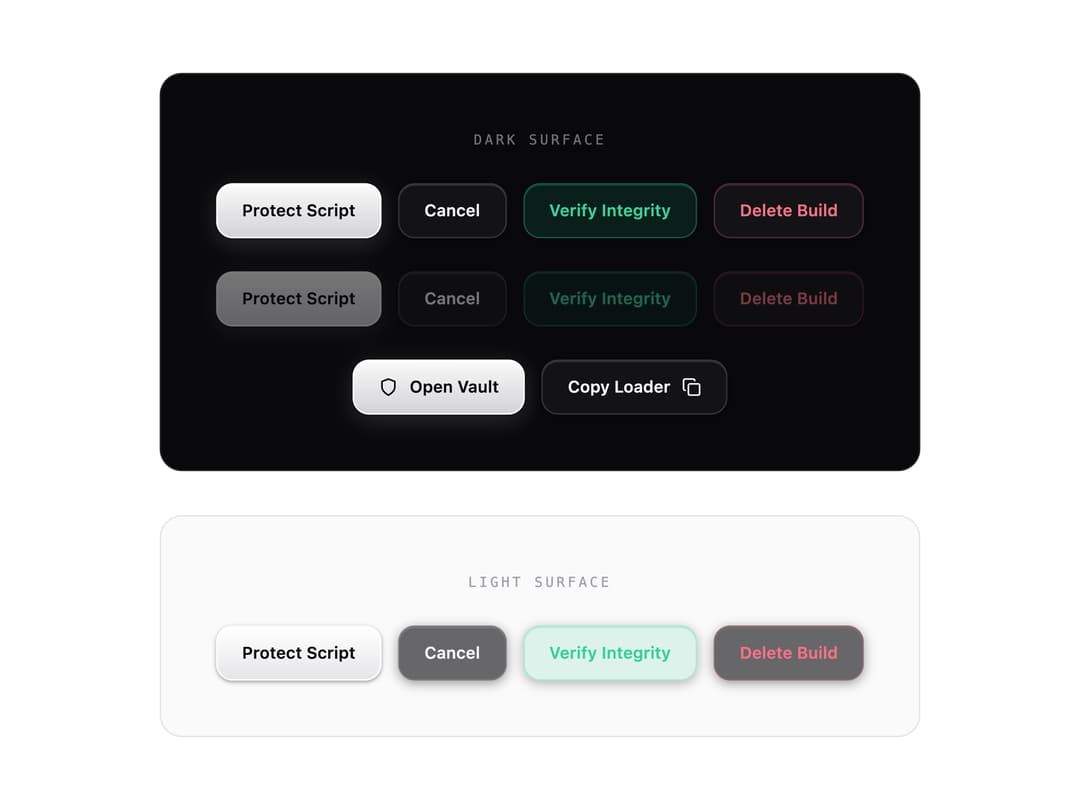
Glass Edged button from the LuaGuard Armor design system: blurred translucent dark-glass surface, inset top-edge highlight, white primary action, emerald/rose functional accents, soft hover glow and lift.
Built with React and Tailwind. Copy the prompt and paste it into Claude Code, Cursor or Lovable: your agent adds Glass Button to your project and fits it to your theme.
Code
How Glass Button is used: the demo's code. The component's own source comes with a free account.
Usage.tsx
import React from 'react';
import { GlassButton } from '@/components/ui/glass-button';

/**
 * Demo: every variant on the dark glass surface it was designed for,
 * plus the same set on a light surface to prove the buttons hold up
 * in light mode. Includes disabled states and a row with icons.
 */

function Row({ children }: { children: React.ReactNode }) {
  return <div className="flex flex-wrap items-center justify-center gap-3">{children}</div>;
}

export function GlassButtonDemo() {
  return (
    <div className="flex flex-col gap-8 p-8 font-sans">
      {/* Dark surface — the component's home turf */}
      <section
        className="rounded-2xl border border-zinc-800 bg-zinc-950 p-10 flex flex-col items-center gap-6"
        style={{ backgroundColor: '#09090b' }}
      >
        <span className="text-[10px] font-mono tracking-[0.2em] text-zinc-500 uppercase">
          Dark surface
        </span>
        <Row>
          <GlassButton variant="primary" glow>
            Protect Script
          </GlassButton>
          <GlassButton variant="secondary">Cancel</GlassButton>
          <GlassButton variant="accent" glow>
            Verify Integrity
          </GlassButton>
          <GlassButton variant="danger">Delete Build</GlassButton>
        </Row>
        <Row>
          <GlassButton variant="primary" glow disabled>
            Protect Script
          </GlassButton>
          <GlassButton variant="secondary" disabled>
            Cancel
          </GlassButton>
          <GlassButton variant="accent" disabled>
            Verify Integrity
          </GlassButton>
          <GlassButton variant="danger" disabled>
            Delete Build
          </GlassButton>
        </Row>
        <Row>
          <GlassButton variant="primary" glow>
            <svg width="14" height="14" viewBox="0 0 24 24" fill="none" stroke="currentColor" strokeWidth="2" strokeLinecap="round" strokeLinejoin="round">
              <path d="M12 22s8-4 8-10V5l-8-3-8 3v7c0 6 8 10 8 10" />
            </svg>
            <span>Open Vault</span>
          </GlassButton>
          <GlassButton variant="secondary">
            <span>Copy Loader</span>
            <svg width="14" height="14" viewBox="0 0 24 24" fill="none" stroke="currentColor" strokeWidth="2" strokeLinecap="round" strokeLinejoin="round">
              <rect width="14" height="14" x="8" y="8" rx="2" ry="2" />
              <path d="M4 16c-1.1 0-2-.9-2-2V4c0-1.1.9-2 2-2h10c1.1 0 2 .9 2 2" />
            </svg>
          </GlassButton>
        </Row>
      </section>

      {/* Light surface — same component, no recoloring */}
      <section
        className="rounded-2xl border border-zinc-200 p-10 flex flex-col items-center gap-6"
        style={{ backgroundColor: '#fafafa' }}
      >
        <span className="text-[10px] font-mono tracking-[0.2em] text-zinc-400 uppercase">
          Light surface
        </span>
        <Row>
          <GlassButton variant="primary" glow>
            Protect Script
          </GlassButton>
          <GlassButton variant="secondary">Cancel</GlassButton>
          <GlassButton variant="accent" glow>
            Verify Integrity
          </GlassButton>
          <GlassButton variant="danger">Delete Build</GlassButton>
        </Row>
      </section>
    </div>
  );
}

export default GlassButtonDemo;