
About
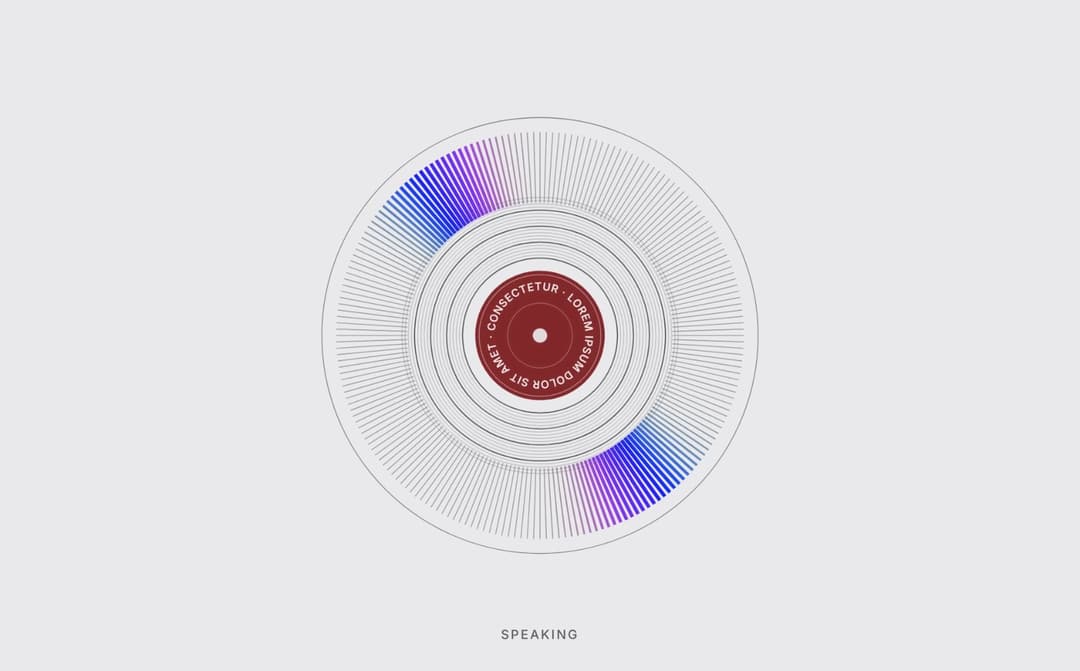
Voice-assistant visualizer shaped like a holographic record. Listening: a rainbow rises from the bottom. Thinking: a comet circles the ring. Speaking: two rainbow spots run round as the record spins. States blend smoothly. Feed level 0–1, put your text on the label. No deps.
Built with React and Tailwind. Copy the prompt and paste it into Claude Code, Cursor or Lovable: your agent adds Holo Vinyl to your project and fits it to your theme.
Code
How Holo Vinyl is used: the demo's code. The component's own source comes with a free account.
Usage.tsx
"use client";

import * as React from "react";
import { HoloVinyl, type HoloVinylState } from "@/components/ui/holo-vinyl";

const PRESETS: Record<string, string> = {
  Burgundy: "#7A1E2C",
  Ink: "#27272A",
  Cobalt: "#2F49C9",
};

const ORDER: HoloVinylState[] = ["idle", "listening", "thinking", "speaking"];

const SEG_BTN =
  "flex items-center gap-1.5 rounded-md px-2.5 py-1 text-xs font-semibold text-muted-foreground transition-colors hover:text-foreground focus-visible:outline-none focus-visible:ring-2 focus-visible:ring-ring aria-pressed:bg-background aria-pressed:text-foreground aria-pressed:shadow-sm";

function Row({ label, children }: { label: string; children: React.ReactNode }) {
  return (
    <div className="flex flex-wrap items-center gap-2">
      <span className="w-20 shrink-0 text-xs text-muted-foreground">{label}</span>
      {children}
    </div>
  );
}

function Segmented<T extends string>({
  label,
  value,
  options,
  onChange,
}: {
  label: string;
  value: T;
  options: { value: T; label: React.ReactNode }[];
  onChange: (v: T) => void;
}) {
  return (
    <Row label={label}>
      <div role="group" aria-label={label} className="flex gap-0.5 rounded-lg bg-muted p-0.5">
        {options.map((o) => (
          <button key={o.value} type="button" aria-pressed={value === o.value} onClick={() => onChange(o.value)} className={SEG_BTN}>
            {o.label}
          </button>
        ))}
      </div>
    </Row>
  );
}

function Slider({
  label,
  value,
  min,
  max,
  step,
  onChange,
  format = (v) => v.toFixed(2),
}: {
  label: string;
  value: number;
  min: number;
  max: number;
  step: number;
  onChange: (v: number) => void;
  format?: (v: number) => string;
}) {
  return (
    <label className="flex items-center gap-2 text-xs text-muted-foreground">
      <span className="w-20 shrink-0">{label}</span>
      <input
        type="range"
        min={min}
        max={max}
        step={step}
        value={value}
        onChange={(e) => onChange(parseFloat(e.target.value))}
        className="w-32 max-w-[180px] flex-1 accent-primary"
      />
      <span className="w-9 font-mono tabular-nums">{format(value)}</span>
    </label>
  );
}

function Group({ title, children }: { title: string; children: React.ReactNode }) {
  return (
    <section className="flex min-w-0 flex-col gap-2.5">
      <h3 className="mb-0.5 border-b border-border pb-1.5 font-mono text-[11px] font-semibold uppercase tracking-[.12em] text-muted-foreground">{title}</h3>
      {children}
    </section>
  );
}

export default function HoloVinylDemo() {
  const [state, setState] = React.useState<HoloVinylState>("speaking");
  const [theme, setTheme] = React.useState<"dark" | "light">("light");
  const [label, setLabel] = React.useState("LOREM IPSUM DOLOR SIT AMET · CONSECTETUR · ");
  const [accent, setAccent] = React.useState(PRESETS.Burgundy);
  const [level, setLevel] = React.useState(0);
  const [simulate, setSimulate] = React.useState(true);
  const [speed, setSpeed] = React.useState(1);
  const [open, setOpen] = React.useState(false);

  // Fake voice envelope: phrases made of syllables. In a real app, feed `level` from an AnalyserNode.
  // 20 updates a second is plenty — the disc smooths `level` itself.
  const active = state === "listening" || state === "speaking";
  React.useEffect(() => {
    if (!simulate || !active) return;
    const start = performance.now();
    const id = window.setInterval(() => {
      const t = (performance.now() - start) / 1000;
      const phrase = (Math.sin(t * 0.7) + 1) / 2;
      const syl = Math.max(0, Math.sin(t * 6.2)) * 0.7 + Math.max(0, Math.sin(t * 9.1 + 1)) * 0.3;
      setLevel(Math.round((0.15 + 0.85 * phrase) * syl * 100) / 100);
    }, 50);
    return () => window.clearInterval(id);
  }, [simulate, active]);

  const dark = theme === "dark";

  return (
    <div className="flex h-full min-h-[600px] w-full flex-col overflow-hidden bg-background text-foreground">
      {/* Stage */}
      <div
        className="relative flex min-h-0 flex-1 items-center justify-center overflow-hidden p-6 transition-colors duration-300"
        style={{ background: dark ? "#0f1117" : "#E9E9EB" }}
      >
        <HoloVinyl
          state={state}
          level={level}
          label={label}
          accent={accent}
          speed={speed}
          theme={theme}
          size="min(340px, 70vw, 52vh)"
          name="Voice assistant"
          onPress={() => setState((s) => ORDER[(ORDER.indexOf(s) + 1) % ORDER.length])}
        />
      </div>

      {/* Controls */}
      <div className="max-h-[60vh] shrink-0 overflow-y-auto border-t border-border px-4 pb-3 pt-3">
        <div className="mb-2 flex items-center justify-between">
          <div className="text-sm font-bold">
            Holo Vinyl <span className="ml-2 font-mono text-[11px] font-normal text-muted-foreground">demo controls · tap the disc to change state</span>
          </div>
          <button
            type="button"
            aria-expanded={open}
            onClick={() => setOpen((v) => !v)}
            className="rounded-lg border border-border bg-muted px-2.5 py-1.5 text-xs font-semibold transition-colors hover:text-foreground focus-visible:outline-none focus-visible:ring-2 focus-visible:ring-ring"
          >
            {open ? "Hide controls" : "Show controls"}
          </button>
        </div>

        {open && (
          <div className="grid grid-cols-1 gap-x-7 gap-y-4 md:grid-cols-3">
            <Group title="Preview">
              <Segmented
                label="State"
                value={state}
                onChange={setState}
                options={[
                  { value: "idle", label: "Idle" },
                  { value: "listening", label: "Listening" },
                  { value: "thinking", label: "Thinking" },
                  { value: "speaking", label: "Speaking" },
                ]}
              />
              <Slider
                label="Voice level"
                value={level}
                min={0}
                max={1}
                step={0.01}
                onChange={(v) => {
                  setSimulate(false);
                  setLevel(v);
                }}
              />
              <label className="flex items-center gap-1.5 pl-[5.5rem] text-xs text-muted-foreground">
                <input type="checkbox" checked={simulate} onChange={(e) => setSimulate(e.target.checked)} className="accent-primary" />
                Simulate speech
              </label>
              <Segmented
                label="Theme"
                value={theme}
                onChange={setTheme}
                options={[
                  { value: "light", label: <><span className="size-3 rounded-full border border-border" style={{ background: "#E9E9EB" }} />Light</> },
                  { value: "dark", label: <><span className="size-3 rounded-full" style={{ background: "#0f1117" }} />Dark</> },
                ]}
              />
            </Group>

            <Group title="Appearance">
              <label className="flex items-center gap-2 text-xs text-muted-foreground">
                <span className="w-20 shrink-0">Label</span>
                <input
                  type="text"
                  value={label}
                  maxLength={60}
                  onChange={(e) => setLabel(e.target.value)}
                  className="h-7 min-w-0 flex-1 rounded-md border border-border bg-background px-2 font-mono text-[11px] text-foreground focus-visible:outline-none focus-visible:ring-2 focus-visible:ring-ring"
                />
              </label>
              <Row label="Accent">
                <input
                  type="color"
                  value={accent}
                  aria-label="Accent color"
                  onChange={(e) => setAccent(e.target.value)}
                  className="h-6 w-7 cursor-pointer rounded-md border border-border bg-muted p-px"
                />
                <div role="group" aria-label="Presets" className="flex gap-0.5 rounded-lg bg-muted p-0.5">
                  {Object.entries(PRESETS).map(([name, c]) => (
                    <button key={name} type="button" aria-pressed={accent.toLowerCase() === c.toLowerCase()} onClick={() => setAccent(c)} className={SEG_BTN}>
                      <span className="size-3 rounded-full" style={{ background: c }} />
                      {name}
                    </button>
                  ))}
                </div>
              </Row>
            </Group>

            <Group title="Motion">
              <Slider label="Speed" value={speed} min={0.3} max={2} step={0.1} onChange={setSpeed} format={(v) => v.toFixed(1) + "×"} />
            </Group>
          </div>
        )}
      </div>
    </div>
  );
}More by Darya
View all

Orbit Timeline
57
Grain Light Card
30
ASCII Voice Orb
12
Impact Flow
Voice Orb
More in AI chats
View all

AI Actions
320
Color Picker
85
Message Thread
37

System Message
54
Commit
17
Approval Card
14
Suggestions
28

Modal Card
101

