
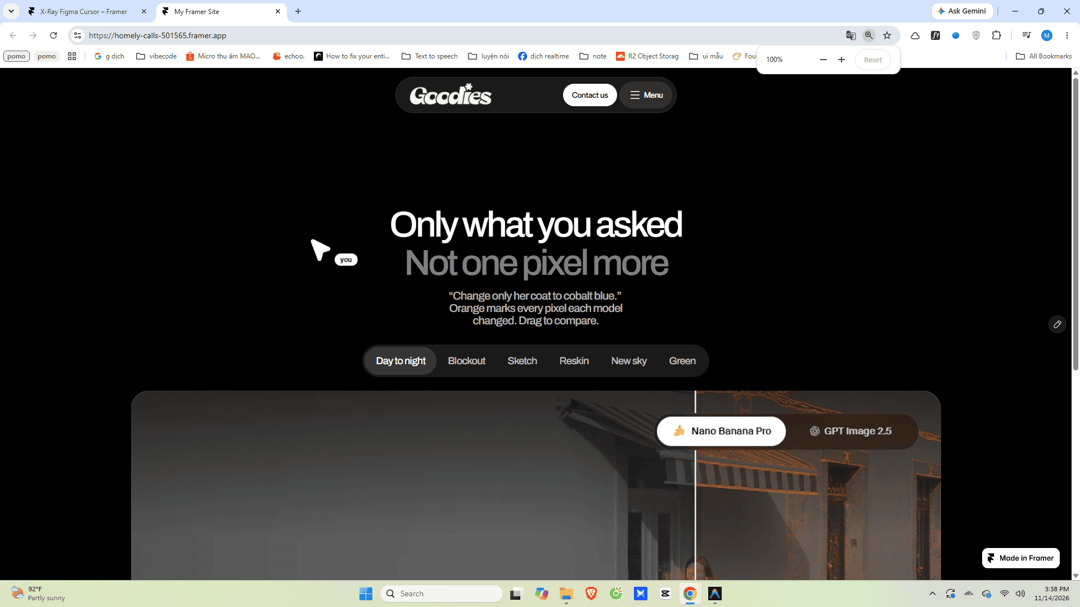
About
A smooth Figma-style multiplayer cursor with a high-contrast X-ray difference blend effect. Explore more free motion components at goodmotion.vercel.app
Built with React and Tailwind. Copy the prompt and paste it into Claude Code, Cursor or Lovable: your agent adds X-Ray Figma Cursor to your project and fits it to your theme.
Code
How X-Ray Figma Cursor is used: the demo's code. The component's own source comes with a free account.
Usage.tsx
"use client";

import React, { useState, useEffect } from "react";
import XRayFigmaCursor from "@/components/ui/x-ray-figma-cursor";

export function XRayFigmaCursorDemo() {
  const [mounted, setMounted] = useState(false);
  const [windowWidth, setWindowWidth] = useState(1200);
  const [activeFilter, setActiveFilter] = useState("Day to night");

  useEffect(() => {
    setMounted(true);
    setWindowWidth(window.innerWidth);

    const handleResize = () => setWindowWidth(window.innerWidth);
    window.addEventListener("resize", handleResize);
    return () => window.removeEventListener("resize", handleResize);
  }, []);

  const isMobile = mounted && windowWidth < 768;
  const isTablet = mounted && windowWidth >= 768 && windowWidth < 1024;

  const allFilters = [
    "Day to night",
    "Blockout",
    "Sketch",
    "Reskin",
    "New sky",
    "Green",
  ];

  // Show first 4 filters on mobile to prevent overflow
  const visibleFilters = isMobile ? allFilters.slice(0, 4) : allFilters;

  return (
    <div
      style={{
        backgroundColor: "#000000",
        color: "#FFFFFF",
        minHeight: "100vh",
        width: "100%",
        position: "relative",
        boxSizing: "border-box",
        fontFamily:
          "'Archivo', -apple-system, BlinkMacSystemFont, 'Segoe UI', Roboto, sans-serif",
        overflowX: "hidden",
        paddingTop: isMobile ? "8px" : "20px",
      }}
    >
      {/* Import Archivo Font (scoped without global selector pollution) */}
      <style>
        {`@import url('https://fonts.googleapis.com/css2?family=Archivo:ital,wght@0,100..900;1,100..900&display=swap');`}
      </style>

      {/* Component X-Ray Figma Cursor */}
      <XRayFigmaCursor
        name="you"
        size={22}
        ease={0.34}
        hideDefaultCursor={true}
      />

      {/* Floating Capsule Navbar */}
      <nav
        style={{
          width: isMobile ? "calc(100% - 32px)" : isTablet ? "440px" : "500px",
          maxWidth: "100%",
          margin: isMobile
            ? "8px auto 60px"
            : isTablet
              ? "12px auto 90px"
              : "0 auto 130px",
          backgroundColor: "rgba(18, 18, 20, 0.85)",
          backdropFilter: "blur(16px)",
          WebkitBackdropFilter: "blur(16px)",
          border: "1px solid rgba(255, 255, 255, 0.12)",
          borderRadius: "9999px",
          padding: isMobile ? "6px 8px 6px 16px" : "8px 12px 8px 24px",
          display: "flex",
          alignItems: "center",
          justifyContent: "space-between",
          boxSizing: "border-box",
          boxShadow: "0 8px 32px rgba(0, 0, 0, 0.4)",
          position: "sticky",
          top: isMobile ? "8px" : "16px",
          zIndex: 40,
        }}
      >
        {/* Goodies Logo from jsDelivr CDN */}
        <div style={{ display: "flex", alignItems: "center" }}>
          <img
            src="https://cdn.21st.dev/assets/mirror/04/0401256a66d746c8d85e824df589132d3136ec53a7bb124dcf370c53b44d84e9.png"
            alt="Goodies"
            style={{
              height: isMobile ? "32px" : "44px",
              width: "auto",
              display: "block",
              userSelect: "none",
            }}
          />
        </div>

        {/* Action Buttons */}
        <div style={{ display: "flex", alignItems: "center", gap: "8px" }}>
          {/* Contact us button - Hidden on mobile */}
          {!isMobile && (
            <button
              type="button"
              style={{
                fontFamily: "inherit",
                backgroundColor: "#FFFFFF",
                color: "#000000",
                border: "none",
                borderRadius: "9999px",
                padding: isTablet ? "10px 14px" : "12px 16px",
                fontSize: "14px",
                fontWeight: 600,
                letterSpacing: "-0.03em",
                lineHeight: 1,
                cursor: "pointer",
                transition: "opacity 0.2s ease",
              }}
              onMouseEnter={(e) => (e.currentTarget.style.opacity = "0.9")}
              onMouseLeave={(e) => (e.currentTarget.style.opacity = "1")}
            >
              Contact us
            </button>
          )}

          {/* Menu button */}
          <button
            type="button"
            style={{
              fontFamily: "inherit",
              backgroundColor: "rgba(255, 255, 255, 0.1)",
              color: "#FFFFFF",
              border: "none",
              borderRadius: "9999px",
              padding: isTablet ? "10px 14px" : "12px 16px",
              fontSize: "14px",
              fontWeight: 500,
              letterSpacing: "-0.03em",
              lineHeight: 1,
              cursor: "pointer",
              display: "inline-flex",
              alignItems: "center",
              gap: "6px",
              transition: "background-color 0.2s ease",
            }}
            onMouseEnter={(e) =>
            (e.currentTarget.style.backgroundColor =
              "rgba(255, 255, 255, 0.18)")
            }
            onMouseLeave={(e) =>
            (e.currentTarget.style.backgroundColor =
              "rgba(255, 255, 255, 0.1)")
            }
          >
            <span style={{ fontSize: "15px", lineHeight: 1 }}>≡</span>
            <span>Menu</span>
          </button>
        </div>
      </nav>

      {/* Main Title Section */}
      <header
        style={{
          textAlign: "center",
          paddingLeft: isMobile ? "16px" : "24px",
          paddingRight: isMobile ? "16px" : "24px",
          marginBottom: "16px",
        }}
      >
        <h1
          style={{
            margin: 0,
            fontSize: isMobile ? "38px" : isTablet ? "50px" : "64px",
            fontWeight: 500,
            lineHeight: 1.05,
            letterSpacing: "-0.05em",
          }}
        >
          <span style={{ color: "#FFFFFF", display: "block" }}>
            Only what you asked
          </span>
          <span
            style={{
              color: "rgba(255, 255, 255, 0.7)",
              display: "block",
              marginTop: isMobile ? "4px" : "6px",
            }}
          >
            Not one pixel more
          </span>
        </h1>
      </header>

      {/* Subtitle Section */}
      <section
        style={{
          textAlign: "center",
          paddingLeft: isMobile ? "16px" : "24px",
          paddingRight: isMobile ? "16px" : "24px",
          marginBottom: isMobile ? "24px" : "32px",
        }}
      >
        <p
          style={{
            margin: "0 auto",
            maxWidth: "600px",
            fontSize: isMobile ? "16px" : isTablet ? "18px" : "20px",
            fontWeight: 500,
            color: "rgba(255, 255, 255, 0.7)",
            letterSpacing: "-0.03em",
            lineHeight: 1.4,
          }}
        >
          <span>“Change only her coat to cobalt blue.”</span>
          <br />
          <span>
            Orange marks every pixel each model changed. Drag to compare.
          </span>
        </p>

        {/* Mobile touch fallback badge */}
        {isMobile && (
          <div
            style={{
              display: "inline-flex",
              alignItems: "center",
              gap: "8px",
              marginTop: "16px",
              backgroundColor: "rgba(255, 255, 255, 0.08)",
              border: "1px solid rgba(255, 255, 255, 0.12)",
              borderRadius: "9999px",
              padding: "6px 14px",
              fontSize: "12px",
              color: "rgba(255, 255, 255, 0.8)",
              userSelect: "none",
            }}
          >
            <span>✨</span>
            <span>Desktop cursor active — view with mouse pointer</span>
          </div>
        )}
      </section>

      {/* Tab Filter Pills */}
      <div
        style={{
          display: "flex",
          justifyContent: "center",
          paddingLeft: isMobile ? "16px" : "24px",
          paddingRight: isMobile ? "16px" : "24px",
          marginBottom: "24px",
        }}
      >
        <div
          style={{
            display: "inline-flex",
            alignItems: "center",
            backgroundColor: "#1A1A1A",
            borderRadius: "9999px",
            padding: "4px",
            boxSizing: "border-box",
            border: "none",
            boxShadow: "none",
            maxWidth: "100%",
            overflowX: "auto",
          }}
        >
          {visibleFilters.map((filter) => {
            const isActive = activeFilter === filter;
            return (
              <button
                key={filter}
                type="button"
                onClick={() => setActiveFilter(filter)}
                style={{
                  fontFamily: "inherit",
                  backgroundColor: isActive
                    ? "rgba(255, 255, 255, 0.12)"
                    : "transparent",
                  color: isActive ? "#FFFFFF" : "rgba(255, 255, 255, 0.7)",
                  border: "none",
                  boxShadow: "none",
                  borderRadius: "9999px",
                  padding: isMobile ? "10px 14px" : "12px 16px",
                  fontSize: isMobile ? "13px" : "15px",
                  fontWeight: 500,
                  letterSpacing: "-0.03em",
                  lineHeight: 1,
                  cursor: "pointer",
                  whiteSpace: "nowrap",
                  transition: "all 0.2s ease",
                }}
              >
                {filter}
              </button>
            );
          })}
        </div>
      </div>

      {/* Main Image Showcase Section */}
      <main
        style={{
          width: "100%",
          maxWidth: "1440px",
          margin: "0 auto",
          paddingLeft: isMobile ? "16px" : "24px",
          paddingRight: isMobile ? "16px" : "24px",
          paddingBottom: "40px",
          boxSizing: "border-box",
          display: "flex",
          justifyContent: "center",
        }}
      >
        <img
          src="https://cdn.21st.dev/assets/mirror/c5/c5fb144e68dd46260c453d0dd4086e383fe69b19de4bffb1ddbb818eb5dc4f42.png"
          alt="Only what you asked - Not one pixel more"
          style={{
            width: "100%",
            height: "auto",
            display: "block",
            borderRadius: isMobile ? "16px" : "24px",
          }}
        />
      </main>

      {/* Subtle Goodmotion Branding Footer */}
      <footer
        style={{
          textAlign: "center",
          paddingBottom: "36px",
          paddingLeft: "16px",
          paddingRight: "16px",
          fontSize: "13px",
          color: "rgba(255, 255, 255, 0.45)",
          letterSpacing: "-0.01em",
        }}
      >
        <span>Built with </span>
        <a
          href="https://goodmotion.vercel.app/"
          target="_blank"
          rel="noopener noreferrer"
          style={{
            color: "rgba(255, 255, 255, 0.8)",
            textDecoration: "underline",
            textUnderlineOffset: "3px",
            transition: "color 0.2s ease",
          }}
          onMouseEnter={(e) => (e.currentTarget.style.color = "#FFFFFF")}
          onMouseLeave={(e) =>
            (e.currentTarget.style.color = "rgba(255, 255, 255, 0.8)")
          }
        >
          Goodmotion
        </a>
      </footer>
    </div>
  );
}

export default XRayFigmaCursorDemo;
Dependencies
More by GoodMotion
View all

Googly Eye Cursor
26
Circle Reveal Loader
24
Y2K Dreamy Text
9
Rubber Band Text
1