
About
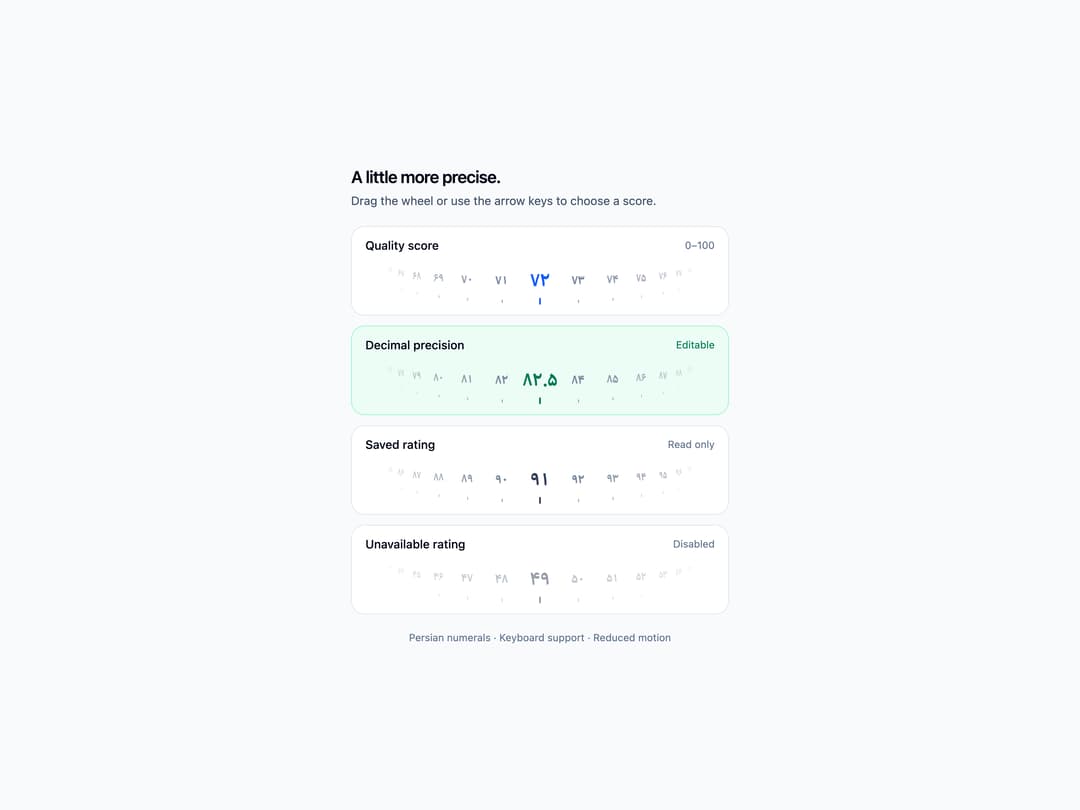
A tactile 0-100 rating wheel with Persian numerals, keyboard controls, and optional sound.
Built with React and Tailwind. Copy the prompt and paste it into Claude Code, Cursor or Lovable: your agent adds Rating Score Picker to your project and fits it to your theme.
Code
How Rating Score Picker is used: the demo's code. The component's own source comes with a free account.
Usage.tsx
"use client";

import { useState } from "react";
import RatingScorePicker from "@/components/ui/rating-score-picker";

export default function RatingScorePickerDemo() {
  const [score, setScore] = useState("72");
  const [decimalScore, setDecimalScore] = useState("82.5");

  return (
    <div className="flex min-h-screen w-full items-center justify-center bg-slate-50 p-6 text-slate-950 dark:bg-slate-950 dark:text-slate-50">
      <div className="w-full max-w-md space-y-5">
        <header className="space-y-1">
          <h1 className="text-xl font-semibold tracking-tight">A little more precise.</h1>
          <p className="text-sm text-slate-600 dark:text-slate-400">Drag the wheel or use the arrow keys to choose a score.</p>
        </header>
        <div className="space-y-3">
          <section className="overflow-hidden rounded-2xl border border-slate-200 bg-white px-4 pb-2 pt-3 dark:border-slate-800 dark:bg-slate-900" aria-labelledby="interactive-label">
            <div className="flex items-center justify-between gap-2 text-sm">
              <h2 id="interactive-label" className="font-medium">Quality score</h2>
              <span className="text-xs text-slate-500 dark:text-slate-400">0–100</span>
            </div>
            <RatingScorePicker value={score} label="Quality score" onChange={setScore} disabled={false} readOnly={false} invalid={false} inputDisabled />
          </section>
          <section className="overflow-hidden rounded-2xl border border-emerald-200 bg-emerald-50 px-4 pb-2 pt-3 dark:border-emerald-900 dark:bg-emerald-950/40" aria-labelledby="decimal-label">
            <div className="flex items-center justify-between gap-2 text-sm">
              <h2 id="decimal-label" className="font-medium">Decimal precision</h2>
              <span className="text-xs text-emerald-700 dark:text-emerald-400">Editable</span>
            </div>
            <RatingScorePicker value={decimalScore} label="Decimal score" onChange={setDecimalScore} disabled={false} readOnly={false} invalid={false} selectedTextClassName="text-emerald-700 dark:text-emerald-400" />
          </section>
          <section className="overflow-hidden rounded-2xl border border-slate-200 bg-white px-4 pb-2 pt-3 dark:border-slate-800 dark:bg-slate-900" aria-labelledby="readonly-label">
            <div className="flex items-center justify-between gap-2 text-sm">
              <h2 id="readonly-label" className="font-medium">Saved rating</h2>
              <span className="text-xs text-slate-500 dark:text-slate-400">Read only</span>
            </div>
            <RatingScorePicker value="91" label="Saved rating" onChange={() => {}} disabled={false} readOnly invalid={false} inputDisabled selectedTextClassName="text-slate-700 dark:text-slate-200" />
          </section>
          <section className="overflow-hidden rounded-2xl border border-slate-200 bg-white px-4 pb-2 pt-3 dark:border-slate-800 dark:bg-slate-900" aria-labelledby="disabled-label">
            <div className="flex items-center justify-between gap-2 text-sm">
              <h2 id="disabled-label" className="font-medium">Unavailable rating</h2>
              <span className="text-xs text-slate-500 dark:text-slate-400">Disabled</span>
            </div>
            <RatingScorePicker value="49" label="Unavailable rating" onChange={() => {}} disabled readOnly={false} invalid={false} inputDisabled selectedTextClassName="text-slate-700 dark:text-slate-200" />
          </section>
        </div>
        <p className="text-center text-xs text-slate-500 dark:text-slate-400">Persian numerals · Keyboard support · Reduced motion</p>
      </div>
    </div>
  );
}