
About
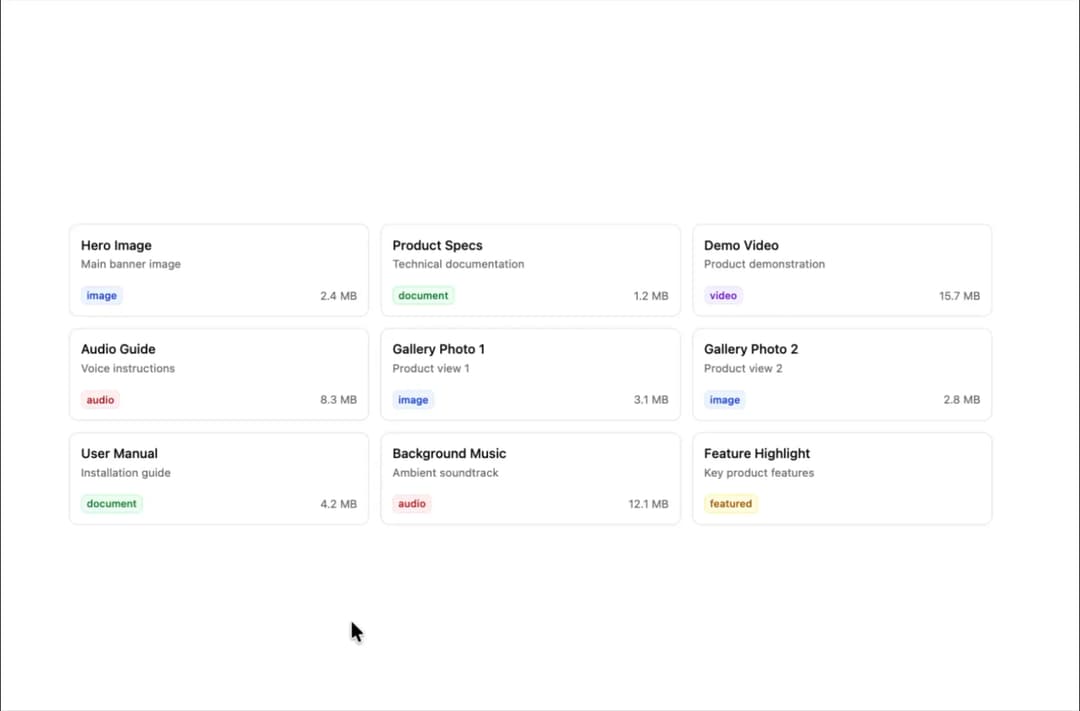
A drag-and-drop sortable component designed for seamless item organization across customizable columns.
Built with React and Tailwind. Copy the prompt and paste it into Claude Code, Cursor or Lovable: your agent adds Sortable to your project and fits it to your theme.
Code
How Sortable is used: the demo's code. The component's own source comes with a free account.
Usage.tsx
'use client';

import { useState } from 'react';
import { cn } from '@/lib/utils';
import { Badge } from '@/components/ui/badge-2';
import { Sortable, SortableItem, SortableItemHandle } from '@/components/ui/sortable';
import { FileTextIcon, GripVertical, ImageIcon, MusicIcon, StarIcon, VideoIcon } from 'lucide-react';
import { toast } from 'sonner';

interface GridItem {
  id: string;
  title: string;
  description: string;
  type: 'image' | 'document' | 'audio' | 'video' | 'featured';
  size: string;
  priority: 'high' | 'medium' | 'low';
}

const defaultGridItems: GridItem[] = [
  {
    id: '1',
    title: 'Hero Image',
    description: 'Main banner image',
    type: 'image',
    size: '2.4 MB',
    priority: 'high',
  },
  {
    id: '2',
    title: 'Product Specs',
    description: 'Technical documentation',
    type: 'document',
    size: '1.2 MB',
    priority: 'medium',
  },
  {
    id: '3',
    title: 'Demo Video',
    description: 'Product demonstration',
    type: 'video',
    size: '15.7 MB',
    priority: 'high',
  },
  {
    id: '4',
    title: 'Audio Guide',
    description: 'Voice instructions',
    type: 'audio',
    size: '8.3 MB',
    priority: 'low',
  },
  {
    id: '5',
    title: 'Gallery Photo 1',
    description: 'Product view 1',
    type: 'image',
    size: '3.1 MB',
    priority: 'medium',
  },
  {
    id: '6',
    title: 'Gallery Photo 2',
    description: 'Product view 2',
    type: 'image',
    size: '2.8 MB',
    priority: 'medium',
  },
  {
    id: '7',
    title: 'User Manual',
    description: 'Installation guide',
    type: 'document',
    size: '4.2 MB',
    priority: 'high',
  },
  {
    id: '8',
    title: 'Background Music',
    description: 'Ambient soundtrack',
    type: 'audio',
    size: '12.1 MB',
    priority: 'low',
  },
  {
    id: '9',
    title: 'Feature Highlight',
    description: 'Key product features',
    type: 'featured',
    size: 'N/A',
    priority: 'high',
  },
];

const getTypeIcon = (type: GridItem['type']) => {
  switch (type) {
    case 'image':
      return <ImageIcon className="h-4 w-4" />;
    case 'document':
      return <FileTextIcon className="h-4 w-4" />;
    case 'audio':
      return <MusicIcon className="h-4 w-4" />;
    case 'video':
      return <VideoIcon className="h-4 w-4" />;
    case 'featured':
      return <StarIcon className="h-4 w-4" />;
  }
};

const getTypeColor = (type: GridItem['type']) => {
  switch (type) {
    case 'image':
      return 'primary';
    case 'document':
      return 'success';
    case 'audio':
      return 'destructive';
    case 'video':
      return 'info';
    case 'featured':
      return 'warning';
  }
};

const getPriorityColor = (priority: GridItem['priority']) => {
  switch (priority) {
    case 'high':
      return 'text-red-600 bg-red-50 border-red-200';
    case 'medium':
      return 'text-yellow-600 bg-yellow-50 border-yellow-200';
    case 'low':
      return 'text-green-600 bg-green-50 border-green-200';
  }
};

const getItemSize = (type: GridItem['type']) => {
  switch (type) {
    case 'featured':
      return 'col-span-2 row-span-2';
    case 'image':
    case 'video':
      return 'col-span-1 row-span-1';
    case 'document':
    case 'audio':
      return 'col-span-1 row-span-1';
    default:
      return 'col-span-1 row-span-1';
  }
};

export default function SortableGrid() {
  const [items, setItems] = useState<GridItem[]>(defaultGridItems);

  const handleValueChange = (newItems: GridItem[]) => {
    console.log('🔴 GRID VALUE CHANGED:', newItems);
    setItems(newItems);

    // Show toast with new order
    toast.success('Grid items reordered successfully!', {
      description: `New order: ${newItems.map((item, index) => `${index + 1}. ${item.title}`).join(', ')}`,
      duration: 4000,
    });
  };

  const getItemValue = (item: GridItem) => item.id;

  return (
    <div className="w-full max-w-5xl mx-auto p-4 space-y-6">
      <Sortable
        value={items}
        onValueChange={handleValueChange}
        getItemValue={getItemValue}
        strategy="grid"
        className="grid grid-cols-3 gap-3 auto-rows-fr"
      >
        {items.map((item) => (
          <SortableItem key={item.id} value={item.id}>
            <div
              className={cn(
                'group relative p-3 bg-background border border-border rounded-lg hover:bg-accent/50 transition-colors cursor-pointer',
                getItemSize(item.type),
                'min-h-[100px] flex flex-col',
              )}
              onClick={() => console.log('🔴 GRID ITEM CLICKED:', item.id)}
            >
              <SortableItemHandle className="absolute top-2.5 end-1.5 text-muted-foreground hover:text-foreground z-10 opacity-0 group-hover:opacity-100 transition-opacity">
                <GripVertical className="h-3.5 w-3.5" />
              </SortableItemHandle>

              <div className="flex-1 min-w-0">
                <h4 className="font-medium text-sm truncate">{item.title}</h4>
                <p className="text-xs text-muted-foreground truncate mt-0.5">{item.description}</p>
              </div>

              <div className="flex items-center justify-between mt-2">
                <Badge variant={getTypeColor(item.type)} appearance="outline" size="sm">
                  {item.type}
                </Badge>
                {item.type !== 'featured' && <span className="text-xs text-muted-foreground">{item.size}</span>}
              </div>
            </div>
          </SortableItem>
        ))}
      </Sortable>
    </div>
  );
}
Dependencies
More by Sean Hello
View all

3D Testimonails
3.3K
Line Charts 9
630
Alert
492
Area Charts 1
383
Line Charts 6
381
Scroll Area
375
Area Charts 2
315
Navigation Menu
305
More in Cards
View all
Stats cards with links
120

Course Design Cards
1.1K
Statistics Card 2
258
Card
55

Card Studio
9
Statistics Card 7
288
The Item one
3

Weather Card
52
