
About
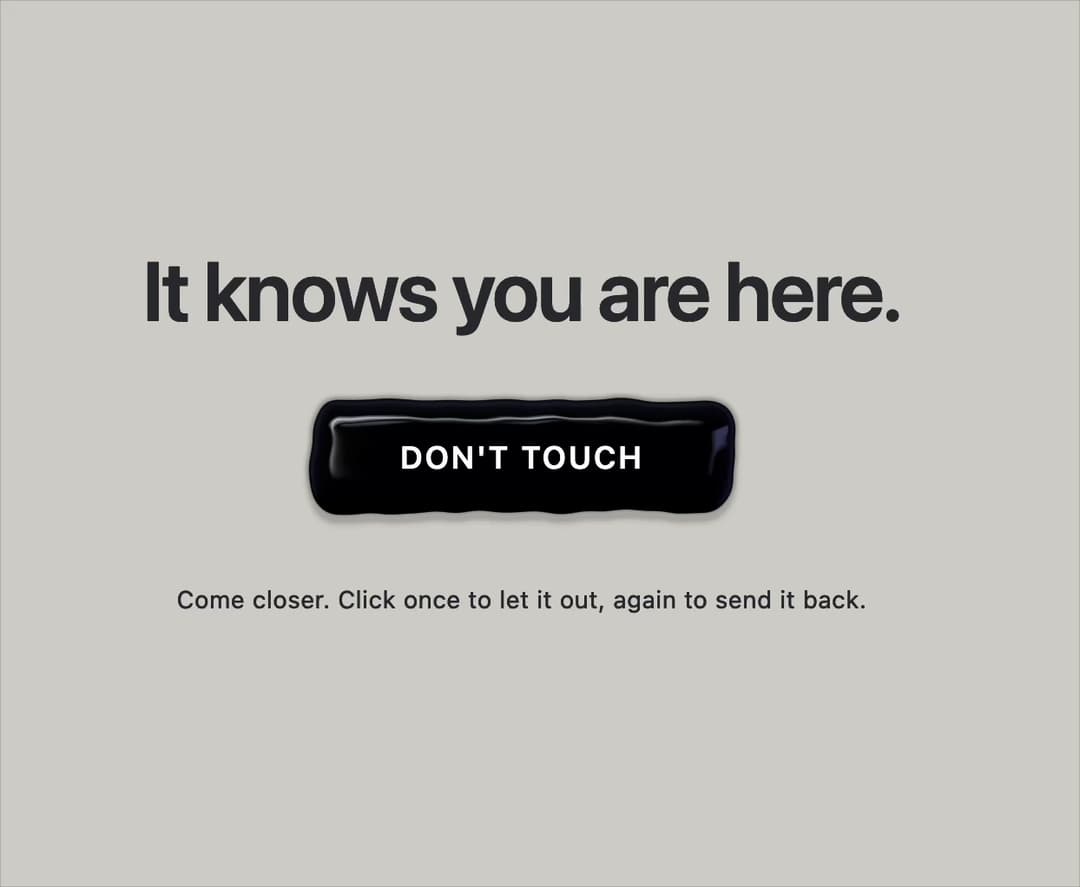
A living black-symbiote button in raw WebGL2. Tendrils strain toward your cursor, seize it within 100px and turn it into a slime arrow. Click to unleash a flood that swallows the screen — click again to pull it all back. React only, zero dependencies.
Built with React and Tailwind. Copy the prompt and paste it into Claude Code, Cursor or Lovable: your agent adds Venom Button to your project and fits it to your theme.
Code
How Venom Button is used: the demo's code. The component's own source comes with a free account.
Usage.tsx
import { VenomButton } from "@/components/ui/venom-button";

// Text that should invert over the slime: `relative z-[N] text-white mix-blend-difference`,
// with N above the button's `zIndex` (default 1). Keep the wrapper free of z-index / transform /
// isolation, otherwise it becomes its own stacking context and the blend can't see the canvas.
export default function Demo() {
  return (
    <div className="relative flex min-h-screen w-full flex-col items-center justify-center bg-[#d4d1cb] px-4">
      <div className="flex h-40 items-end pb-10">
        <h1 className="relative z-[2] text-center text-4xl font-semibold tracking-tight text-white mix-blend-difference sm:text-5xl">
          It knows you are here.
        </h1>
      </div>

      <VenomButton>{"DON'T TOUCH"}</VenomButton>

      <div className="flex h-40 items-start pt-10">
        <p className="relative z-[2] text-center text-sm tracking-wide text-white mix-blend-difference">
          Come closer. Click once to let it out, again to send it back.
        </p>
      </div>
    </div>
  );
}
More in Shaders
View all
Glass Fold
316

Phosphor 30
296

Shader Animation
3.8K

NeonRGBTextEffect
147
Wave
695
Shader Background
2K
Black Hole
30

Paper design shader Background
684

