
About
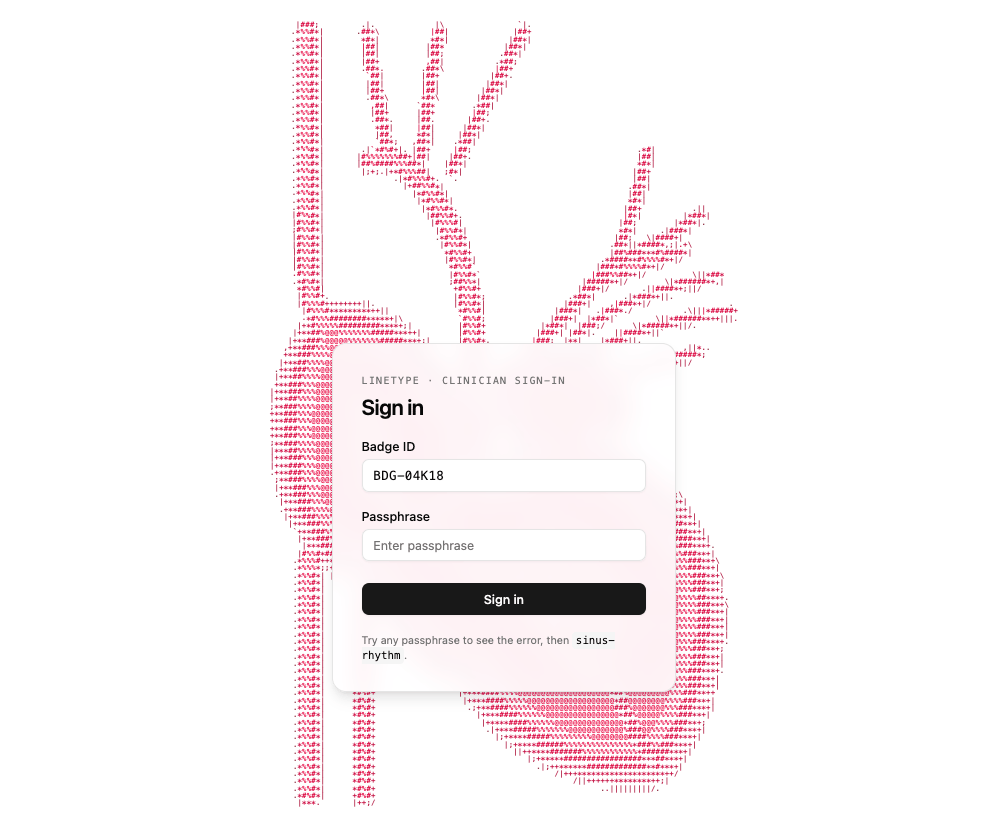
Clinician sign-in over an anatomical ASCII heart drawn on canvas. Glyphs lean toward the cursor, scatter calmly on a wrong passphrase (no shake), and the heart beats once on success. Theme tokens, light/dark, reduced motion, aria-live errors.
Built with React and Tailwind. Copy the prompt and paste it into Claude Code, Cursor or Lovable: your agent adds ASCII Heart Login to your project and fits it to your theme.
Code
How ASCII Heart Login is used: the demo's code. The component's own source comes with a free account.
Usage.tsx
import { AsciiHeartLogin } from "@/components/ui/ascii-heart-login"

// Demo UI, dummy data. Fictional product, clinician and badge.
// The passphrase check is a stand-in: real sign-in belongs on a server.
const DEMO_BADGE = "BDG-04K18"
const DEMO_PASSPHRASE = "sinus-rhythm"

export default function AsciiHeartLoginDemo() {
  return (
    <div className="relative h-svh min-h-[40rem] w-full">
      <span className="absolute top-4 left-4 z-10 rounded-full border border-border bg-background/80 px-3 py-1 text-xs font-medium text-muted-foreground backdrop-blur">
        Demo UI, dummy data
      </span>
      <AsciiHeartLogin
        brandName="Linetype"
        kicker="Clinician sign-in"
        title="Sign in"
        defaultBadgeId={DEMO_BADGE}
        errorMessage="Passphrase is incorrect"
        validate={async ({ badgeId, passphrase }) => {
          await new Promise((r) => setTimeout(r, 350))
          return badgeId.toUpperCase() === DEMO_BADGE && passphrase === DEMO_PASSPHRASE
        }}
        welcomeKicker="Session ready"
        welcomeTitle="Welcome, Dr. Venn"
        welcomeDescription="Dummy clinician session. No patient data."
        footer={
          <>
            Try any passphrase to see the error, then{" "}
            <code className="rounded bg-muted px-1 py-0.5 font-mono text-foreground">{DEMO_PASSPHRASE}</code>.
          </>
        }
      />
    </div>
  )
}
More by Barely Designer
View all
Car sales Dashboard
8
No Green Tick
More in Forms
View all

Premium Auth
577

Login 1
68

Contact Card
1.1K
Form
18

Login Card
36

Login 2
15

Change Password Form
11

Form
3