
About
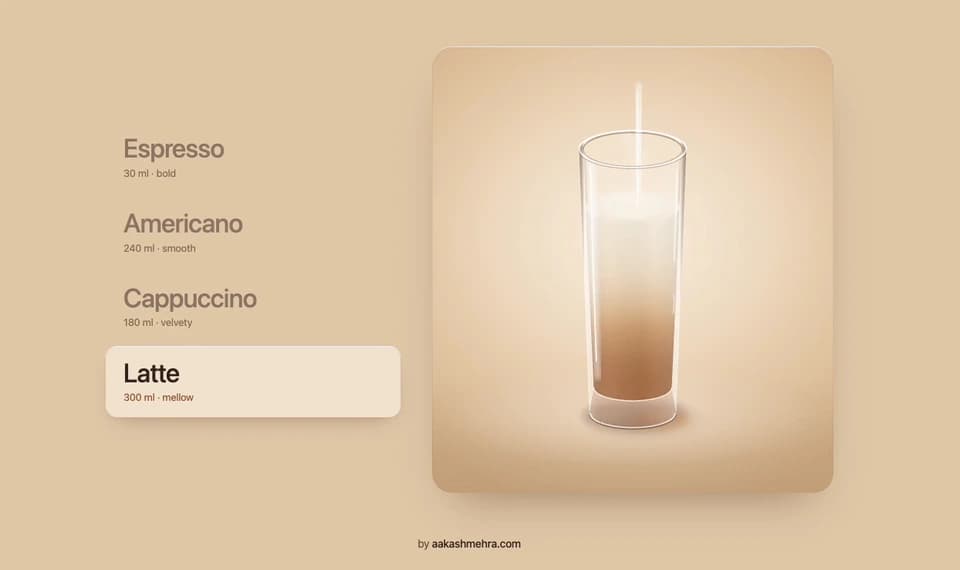
A coffee menu with detailed SVG cups and hand-written physics: hover a drink and its cup slides in, coffee and milk pour, splash and blend, and the previous cup tips over and falls away.
Built with React and Tailwind. Copy the prompt and paste it into Claude Code, Cursor or Lovable: your agent adds Coffee Pour Menu to your project and fits it to your theme.
Code
How Coffee Pour Menu is used: the demo's code. The component's own source comes with a free account.
Usage.tsx
import { CoffeePourMenu, type CoffeeItem } from "@/components/ui/coffee-pour-menu";

const items: CoffeeItem[] = [
  {
    id: "espresso",
    name: "Espresso",
    subtitle: "30 ml · bold",
    description: "a short, intense shot with golden crema",
    vessel: "demitasse",
    layers: [{ type: "espresso", amount: 0.72 }],
    crema: true,
  },
  {
    id: "americano",
    name: "Americano",
    subtitle: "240 ml · smooth",
    description: "espresso over hot water",
    vessel: "glass-mug",
    layers: [
      { type: "water", amount: 0.54 },
      { type: "espresso", amount: 0.24 },
    ],
    crema: true,
    blend: 0.9,
  },
  {
    id: "cappuccino",
    name: "Cappuccino",
    subtitle: "180 ml · velvety",
    description: "espresso with steamed milk and foam",
    vessel: "cup",
    layers: [
      { type: "espresso", amount: 0.3 },
      { type: "milk", amount: 0.44 },
    ],
    foam: 0.14,
    art: "heart",
  },
  {
    id: "latte",
    name: "Latte",
    subtitle: "300 ml · mellow",
    description: "espresso with lots of steamed milk and microfoam",
    vessel: "tall-glass",
    layers: [
      { type: "espresso", amount: 0.25 },
      { type: "milk", amount: 0.51 },
    ],
    foam: 0.11,
    blend: 0.15,
  },
];

export default function CoffeePourMenuDemo() {
  return (
    <div className="flex w-full flex-col items-center bg-[#e4cdb0] p-2 sm:p-6">
      <CoffeePourMenu items={items} defaultValue="cappuccino" className="max-w-5xl" />
      <p className="mt-4 text-center text-sm tracking-tight text-[#7a5a42]">
        by{" "}
        <a
          href="https://aakashmehra.com/ref/coffeepourmenu"
          target="_blank"
          rel="noopener noreferrer"
          className="font-medium text-[#3a271d] underline-offset-4 hover:underline"
        >
          aakashmehra.com
        </a>
      </p>
    </div>
  );
}
Dependencies
More by Aakash
View all
Disc Reveal List
35
Liquid Glass Button
7
Retro Slide to Unlock
Nearby Walk Menu

Holographic Business Card