
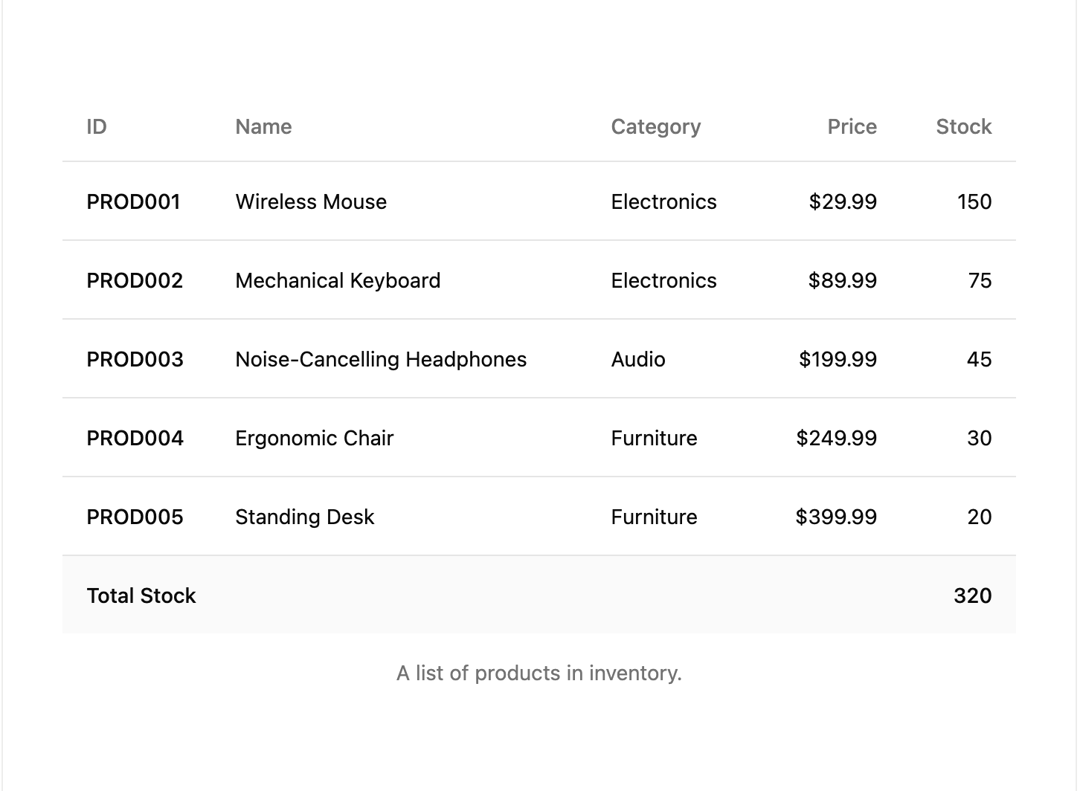
A composable and accessible Table component built with React and Tailwind CSS, featuring smooth row animations powered by Framer Motion. Features: Lightweight, customizable table primitives for building full-featured tables. Supports semantic table elements: table, thead, tbody, tfoot, tr, th, and td. Smooth fade and slide-in row animations on mount, creating a visually appealing waterfall effect. Responsive design with horizontal scrolling enabling when content exceeds container width. Tailwind CSS integration for easy styling and theming consistency. Works well with complex data and interactive contexts.
Built with React and Tailwind. Copy the prompt and paste it into Claude Code, Cursor or Lovable: your agent adds Animated Table to your project and fits it to your theme.
Code
How Animated Table is used: the demo's code. The component's own source comes with a free account.
Usage.tsx
import React from 'react';
import { motion } from 'framer-motion';

import {
  Table,
  TableBody,
  TableCaption,
  TableCell,
  TableFooter,
  TableHead,
  TableHeader,
  TableRow,
} from '@/components/ui/animated-table';

const products = [
  {
    id: 'PROD001',
    name: 'Wireless Mouse',
    category: 'Electronics',
    price: '$29.99',
    stock: 150,
  },
  {
    id: 'PROD002',
    name: 'Mechanical Keyboard',
    category: 'Electronics',
    price: '$89.99',
    stock: 75,
  },
  {
    id: 'PROD003',
    name: 'Noise-Cancelling Headphones',
    category: 'Audio',
    price: '$199.99',
    stock: 45,
  },
  {
    id: 'PROD004',
    name: 'Ergonomic Chair',
    category: 'Furniture',
    price: '$249.99',
    stock: 30,
  },
  {
    id: 'PROD005',
    name: 'Standing Desk',
    category: 'Furniture',
    price: '$399.99',
    stock: 20,
  },
];

export default function TableDemo() {
  const totalStock = products.reduce((sum, product) => sum + product.stock, 0);

  return (
    <div className='w-full px-10'>
      <Table>
        <TableCaption>A list of products in inventory.</TableCaption>

        <TableHeader>
          <TableRow>
            <TableHead className='w-[100px]'>ID</TableHead>
            <TableHead>Name</TableHead>
            <TableHead>Category</TableHead>
            <TableHead className='text-right'>Price</TableHead>
            <TableHead className='text-right'>Stock</TableHead>
          </TableRow>
        </TableHeader>

        <TableBody>
          {products.map((product, index) => (
            <motion.tr
              key={product.id}
              initial={{ opacity: 0, x: -20 }}
              animate={{ opacity: 1, x: 0 }}
              transition={{ duration: 0.4, delay: index * 0.1 }}
              className='border-b transition-colors hover:bg-muted/50'
            >
              <TableCell className='font-medium'>{product.id}</TableCell>
              <TableCell>{product.name}</TableCell>
              <TableCell>{product.category}</TableCell>
              <TableCell className='text-right'>{product.price}</TableCell>
              <TableCell className='text-right'>{product.stock}</TableCell>
            </motion.tr>
          ))}
        </TableBody>

        <TableFooter>
          <TableRow>
            <TableCell colSpan={4}>Total Stock</TableCell>
            <TableCell className='text-right'>{totalStock}</TableCell>
          </TableRow>
        </TableFooter>
      </Table>
    </div>
  );
}
More by Arunachalam
View all
Scroll media expansion hero
10.6K
Profile Card Testimonial Carousel
1.2K
Modern Animated Sign In
1.1K
Bottom Nav Bar
801
Toast
659
Adaptive Notch Navigation Bar
655
Connected Carousel
378
Animated File Tree
336