
About
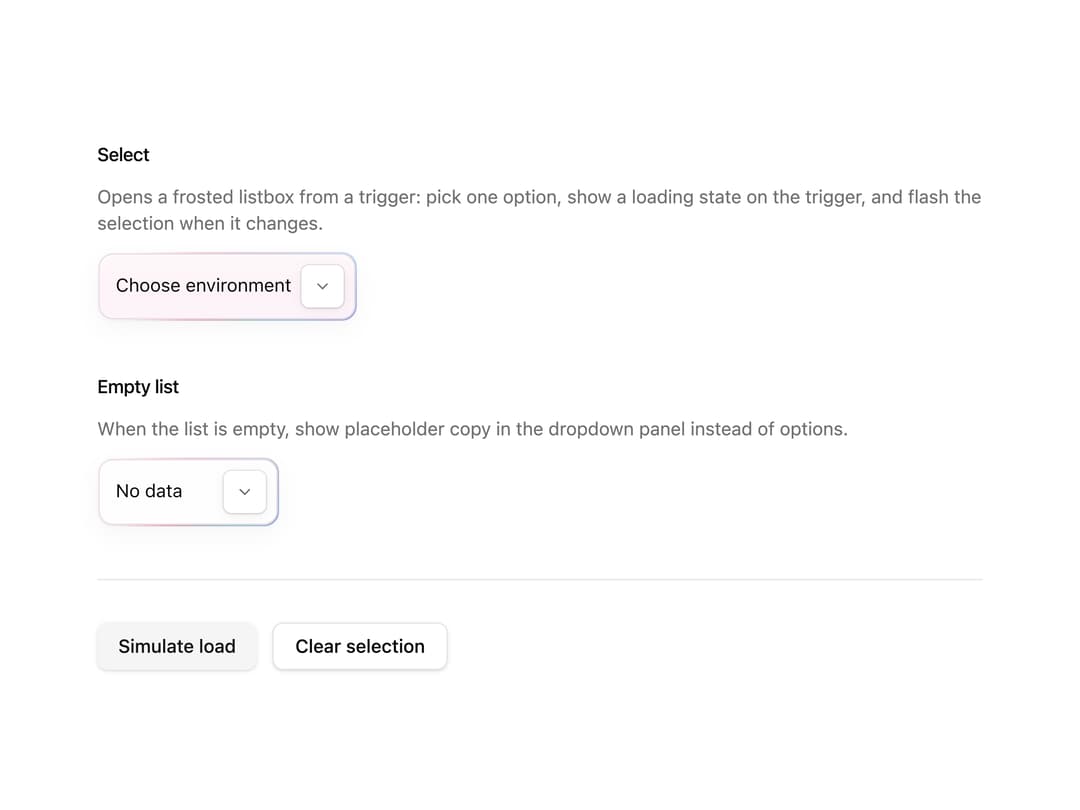
A composable animated dropdown select with a gradient rim, frosted-glass fill, staggered label reveal, and a trailing spinner/check/chevron indicator.
Built with React and Tailwind. Copy the prompt and paste it into Claude Code, Cursor or Lovable: your agent adds Halo Select to your project and fits it to your theme.
Code
How Halo Select is used: the demo's code. The component's own source comes with a free account.
Usage.tsx
"use client";

import { useState } from "react";

import { Button } from "@/components/ui/button";
import {
  HaloSelect,
  HaloSelectContent,
  HaloSelectItem,
  HaloSelectTrailingIndicator,
  HaloSelectTrigger,
  HaloSelectValue,
  type PolishedSelectItem,
} from "@/components/ui/halo-select";

const MOCK_ITEMS: PolishedSelectItem[] = [
  { value: "prod", label: "Production" },
  { value: "staging", label: "Staging" },
  { value: "dev", label: "Development" },
  { value: "preview", label: "Preview", disabled: true },
  { value: "edge", label: "Edge" },
];

const NO_ITEMS: PolishedSelectItem[] = [];

/** How long the demo keeps `isLoading` true. */
const MOCK_LOADING_MS = 2000;

function itemEqual(a: unknown, b: unknown) {
  return (
    (a as PolishedSelectItem | null | undefined)?.value ===
    (b as PolishedSelectItem | null | undefined)?.value
  );
}

export default function HaloSelectDemo() {
  const [value, setValue] = useState<PolishedSelectItem | null>(null);
  const [isLoading, setIsLoading] = useState(false);

  return (
    <main className="flex w-full flex-col items-center justify-center">
      <div className="w-full max-w-2xl space-y-10">
        <section aria-labelledby="demo-heading" className="space-y-3">
          <h2
            className="font-medium text-foreground text-sm tracking-tight"
            id="demo-heading"
          >
            Select
          </h2>
          <p className="text-muted-foreground text-sm">
            Opens a frosted listbox from a trigger: pick one option, show a
            loading state on the trigger, and flash the selection when it
            changes.
          </p>
          <HaloSelect
            isItemEqualToValue={itemEqual}
            isLoading={isLoading}
            items={MOCK_ITEMS}
            onValueChange={(next) =>
              setValue(next as PolishedSelectItem | null)
            }
            placeholder="Choose environment"
            showSelectionFlash
            translucent
            value={value}
          >
            <HaloSelectTrigger id="demo-halo-select">
              <HaloSelectValue />
              <HaloSelectTrailingIndicator />
            </HaloSelectTrigger>
            <HaloSelectContent>
              {MOCK_ITEMS.map((item, listIndex) => (
                <HaloSelectItem
                  disabled={item.disabled}
                  index={listIndex}
                  key={item.value}
                  label={item.label}
                  value={item}
                >
                  {item.label}
                </HaloSelectItem>
              ))}
            </HaloSelectContent>
          </HaloSelect>
        </section>

        <section aria-labelledby="empty-heading" className="space-y-3">
          <h2
            className="font-medium text-foreground text-sm tracking-tight"
            id="empty-heading"
          >
            Empty list
          </h2>
          <p className="text-muted-foreground text-sm">
            When the list is empty, show placeholder copy in the dropdown panel
            instead of options.
          </p>
          <HaloSelect
            isItemEqualToValue={itemEqual}
            items={NO_ITEMS}
            placeholder="No data"
            value={null}
          >
            <HaloSelectTrigger id="demo-empty-select">
              <HaloSelectValue />
              <HaloSelectTrailingIndicator />
            </HaloSelectTrigger>
            <HaloSelectContent>
              <p className="px-3 py-6 text-center text-muted-foreground text-sm">
                No options.
              </p>
            </HaloSelectContent>
          </HaloSelect>
        </section>

        <div className="flex flex-wrap gap-3 border-border border-t pt-8">
          <Button
            disabled={isLoading}
            onClick={() => {
              setIsLoading(true);
              window.setTimeout(() => setIsLoading(false), MOCK_LOADING_MS);
            }}
            type="button"
            variant="secondary"
          >
            Simulate load
          </Button>
          <Button
            onClick={() => setValue(null)}
            type="button"
            variant="outline"
          >
            Clear selection
          </Button>
        </div>
      </div>
    </main>
  );
}
Dependencies
More by cult/ui
View all
3D Carousel
2.5K
Logo Carousel
1.1K
Feature Carousel
504
Popover Form
419
Floating Panel
245
Expandable
126
Dock
119
Hero Liquid Metal
100
More in Forms
View all

Premium Auth
498

Login 2
7

Login 1
52
Authentication Card
45

Contact Card
1K
Login Form
6

Form
16

Form
136
