About
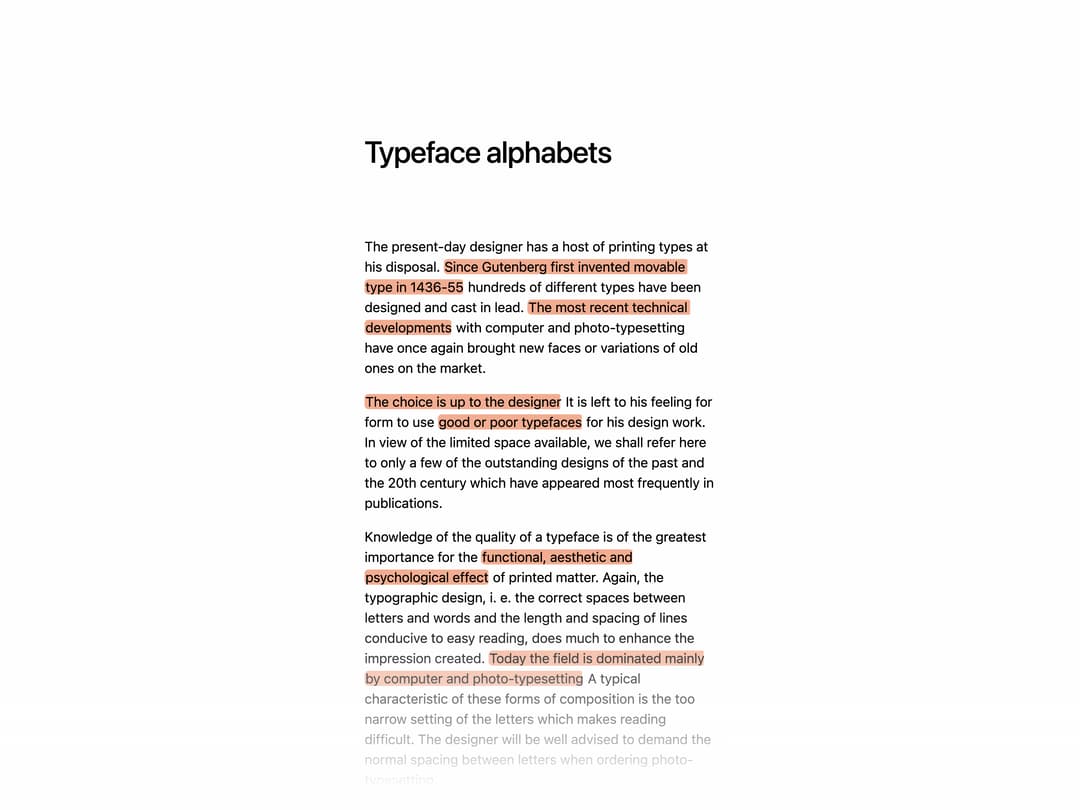
Animated text highlighter that sweeps a marker-style background behind inline text, triggered on hover, scroll into view, or imperatively via ref, with configurable direction and color.
Built with React and Tailwind. Copy the prompt and paste it into Claude Code, Cursor or Lovable: your agent adds Text Highlighter to your project and fits it to your theme.
Code
How Text Highlighter is used: the demo's code. The component's own source comes with a free account.
Usage.tsx
"use client"

import * as React from "react"
import Lenis from "lenis"

import { TextHighlighter } from "@/components/ui/text-highlighter"
import { Transition } from "motion"

export default function TextHighlighterDemo() {
  const containerRef = React.useRef<HTMLDivElement | null>(null)

  const transition = { type: "spring", duration: 1, delay: 0.4, bounce: 0 }
  const highlightClass = "rounded-[0.3em] px-px"
  const highlightColor = "#F2AD91"
  const inViewOptions = { once: true, initial: true, amount: 0.1 }

  React.useEffect(() => {
    if (!containerRef.current) return

    const lenis = new Lenis({
      autoRaf: true,
      wrapper: containerRef.current,
      duration: 1.2,
      orientation: "vertical",
      gestureOrientation: "vertical",
      smoothWheel: true,
      touchMultiplier: 2,
    })

    return () => {
      lenis.destroy()
    }
  }, [])

  return (
    <div className="w-dvw h-dvh bg-[#fefefe] relative p-0">
      <div className="absolute bottom-0 w-full left-0 h-64 bg-gradient-to-t from-[#fefefe] from-10% via-50% via-[#fefefe]/50 to-transparent pointer-events-none isolate" />

      <div
        className="h-full w-full z-10 bg-[#fefefe] overflow-scroll"
        ref={containerRef}
      >
        <div className="max-w-md mx-auto px-4 mt-40 pb-64 p-0  text-black">
          <h1 className="text-4xl font-medium mb-20 font-calendas tracking-tight">
            Typeface alphabets
          </h1>

          <div className="text leading-normal space-y-4 font-overusedGrotesk ">
            <p className="whitespace-break-spaces">
              The present-day designer has a host of printing types at his
              disposal.{" "}
              <TextHighlighter
                className={highlightClass}
                transition={transition as Transition}
                highlightColor={highlightColor}
                useInViewOptions={inViewOptions}
              >
                Since Gutenberg first invented movable type in 1436-55
              </TextHighlighter>{" "}
              hundreds of different types have been designed and cast in lead.{" "}
              <TextHighlighter
                className={highlightClass}
                transition={transition as Transition}
                highlightColor={highlightColor}
                useInViewOptions={inViewOptions}
              >
                The most recent technical developments
              </TextHighlighter>{" "}
              with computer and photo-typesetting have once again brought new
              faces or variations of old ones on the market.
            </p>

            <p>
              <TextHighlighter
                className={highlightClass}
                transition={transition as Transition}
                highlightColor={highlightColor}
                useInViewOptions={inViewOptions}
              >
                The choice is up to the designer
              </TextHighlighter>{" "}
              It is left to his feeling for form to use{" "}
              <TextHighlighter
                className={highlightClass}
                transition={transition as Transition}
                highlightColor={highlightColor}
                useInViewOptions={inViewOptions}
              >
                good or poor typefaces
              </TextHighlighter>{" "}
              for his design work. In view of the limited space available, we
              shall refer here to only a few of the outstanding designs of the
              past and the 20th century which have appeared most frequently in
              publications.
            </p>

            <p>
              Knowledge of the quality of a typeface is of the greatest
              importance for the{" "}
              <TextHighlighter
                className={highlightClass}
                transition={transition as Transition}
                highlightColor={highlightColor}
                useInViewOptions={inViewOptions}
              >
                functional, aesthetic and psychological effect
              </TextHighlighter>{" "}
              of printed matter. Again, the typographic design, i. e. the
              correct spaces between letters and words and the length and
              spacing of lines conducive to easy reading, does much to enhance
              the impression created.{" "}
              <TextHighlighter
                className={highlightClass}
                transition={transition as Transition}
                highlightColor={highlightColor}
                useInViewOptions={inViewOptions}
              >
                Today the field is dominated mainly by computer and
                photo-typesetting
              </TextHighlighter>{" "}
              A typical characteristic of these forms of composition is the too
              narrow setting of the letters which makes reading difficult. The
              designer will be well advised to demand the normal spacing between
              letters when ordering photo-typesetting.
            </p>

            <p>
              <TextHighlighter
                className={highlightClass}
                transition={transition as Transition}
                highlightColor={highlightColor}
                useInViewOptions={inViewOptions}
              >
                By studying the classic designs
              </TextHighlighter>{" "}
              of{" "}
              <TextHighlighter
                className={highlightClass}
                transition={transition as Transition}
                highlightColor={highlightColor}
                useInViewOptions={inViewOptions}
              >
                Garamond, Casion, Bodoni, Walbaum
              </TextHighlighter>{" "}
              and others, the designer can learn what the timeless criteria are
              which produce a refined and artistic typeface that makes for ease
              of reading.
            </p>

            <p>
              The lead type designs of{" "}
              <TextHighlighter
                className={highlightClass}
                transition={transition as Transition}
                highlightColor={highlightColor}
                useInViewOptions={inViewOptions}
              >
                Berthold, Helvetica, Folio, Univers
              </TextHighlighter>{" "}
              etc. produce pleasant and easily legible type areas. The
              typographic rules that apply to the roman typefaces are also valid
              for the sans serifs.
            </p>

            <p>
              <TextHighlighter
                className={highlightClass}
                transition={transition as Transition}
                highlightColor={highlightColor}
                useInViewOptions={inViewOptions}
              >
                The creators of these type designs
              </TextHighlighter>{" "}
              were extremely intelligent artists with high creative powers. This
              is shown by the fact that for more than four centuries innumerable
              type designers have sought to create new type alphabets but very
              few of these have gained acceptance.{" "}
              <TextHighlighter
                className={highlightClass}
                transition={transition as Transition}
                highlightColor={highlightColor}
                useInViewOptions={inViewOptions}
              >
                An alphabet of Garamond
              </TextHighlighter>{" "}
              for example, is an artistic achievement of the first order. Each
              letter has its own unmistakable face, whether lower or upper case,
              and displays the highest quality of form and originality. Each
              letter has its own personality and makes a marked impact.
            </p>

            <p>
              Every designer who is concerned with typography should take the
              trouble when creating graphic designs to{" "}
              <TextHighlighter
                className={highlightClass}
                transition={transition as Transition}
                highlightColor={highlightColor}
                useInViewOptions={inViewOptions}
              >
                sketch words and sentences by hand
              </TextHighlighter>{" "}
              Many designers take advantage of the Letraset process, which can
              undoubtedly produce a clean draft design that is almost ready for
              press. But a feeling for good letter forms and an attractive
              typeface can be acquired only by constant and careful practice in
              sketching letters.
            </p>

            <p>
              <TextHighlighter
                className={highlightClass}
                transition={transition as Transition}
                highlightColor={highlightColor}
                useInViewOptions={inViewOptions}
              >
                How the forms of letters can create simultaneously both tension
                and nobility
              </TextHighlighter>{" "}
              and how pleasantly legible lines of type can appear to the eye of
              the reader may be seen from the examples on the following pages.
            </p>

            <p>
              <TextHighlighter
                className={highlightClass}
                transition={transition as Transition}
                highlightColor={highlightColor}
                useInViewOptions={inViewOptions}
              >
                The Renaissance created midline typography
              </TextHighlighter>{" "}
              which held its position until the 20th century.
            </p>

            <p>
              The new typography differs from the old in that it is the first to
              try to{" "}
              <TextHighlighter
                className={highlightClass}
                transition={transition as Transition}
                highlightColor={highlightColor}
                useInViewOptions={inViewOptions}
              >
                develop the outward appearance from the function of the text
              </TextHighlighter>
            </p>

            <p>
              <TextHighlighter
                className={highlightClass}
                transition={transition as Transition}
                highlightColor={highlightColor}
                useInViewOptions={inViewOptions}
              >
                The new typography uses the background
              </TextHighlighter>{" "}
              as an element of design which is on a par with the other elements.
            </p>

            <p>
              Earlier typography (midline typography){" "}
              <TextHighlighter
                className={highlightClass}
                transition={transition as Transition}
                highlightColor={highlightColor}
                useInViewOptions={inViewOptions}
              >
                played an active role against a dead, passive background.
              </TextHighlighter>
            </p>
          </div>
        </div>
      </div>
    </div>
  )
}
Dependencies
More by Daniel Petho
View all
Parallax Floating
2.2K
Text Rotate
2.1K
Typewriter
1.9K
Marquee Along SVG Path
1.4K
Image Trail
1.4K
Animated Gradient With SVG
884
Text Cursor Proximity
781
Pixel Trail
645
More in Text
View all

Vertical Cut Reveal Characters
103

Rainbow Text Effect
47
Motion Blur Text
36
Text Loop
307
Text Reveal
27

Animated Text
8
Apple Hello Effect
609
Lightning Text
123

