About
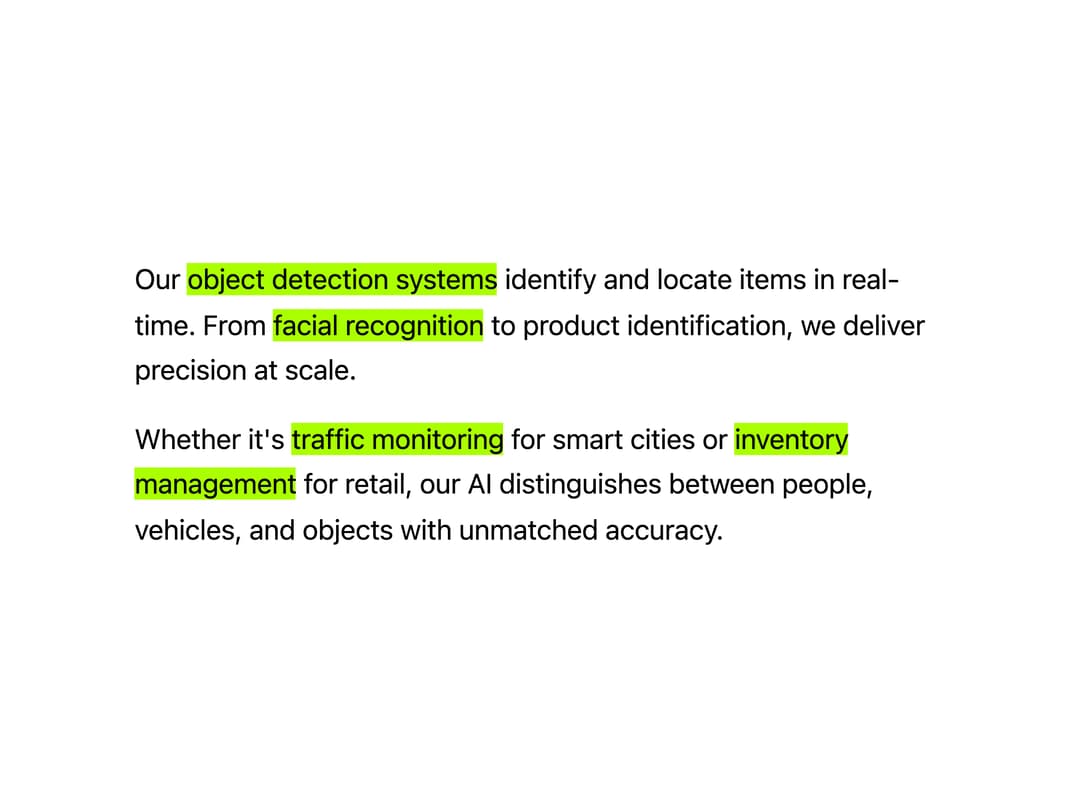
Animated text highlighter that sweeps a marker-style background behind inline text, triggered on hover, scroll into view, or imperatively via ref, with configurable direction and color.
Built with React and Tailwind. Copy the prompt and paste it into Claude Code, Cursor or Lovable: your agent adds Text Highlighter to your project and fits it to your theme.
Code
How Text Highlighter is used: the demo's code. The component's own source comes with a free account.
Usage.tsx
"use client"

import { TextHighlighter } from "@/components/ui/text-highlighter"

import * as React from "react"
import { motion, Transition, useInView } from "motion/react"

const HIGHLIGHT_COLOR = "hsl(80, 100%, 50%)"

const DEMO_USE_IN_VIEW_OPTIONS = { once: false, initial: false, amount: 0.1 }
const DEMO_TRANSITION = { type: "spring", duration: 1, delay: 0.4, bounce: 0 }

const SECTION_CLASSES =
  "min-w-full h-full snap-start flex items-center justify-center shrink-0"
const CONTAINER_CLASSES =
  "max-w-[240px] sm:max-w-sm md:max-w-md lg:max-w-lg xl:max-w-xl mx-auto px-4 sm:px-6"
const PARAGRAPH_CLASSES =
  "text-sm sm:text-base md:text-lg leading-relaxed font-overusedGrotesk mb-3 sm:mb-4 last:mb-0"

function Section({
  children,
  delay = 0,
}: {
  children: React.ReactNode
  delay?: number
}) {
  const ref = React.useRef(null)
  const isInView = useInView(ref, {
    once: false,
    margin: "-20%",
    amount: 0.5,
  })

  return (
    <section className={SECTION_CLASSES}>
      <div className={CONTAINER_CLASSES}>
        <motion.div
          ref={ref}
          initial={{
            opacity: 0,
            filter: "blur(8px)",
          }}
          animate={
            isInView
              ? { opacity: 1, filter: "blur(0px)" }
              : { opacity: 0.3, filter: "blur(6px)" }
          }
          transition={{
            duration: 0.8,
            delay: isInView ? delay : 0,
            ease: [0.25, 0.1, 0.25, 1],
          }}
          className="space-y-4"
        >
          {children}
        </motion.div>
      </div>
    </section>
  )
}

function Paragraph({ children }: { children: React.ReactNode }) {
  return <p className={PARAGRAPH_CLASSES}>{children}</p>
}

export default function TextHighlighterDemo() {
  const containerRef = React.useRef<HTMLDivElement>(null)
  const [currentSection, setCurrentSection] = React.useState(1)
  const [scrollDirection, setScrollDirection] = React.useState<"ltr" | "rtl">("ltr")

  React.useEffect(() => {
    const container = containerRef.current
    if (!container) return

    let prevScrollLeft = container.scrollLeft

    const handleScroll = () => {
      const scrollLeft = container.scrollLeft
      const containerWidth = container.clientWidth
      const sectionIndex = Math.round(scrollLeft / containerWidth) + 1
      setCurrentSection(Math.min(5, Math.max(1, sectionIndex)))

      const scrollDiff = scrollLeft - prevScrollLeft
      if (Math.abs(scrollDiff) > 5) {
        setScrollDirection(scrollDiff > 0 ? "ltr" : "rtl")
      }
      prevScrollLeft = scrollLeft
    }

    container.addEventListener("scroll", handleScroll)
    return () => container.removeEventListener("scroll", handleScroll)
  }, [])

  return (
    <div className="w-dvw h-dvh bg-[#fff] text-black relative p-0">
      <div className="absolute bottom-8 sm:bottom-12 md:bottom-16 lg:bottom-20 left-1/2 z-20 text-sm sm:text-base -translate-x-1/2 rounded-full border border-black/80 px-2 sm:px-3 pb-0.5 flex items-center justify-center w-8 sm:w-10 tabular-nums">
        <div key={currentSection} className="font-overusedGrotesk">
          {currentSection.toString().padStart(2, "0")}
        </div>
      </div>

      <div
        ref={containerRef}
        className="h-full w-full z-10 bg-[#fff] overflow-x-scroll overflow-y-hidden snap-x snap-mandatory flex mb-4 sm:mb-6"
      >
        <Section>
          <Paragraph>
            <span>Our </span>
            <TextHighlighter
              highlightColor={HIGHLIGHT_COLOR}
              direction={scrollDirection}
              useInViewOptions={DEMO_USE_IN_VIEW_OPTIONS}
              transition={DEMO_TRANSITION as Transition}
            >
              object detection systems
            </TextHighlighter>
            <span> identify and locate items in real-time. From </span>
            <TextHighlighter
              highlightColor={HIGHLIGHT_COLOR}
              direction={scrollDirection}
              useInViewOptions={DEMO_USE_IN_VIEW_OPTIONS}
              transition={DEMO_TRANSITION as Transition}
            >
              facial recognition
            </TextHighlighter>
            <span>
              {" "}
              to product identification, we deliver precision at scale.
            </span>
          </Paragraph>

          <Paragraph>
            <span>Whether it's </span>
            <TextHighlighter
              highlightColor={HIGHLIGHT_COLOR}
              direction={scrollDirection}
              useInViewOptions={DEMO_USE_IN_VIEW_OPTIONS}
              transition={DEMO_TRANSITION as Transition}
            >
              traffic monitoring
            </TextHighlighter>
            <span> for smart cities or </span>
            <TextHighlighter
              highlightColor={HIGHLIGHT_COLOR}
              direction={scrollDirection}
              useInViewOptions={DEMO_USE_IN_VIEW_OPTIONS}
              transition={DEMO_TRANSITION as Transition}
            >
              inventory management
            </TextHighlighter>
            <span>
              {" "}
              for retail, our AI distinguishes between people, vehicles, and
              objects with unmatched accuracy.
            </span>
          </Paragraph>
        </Section>

        <Section>
          <Paragraph>
            <span>Advanced </span>
            <TextHighlighter
              highlightColor={HIGHLIGHT_COLOR}
              direction={scrollDirection}
              useInViewOptions={DEMO_USE_IN_VIEW_OPTIONS}
              transition={DEMO_TRANSITION as Transition}
            >
              video analytics
            </TextHighlighter>
            <span> track movement across frames. Our </span>
            <TextHighlighter
              highlightColor={HIGHLIGHT_COLOR}
              direction={scrollDirection}
              useInViewOptions={DEMO_USE_IN_VIEW_OPTIONS}
              transition={DEMO_TRANSITION as Transition}
            >
              object tracking algorithms
            </TextHighlighter>
            <span>
              {" "}
              power autonomous vehicles and security systems worldwide.
            </span>
          </Paragraph>

          <Paragraph>
            <TextHighlighter
              highlightColor={HIGHLIGHT_COLOR}
              direction={scrollDirection}
              useInViewOptions={DEMO_USE_IN_VIEW_OPTIONS}
              transition={DEMO_TRANSITION as Transition}
            >
              Scene understanding
            </TextHighlighter>
            <span>
              {" "}
              capabilities analyze spatial relationships and context. From{` `}
            </span>
            <TextHighlighter
              highlightColor={HIGHLIGHT_COLOR}
              direction={scrollDirection}
              useInViewOptions={DEMO_USE_IN_VIEW_OPTIONS}
              transition={DEMO_TRANSITION as Transition}
            >
              sports performance analysis
            </TextHighlighter>
            <span> to </span>
            <TextHighlighter
              highlightColor={HIGHLIGHT_COLOR}
              direction={scrollDirection}
              useInViewOptions={DEMO_USE_IN_VIEW_OPTIONS}
              transition={DEMO_TRANSITION as Transition}
            >
              surveillance systems
            </TextHighlighter>
            <span>, we make sense of complex visual data.</span>
          </Paragraph>
        </Section>

        <Section>
          <Paragraph>
            <span>Our </span>
            <TextHighlighter
              highlightColor={HIGHLIGHT_COLOR}
              direction={scrollDirection}
              useInViewOptions={DEMO_USE_IN_VIEW_OPTIONS}
              transition={DEMO_TRANSITION as Transition}
            >
              OCR technology
            </TextHighlighter>
            <span>
              {" "}
              converts printed and handwritten text to digital format instantly.{" "}
            </span>
            <TextHighlighter
              highlightColor={HIGHLIGHT_COLOR}
              direction={scrollDirection}
              useInViewOptions={DEMO_USE_IN_VIEW_OPTIONS}
              transition={DEMO_TRANSITION as Transition}
            >
              Document automation
            </TextHighlighter>
            <span> streamlines workflows across industries.</span>
          </Paragraph>

          <Paragraph>
            <span>From </span>
            <TextHighlighter
              highlightColor={HIGHLIGHT_COLOR}
              direction={scrollDirection}
              useInViewOptions={DEMO_USE_IN_VIEW_OPTIONS}
              transition={DEMO_TRANSITION as Transition}
            >
              invoice processing
            </TextHighlighter>
            <span> to </span>
            <TextHighlighter
              highlightColor={HIGHLIGHT_COLOR}
              direction={scrollDirection}
              useInViewOptions={DEMO_USE_IN_VIEW_OPTIONS}
              transition={DEMO_TRANSITION as Transition}
            >
              accessibility solutions
            </TextHighlighter>
            <span>
              , our text recognition supports multiple languages and formats
              with exceptional accuracy.
            </span>
          </Paragraph>
        </Section>

        <Section>
          <Paragraph>
            <TextHighlighter
              highlightColor={HIGHLIGHT_COLOR}
              direction={scrollDirection}
              useInViewOptions={DEMO_USE_IN_VIEW_OPTIONS}
              transition={DEMO_TRANSITION as Transition}
            >
              3D depth perception
            </TextHighlighter>
            <span> enables precise spatial understanding. Our </span>
            <TextHighlighter
              highlightColor={HIGHLIGHT_COLOR}
              direction={scrollDirection}
              useInViewOptions={DEMO_USE_IN_VIEW_OPTIONS}
              transition={DEMO_TRANSITION as Transition}
            >
              stereo vision systems
            </TextHighlighter>
            <span>
              {" "}
              power robotic automation and quality control processes.
            </span>
          </Paragraph>

          <Paragraph>
            <span>Advanced </span>
            <TextHighlighter
              highlightColor={HIGHLIGHT_COLOR}
              direction={scrollDirection}
              useInViewOptions={DEMO_USE_IN_VIEW_OPTIONS}
              transition={DEMO_TRANSITION as Transition}
            >
              augmented reality
            </TextHighlighter>
            <span> and </span>
            <TextHighlighter
              highlightColor={HIGHLIGHT_COLOR}
              direction={scrollDirection}
              useInViewOptions={DEMO_USE_IN_VIEW_OPTIONS}
              transition={DEMO_TRANSITION as Transition}
            >
              virtual reality applications
            </TextHighlighter>
            <span>
              {" "}
              rely on our depth analysis for immersive, interactive experiences.
            </span>
          </Paragraph>
        </Section>

        <Section>
          <Paragraph>
            <TextHighlighter
              highlightColor={HIGHLIGHT_COLOR}
              direction={scrollDirection}
              useInViewOptions={DEMO_USE_IN_VIEW_OPTIONS}
              transition={DEMO_TRANSITION as Transition}
            >
              Image segmentation
            </TextHighlighter>
            <span>
              {" "}
              separates objects with pixel-perfect precision. Our{` `}
            </span>
            <TextHighlighter
              highlightColor={HIGHLIGHT_COLOR}
              direction={scrollDirection}
              useInViewOptions={DEMO_USE_IN_VIEW_OPTIONS}
              transition={DEMO_TRANSITION as Transition}
            >
              enhancement algorithms
            </TextHighlighter>
            <span>
              {" "}
              restore clarity and remove noise from any visual content.
            </span>
          </Paragraph>

          <Paragraph>
            <span>Generate </span>
            <TextHighlighter
              highlightColor={HIGHLIGHT_COLOR}
              direction={scrollDirection}
              useInViewOptions={DEMO_USE_IN_VIEW_OPTIONS}
              transition={DEMO_TRANSITION as Transition}
            >
              synthetic training data
            </TextHighlighter>
            <span> and create </span>
            <TextHighlighter
              highlightColor={HIGHLIGHT_COLOR}
              direction={scrollDirection}
              useInViewOptions={DEMO_USE_IN_VIEW_OPTIONS}
              transition={DEMO_TRANSITION as Transition}
            >
              high-resolution imagery
            </TextHighlighter>
            <span> for machine learning models and creative applications.</span>
          </Paragraph>

          <Paragraph>
            <TextHighlighter
              highlightColor={HIGHLIGHT_COLOR}
              direction={scrollDirection}
              useInViewOptions={DEMO_USE_IN_VIEW_OPTIONS}
              transition={DEMO_TRANSITION as Transition}
            >
              Transform your industry
            </TextHighlighter>
            <span>
              {" "}
              with computer vision that sees, understands, and acts on visual
              information like never before.
            </span>
          </Paragraph>
        </Section>
      </div>
    </div>
  )
}
Dependencies
More by Daniel Petho
View all
Parallax Floating
2.2K
Text Rotate
2.1K
Typewriter
1.9K
Marquee Along SVG Path
1.4K
Image Trail
1.4K
Animated Gradient With SVG
884
Text Cursor Proximity
779
Pixel Trail
645
More in Text
View all

Vertical Cut Reveal Characters
103
Motion Blur Text
34
Text Reveal
314

Rainbow Text Effect
46

Blur Reveal
296

NeonRGBTextEffect
144

Shine Border
949
Glow
40