About
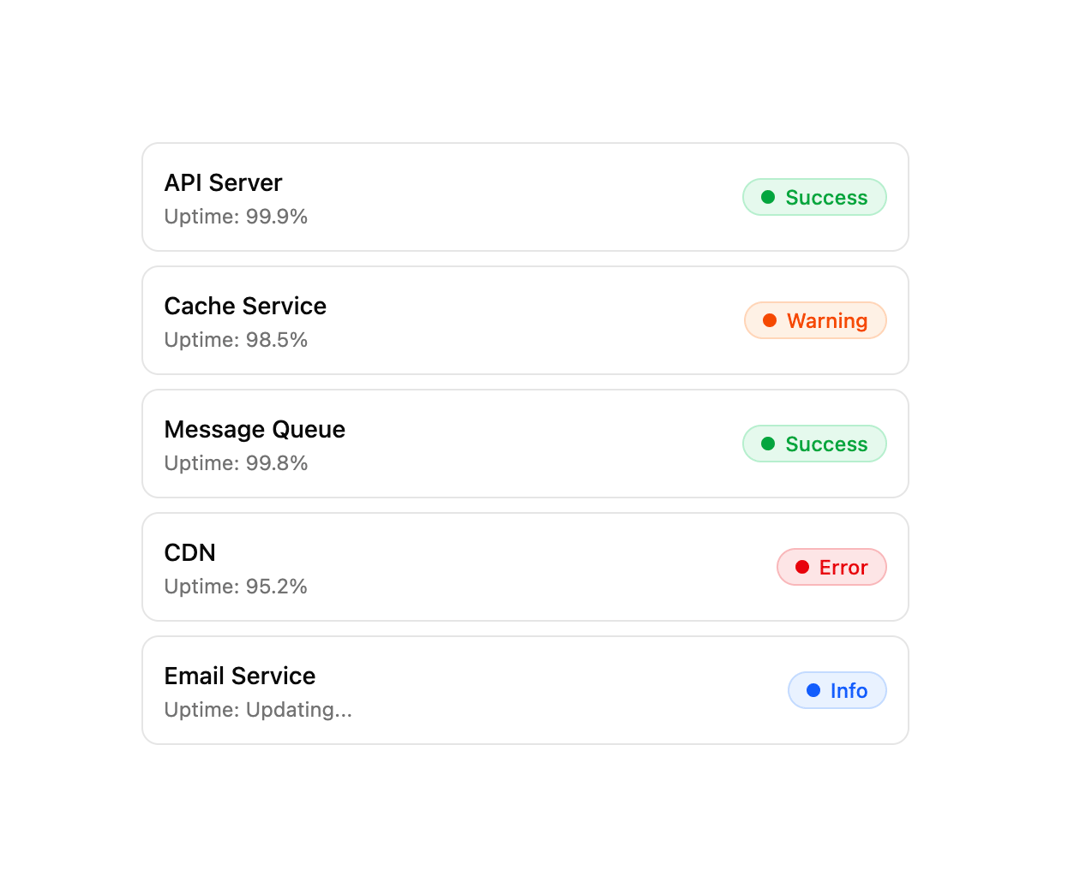
A pill-shaped status badge with a pulsing indicator dot and color variants for signaling online, error, warning, info, and idle states.
Built with React and Tailwind. Copy the prompt and paste it into Claude Code, Cursor or Lovable: your agent adds Status to your project and fits it to your theme.
Code
How Status is used: the demo's code. The component's own source comes with a free account.
Usage.tsx
import { Status, StatusIndicator, StatusLabel } from "@/components/ui/status";

const services = [
  { name: "API Server", status: "success" as const, uptime: "99.9%" },
  { name: "Cache Service", status: "warning" as const, uptime: "98.5%" },
  { name: "Message Queue", status: "success" as const, uptime: "99.8%" },
  { name: "CDN", status: "error" as const, uptime: "95.2%" },
  { name: "Email Service", status: "info" as const, uptime: "Updating..." },
];

export default function StatusListDemo() {
  return (
    <div className="flex w-full max-w-md flex-col gap-2">
      {services.map((service) => (
        <div
          key={service.name}
          className="flex items-center justify-between rounded-lg border bg-card p-3"
        >
          <div className="flex flex-col gap-0.5">
            <span className="font-medium text-sm">{service.name}</span>
            <span className="text-muted-foreground text-xs">
              Uptime: {service.uptime}
            </span>
          </div>
          <Status variant={service.status}>
            <StatusIndicator />
            <StatusLabel className="capitalize">{service.status}</StatusLabel>
          </Status>
        </div>
      ))}
    </div>
  );
}
Dependencies
More by Dice UI
View all

Compare Slider
75
Sortable
49
Circular Progress
41
Pending
27
Banner
18
Stack
7
Scroller
5
Mention
4