About
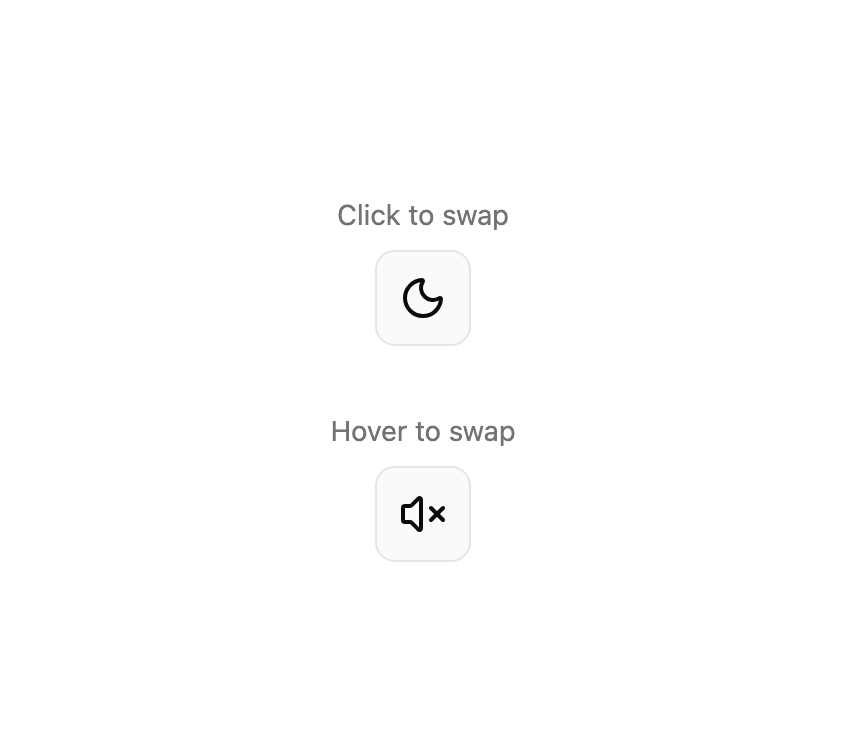
A component that swaps between two states with click or hover activation and fade, rotate, flip, or scale transitions.
Built with React and Tailwind. Copy the prompt and paste it into Claude Code, Cursor or Lovable: your agent adds Swap to your project and fits it to your theme.
Code
How Swap is used: the demo's code. The component's own source comes with a free account.
Usage.tsx
import { Swap, SwapOff, SwapOn } from "@/components/ui/swap";
import { MoonIcon, SunIcon, Volume2Icon, VolumeXIcon } from "lucide-react";

export default function SwapDemo() {
  return (
    <div className="flex flex-col items-center gap-8">
      <div className="flex flex-col items-center gap-2">
        <span className="text-muted-foreground text-sm">Click to swap</span>
        <Swap className="size-12 rounded-lg border bg-muted/50 hover:bg-muted">
          <SwapOn>
            <SunIcon className="size-6" />
          </SwapOn>
          <SwapOff>
            <MoonIcon className="size-6" />
          </SwapOff>
        </Swap>
      </div>

      <div className="flex flex-col items-center gap-2">
        <span className="text-muted-foreground text-sm">Hover to swap</span>
        <Swap
          activationMode="hover"
          className="size-12 rounded-lg border bg-muted/50"
        >
          <SwapOn>
            <Volume2Icon className="size-6" />
          </SwapOn>
          <SwapOff>
            <VolumeXIcon className="size-6" />
          </SwapOff>
        </Swap>
      </div>
    </div>
  );
}
Dependencies
More by Dice UI
View all

Compare Slider
75
Sortable
49
Circular Progress
41
Status
28
Pending
27
Banner
18
Stack
7
Scroller
5