
About
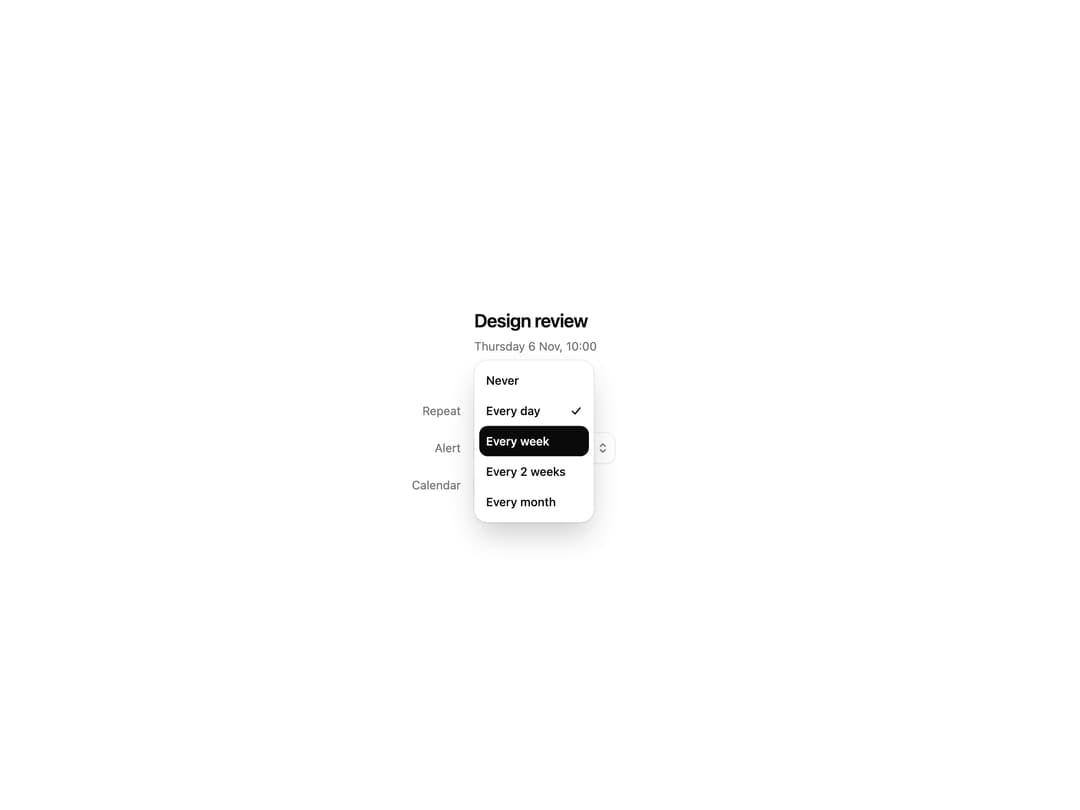
A select that opens around your finger: the current choice stays where you pressed, so you slide to the next one and let go.
Built with React and Tailwind. Copy the prompt and paste it into Claude Code, Cursor or Lovable: your agent adds Popup to your project and fits it to your theme.
Code
How Popup is used: the demo's code. The component's own source comes with a free account.
Usage.tsx
'use client'

import type { ReactNode } from 'react'
import { Popup } from '@/components/ui/popup'

function Field({ label, children }: { label: string; children: ReactNode }) {
  return (
    <div className="flex h-11 items-center gap-4">
      <span className="w-[76px] shrink-0 text-right text-[14px] text-muted-foreground">{label}</span>
      {children}
    </div>
  )
}

export default function PopupDemo() {
  return (
    <div className="flex min-h-[560px] w-full items-center justify-center bg-background p-6">
      <div className="w-[340px] max-w-full text-foreground">
        <p className="pl-[92px] text-[22px] font-semibold tracking-[-.02em]">Design review</p>
        <p className="mb-11 mt-1 pl-[92px] text-[14px] text-muted-foreground">Thursday 6 Nov, 10:00</p>
        <Field label="Repeat">
          <Popup label="Repeat" defaultValue="Every day" options={['Never', 'Every day', 'Every week', 'Every 2 weeks', 'Every month']} />
        </Field>
        <Field label="Alert">
          <Popup label="Alert" defaultValue="10 minutes before" options={['At time of event', '10 minutes before', '30 minutes before', '1 hour before']} />
        </Field>
        <Field label="Calendar">
          <Popup label="Calendar" options={['Work', 'Home', 'Studio']} />
        </Field>
      </div>
    </div>
  )
}
Dependencies
More by Detent UI
View all
Live List
2
Shift
Rewind
Phrase
Metric Explainer