
About
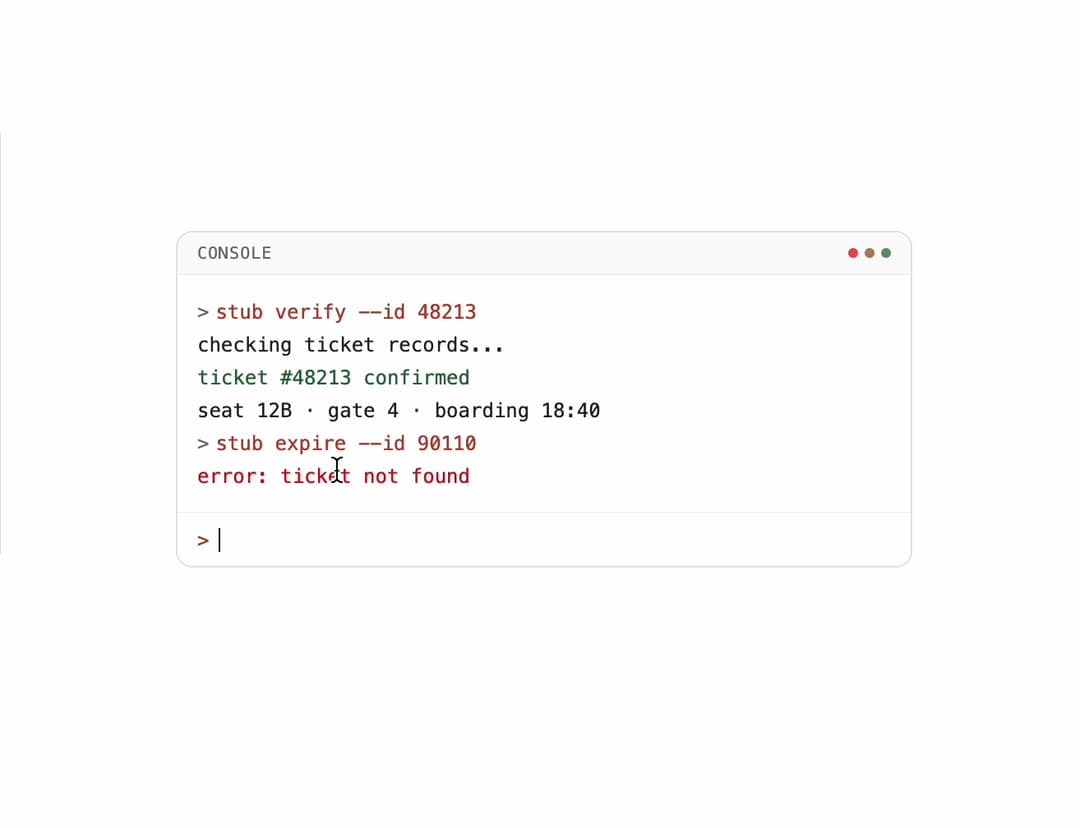
An interactive terminal-style console panel that displays colored log lines (input, output, error, success) with autoscroll and a command prompt input.
Built with React and Tailwind. Copy the prompt and paste it into Claude Code, Cursor or Lovable: your agent adds Console Panel to your project and fits it to your theme.
Code
How Console Panel is used: the demo's code. The component's own source comes with a free account.
Usage.tsx
"use client";

import * as React from "react";
import { ConsolePanel, ConsoleLine } from "@/components/ui/console-panel";

export default function ConsolePanelDemo() {
  const [lines, setLines] = React.useState<ConsoleLine[]>([
    { id: "1", text: "stub verify --id 48213", tone: "input" },
    { id: "2", text: "checking ticket records...", tone: "output" },
    { id: "3", text: "ticket #48213 confirmed", tone: "accent" },
    { id: "4", text: "seat 12B · gate 4 · boarding 18:40", tone: "output" },
    { id: "5", text: "stub expire --id 90110", tone: "input" },
    { id: "6", text: "error: ticket not found", tone: "error" },
  ]);

  const handleSubmit = (command: string) => {
    setLines((prev) => [
      ...prev,
      { id: `${prev.length + 1}-in`, text: command, tone: "input" },
      { id: `${prev.length + 1}-out`, text: `ok: ${command}`, tone: "output" },
    ]);
  };

  return (
    <div className="flex w-full items-center justify-center bg-background p-6 text-foreground">
      <ConsolePanel
        className="max-w-md"
        lines={lines}
        onSubmit={handleSubmit}
      />
    </div>
  );
}
More by f0rextasy
View all
Newsletter Signup Card
16
Board Checklist
15
Stamp Seal
12
Network Graph
12
Navbar
8
Milestone Chart
7
Empty State Card
6
Running Order Timeline
6