
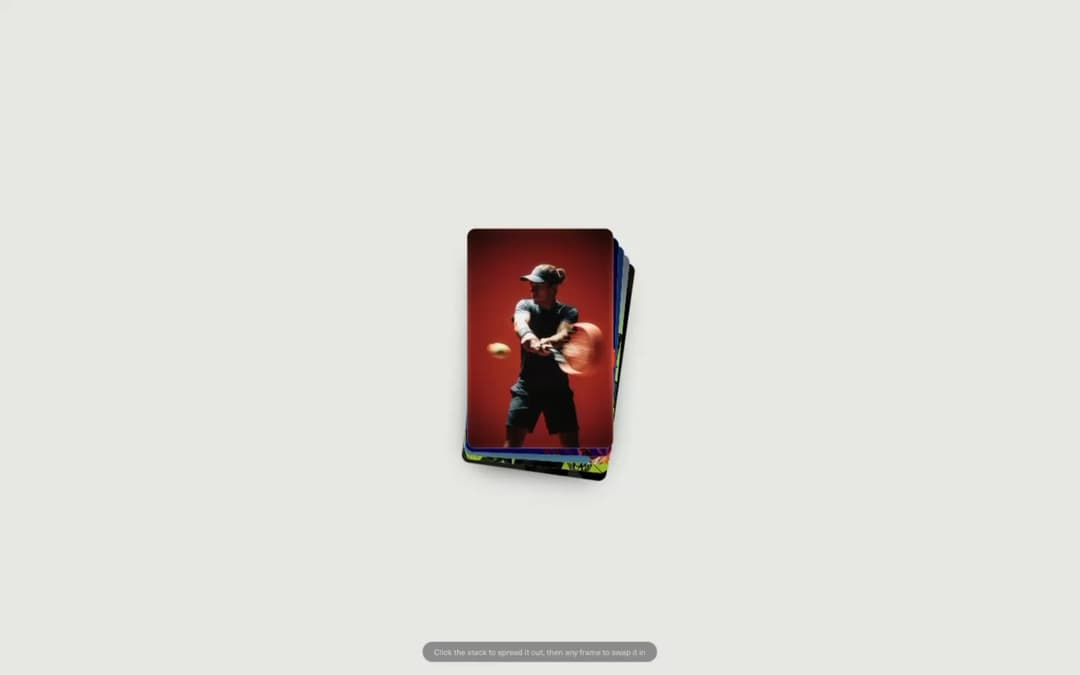
About
GSAP Flip-powered card gallery: tap a thumbnail and it swaps places with the hero preview, same DOM nodes measured and tweened, never re-mounted. Scrollable stacked layout on mobile, reduced-motion fallback.
Built with React and Tailwind. Copy the prompt and paste it into Claude Code, Cursor or Lovable: your agent adds Gsap Card Flip to your project and fits it to your theme.
Code
How Gsap Card Flip is used: the demo's code. The component's own source comes with a free account.
Usage.tsx
"use client";

import GsapFlipCard from "@/components/ui/gsap-card-flip";

const R2 = (name: string) =>
  `https://pub-8abee449136941f5b0a1cd2c014534e9.r2.dev/vault-listing-images/assets-images/gsap-flip-card/${name}`;

const campaignFrames = [
  {
    id: "tennis",
    image: R2("img01.png"),
    alt: "Tennis player mid-backhand against a red studio backdrop",
    caption: "The racquet blurs through the frame while the ball hangs still.",
  },
  {
    id: "basketball",
    image: R2("img02.png"),
    alt: "Basketball dropping through an orange rim on a deep blue background",
    caption: "Backlit and off the rim, shot for the season's biggest opener.",
  },
  {
    id: "runner",
    image: R2("img03.png"),
    alt: "Runner suspended mid-stride against a clear blue sky",
    caption: "Caught mid-stride, one foot still deciding where the ground is.",
  },
  {
    id: "cyclist",
    image: R2("img04.png"),
    alt: "Cyclist in a black suit holding a road bike against a lime backdrop",
    caption: "Tailoring and torque, framed for the road bike's studio debut.",
  },
  {
    id: "portrait",
    image: R2("img05.png"),
    alt: "Profile of an athlete wearing white shield sunglasses in low light",
    caption: "Side light only, letting the frame carry the whole story.",
  },
];

export default function GsapFlipCardDemo() {
  return (
    <div className="relative h-screen w-full overflow-y-auto bg-background">
      <GsapFlipCard
        items={campaignFrames}
        title="Campaign Frames"
        meta="Editorial / Sports Campaign"
        description="Five frames from a season's ad campaign. Tap one to bring it forward."
        rounded={16}
        stackRotation={2}
      />

      <div className="pointer-events-none absolute inset-x-0 bottom-6 z-50 hidden justify-center lg:flex">
        <p className="rounded-full border border-white/10 bg-black/40 px-4 py-1.5 text-xs text-white/70 backdrop-blur-sm">
          Click the stack to spread it out, then any frame to swap it in
        </p>
      </div>
    </div>
  );
}
Dependencies
More by Hyperiux Vault
View all

Product Timeline
2.2K
Stack Spread
1.3K
Arrow Fill Button
906
Interactive List Preview
866
Shiny Button
730
Circular Split Roll
632
Zoom Slider
421
Stack Loader
370