
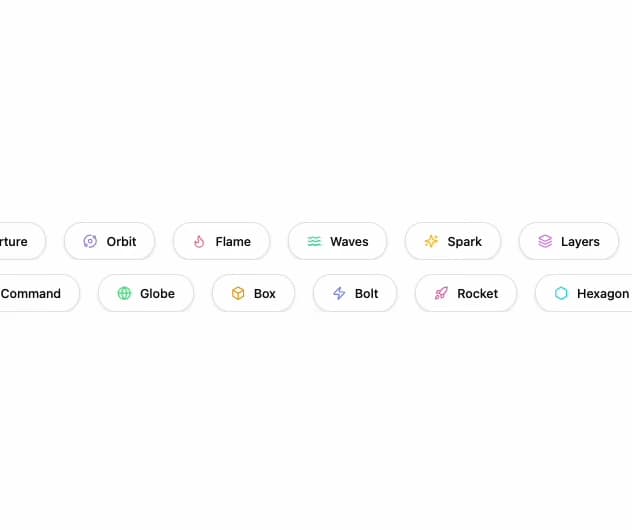
About
A seamless, measured marquee with duplicated content, edge fade and an optional reverse direction.
Built with React and Tailwind. Copy the prompt and paste it into Claude Code, Cursor or Lovable: your agent adds Marquee to your project and fits it to your theme.
Code
How Marquee is used: the demo's code. The component's own source comes with a free account.
Usage.tsx
"use client";

/**
 * PrequelUI Animate — MIT — https://prequeluianimate.terravidhal.me
 */

import * as React from "react";
import {
  Aperture,
  Box,
  Command,
  Flame,
  Globe,
  Hexagon,
  Layers,
  Orbit,
  Rocket,
  Sparkles,
  Waves,
  Zap,
} from "lucide-react";
import { Marquee } from "@/components/ui/marquee";

type Brand = {
  name: string;
  icon: React.ComponentType<{ className?: string; style?: React.CSSProperties }>;
  color: string;
};

const FIRST: Brand[] = [
  { name: "Aperture", icon: Aperture, color: "#38bdf8" },
  { name: "Orbit", icon: Orbit, color: "#a78bfa" },
  { name: "Flame", icon: Flame, color: "#fb7185" },
  { name: "Waves", icon: Waves, color: "#34d399" },
  { name: "Spark", icon: Sparkles, color: "#fbbf24" },
  { name: "Layers", icon: Layers, color: "#e879f9" },
];

const SECOND: Brand[] = [
  { name: "Rocket", icon: Rocket, color: "#f472b6" },
  { name: "Hexagon", icon: Hexagon, color: "#22d3ee" },
  { name: "Command", icon: Command, color: "#94a3b8" },
  { name: "Globe", icon: Globe, color: "#4ade80" },
  { name: "Box", icon: Box, color: "#f59e0b" },
  { name: "Bolt", icon: Zap, color: "#818cf8" },
];

function BrandPill({ brand }: { brand: Brand }) {
  const Icon = brand.icon;
  return (
    <span className="flex items-center gap-2.5 rounded-full border border-border bg-card px-5 py-2.5 text-sm font-medium text-foreground shadow-sm">
      <Icon className="size-4" style={{ color: brand.color }} />
      {brand.name}
    </span>
  );
}

export default function MarqueeDemo() {
  return (
    <main className="flex min-h-screen items-center justify-center bg-background py-12">
      <div className="flex w-full max-w-5xl flex-col gap-4">
        <Marquee speed={52} gap={20}>
          {FIRST.map((brand) => (
            <BrandPill key={brand.name} brand={brand} />
          ))}
        </Marquee>
        <Marquee speed={44} gap={20} reverse>
          {SECOND.map((brand) => (
            <BrandPill key={brand.name} brand={brand} />
          ))}
        </Marquee>
      </div>
    </main>
  );
}
Dependencies
More by terra vidhal
View all

Gravity Stars Background
3
Topographic Lines
1
Firework Burst
Glyph Field

Shimmering Text
Kpi Counter
Gradient Text
Radial Progress