
About
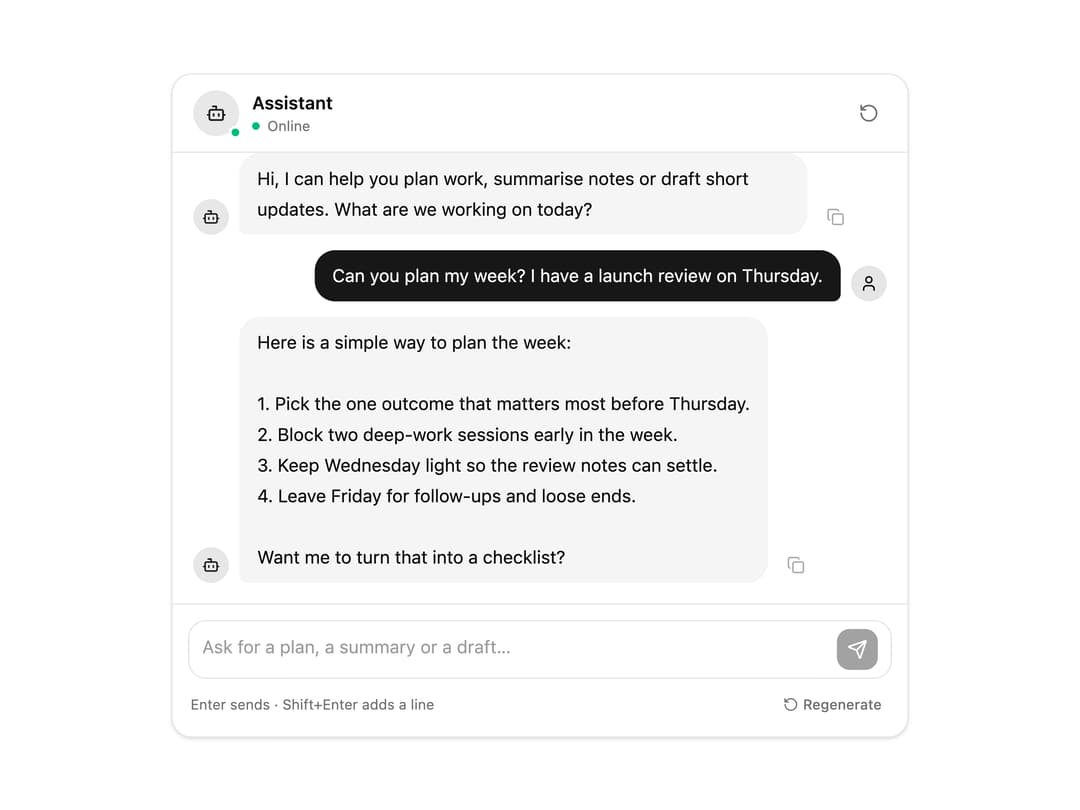
A chat surface with animated message bubbles, prompt suggestions, a typing indicator, token-by-token streaming, a stop action, a regenerate action, per-reply copy and a reset. The transcript auto-scrolls only while pinned near the bottom. Enter sends, Shift+Enter adds a line, Escape stops, and streaming is skipped for reduced motion.
Built with React and Tailwind. Copy the prompt and paste it into Claude Code, Cursor or Lovable: your agent adds Streaming Chat to your project and fits it to your theme.
Code
How Streaming Chat is used: the demo's code. The component's own source comes with a free account.
Usage.tsx
"use client";

/**
 * PrequelUI Animate — MIT — https://prequeluianimate.terravidhal.me
 */

import { StreamingChat, type ChatMessage } from "@/components/ui/streaming-chat";

const MESSAGES: ChatMessage[] = [
  {
    id: "welcome",
    role: "assistant",
    content:
      "Hi, I can help you plan work, summarise notes or draft short updates. What are we working on today?",
  },
  {
    id: "question",
    role: "user",
    content: "Can you plan my week? I have a launch review on Thursday.",
  },
  {
    id: "answer",
    role: "assistant",
    content:
      "Here is a simple way to plan the week:\n\n1. Pick the one outcome that matters most before Thursday.\n2. Block two deep-work sessions early in the week.\n3. Keep Wednesday light so the review notes can settle.\n4. Leave Friday for follow-ups and loose ends.\n\nWant me to turn that into a checklist?",
  },
];

export default function StreamingChatDemo() {
  return (
    <main className="flex min-h-screen w-full items-center justify-center bg-background px-6 py-12">
      <StreamingChat
        messages={MESSAGES}
        assistantName="Assistant"
        suggestions={[
          "Plan my week",
          "Summarise launch risks",
          "Draft a short update",
        ]}
        placeholder="Ask for a plan, a summary or a draft…"
      />
    </main>
  );
}
Dependencies
More by terra vidhal
View all

Gravity Stars Background
13
Booking Calendar
10
Topographic Lines
8
Spotlight Card
8
Audio Waveform
7
Command Palette
6
Kpi Counter
6
Notification Center
5