
About
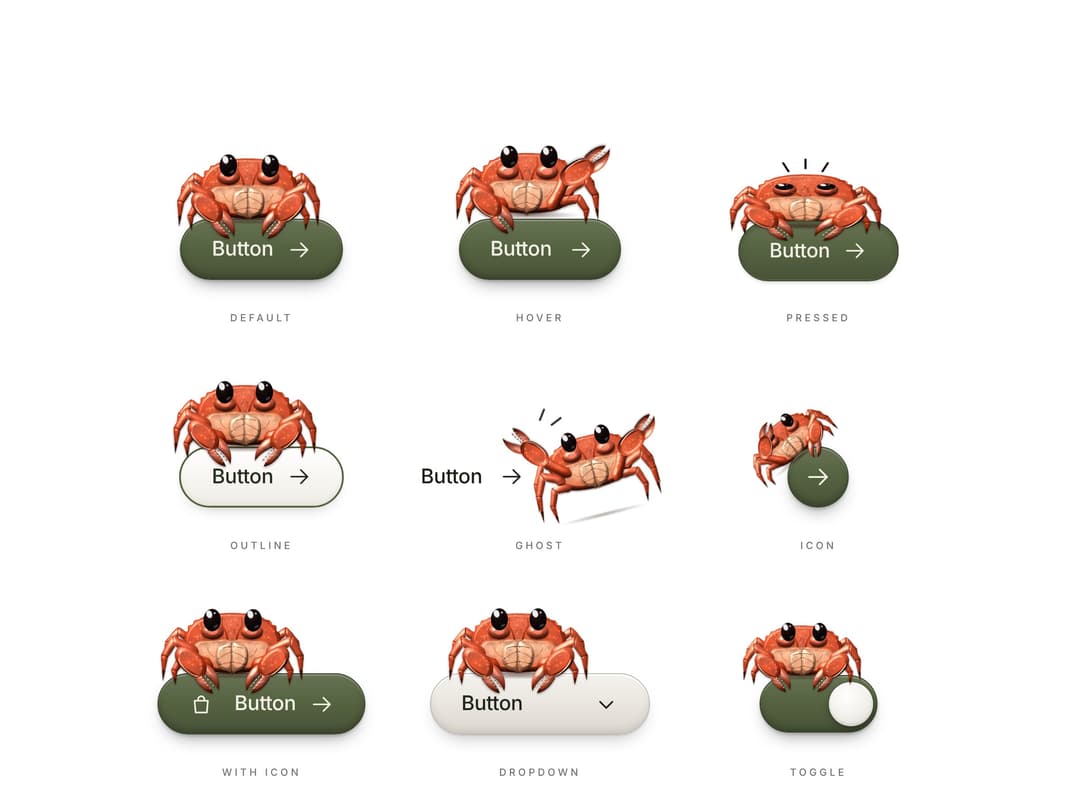
Animated crab mascot buttons: a small red crab perches on every button with its claws over the edge. It breathes, its eyes follow your pointer, it ducks on press and rides toggles and dropdowns. Solid, outline, ghost, icon, with-icon, dropdown and toggle variants, all drawn in code.
Built with React and Tailwind. Copy the prompt and paste it into Claude Code, Cursor or Lovable: your agent adds Animated Crab Mascot Buttons to your project and fits it to your theme.
Code
How Animated Crab Mascot Buttons is used: the demo's code. The component's own source comes with a free account.
Usage.tsx
"use client"

import * as React from "react"
import CrabButton, { CrabDropdown, CrabToggle } from "@/components/ui/crab-perch-buttons"

function BagIcon() {
  return (
    <svg viewBox="0 0 24 24" fill="none" stroke="currentColor" strokeWidth={1.6} strokeLinecap="round" strokeLinejoin="round">
      <path d="M5.5 8.5h13l-1 11.5h-11z" />
      <path d="M9 8.5V7a3 3 0 0 1 6 0v1.5" />
    </svg>
  )
}

function Cell({ label, children }: { label: string; children: React.ReactNode }) {
  return (
    <div className="flex flex-col items-center justify-end gap-5 pt-24">
      <div className="flex h-24 items-center justify-center">{children}</div>
      <p className="text-[11px] font-medium uppercase tracking-[0.28em] text-muted-foreground">{label}</p>
    </div>
  )
}

// The full sheet: every variant, every pose. The first row freezes hover and
// press so you can see them side by side, and still works when you use it.
export default function Demo() {
  const [on, setOn] = React.useState(true)
  return (
    <div className="flex min-h-[100svh] w-full items-center justify-center bg-background px-4 py-16 text-foreground">
      <div className="grid w-full max-w-4xl grid-cols-1 gap-x-8 gap-y-6 sm:grid-cols-2 lg:grid-cols-3">
        <Cell label="Default">
          <CrabButton size="lg">Button</CrabButton>
        </Cell>
        <Cell label="Hover">
          <CrabButton size="lg" state="hover">Button</CrabButton>
        </Cell>
        <Cell label="Pressed">
          <CrabButton size="lg" state="press">Button</CrabButton>
        </Cell>
        <Cell label="Outline">
          <CrabButton size="lg" variant="outline" crabAt={0.4}>
            Button
          </CrabButton>
        </Cell>
        <Cell label="Ghost">
          <CrabButton size="lg" variant="ghost">Button</CrabButton>
        </Cell>
        <Cell label="Icon">
          <CrabButton size="lg" variant="icon">Next</CrabButton>
        </Cell>
        <Cell label="With icon">
          <CrabButton size="lg" icon={<BagIcon />} crabAt={0.36}>
            Button
          </CrabButton>
        </Cell>
        <Cell label="Dropdown">
          <CrabDropdown size="lg" placeholder="Button" aria-label="Pick a tide" options={["Low tide", "High tide", "Spring tide", "Neap tide"]} />
        </Cell>
        <Cell label="Toggle">
          <CrabToggle size="lg" checked={on} onCheckedChange={setOn} aria-label="Crab mode" />
        </Cell>
      </div>
    </div>
  )
}
More by Kedhareswer Naidu
View all

Glassmorphism Folder Cards
3.3K
GitHub Contribution Graph 3D Heatmap
1.9K
Halftone Wordmark Footer
1.5K
Morph Gallery
1.5K
Hanging Polaroid Image Carousel
935
Glass Cards
746
Animated Features Bento with Live Diagrams
684
Tiger Tear Reveal
678
More in Buttons
View all
Texture Button
96

Button
5

Button Group


Eclipse Button
39
Button
4

App Store Button
458

HeroUI Button Group

Base Button
4

