
About
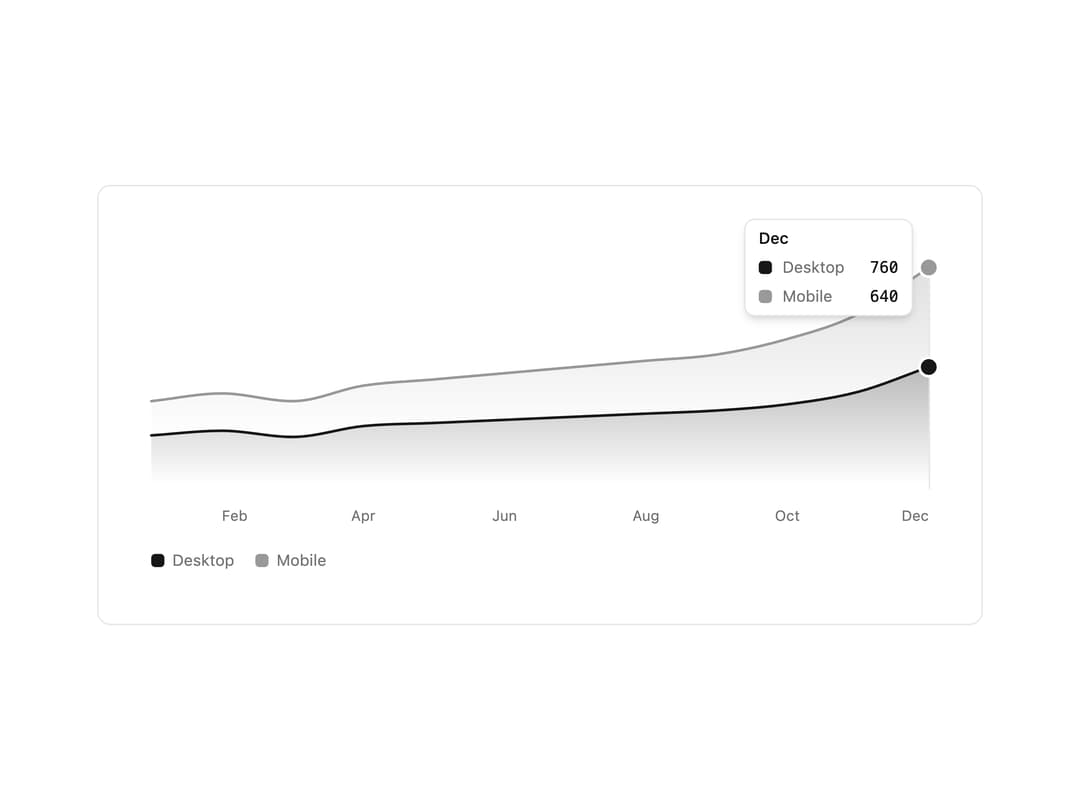
A gradient-filled area chart for one or more data series, stacked or overlapping, with a legend, hover/keyboard tooltip, and animated entrance.
Built with React and Tailwind. Copy the prompt and paste it into Claude Code, Cursor or Lovable: your agent adds Area Chart to your project and fits it to your theme.
Code
How Area Chart is used: the demo's code. The component's own source comes with a free account.
Usage.tsx
"use client";

import { AreaChart } from "@/components/ui/area-chart";

const labels = [
  "Jan",
  "Feb",
  "Mar",
  "Apr",
  "May",
  "Jun",
  "Jul",
  "Aug",
  "Sep",
  "Oct",
  "Nov",
  "Dec",
];

export default function AreaChartDemo() {
  return (
    <div className="w-full max-w-2xl rounded-lg border bg-background p-6 md:p-10">
      <AreaChart
        name="Visitors by device"
        stacked
        labels={labels}
        series={[
          {
            name: "Desktop",
            data: [320, 350, 310, 380, 400, 420, 440, 460, 480, 520, 600, 760],
          },
          {
            name: "Mobile",
            data: [220, 240, 230, 260, 280, 300, 320, 340, 360, 420, 500, 640],
          },
        ]}
      />
    </div>
  );
}
More by kevingirelli
View all
Aurora
50
Warp Gradient
48
FAQ Section
44
QR Code
44
Wave Text
37
Corner Frame
35
Animated Border
31
Spotlight
23
More in Dashboards
View all
Dashboard with Collapsible Sidebar
2.4K

Sidebar
225

SaaS Template
2.4K
Stats Bento
1.1K

Financial Bento Grid
68

Course Design Cards
1.1K
Stats cards with links
79
Card Tabs
99


