
About
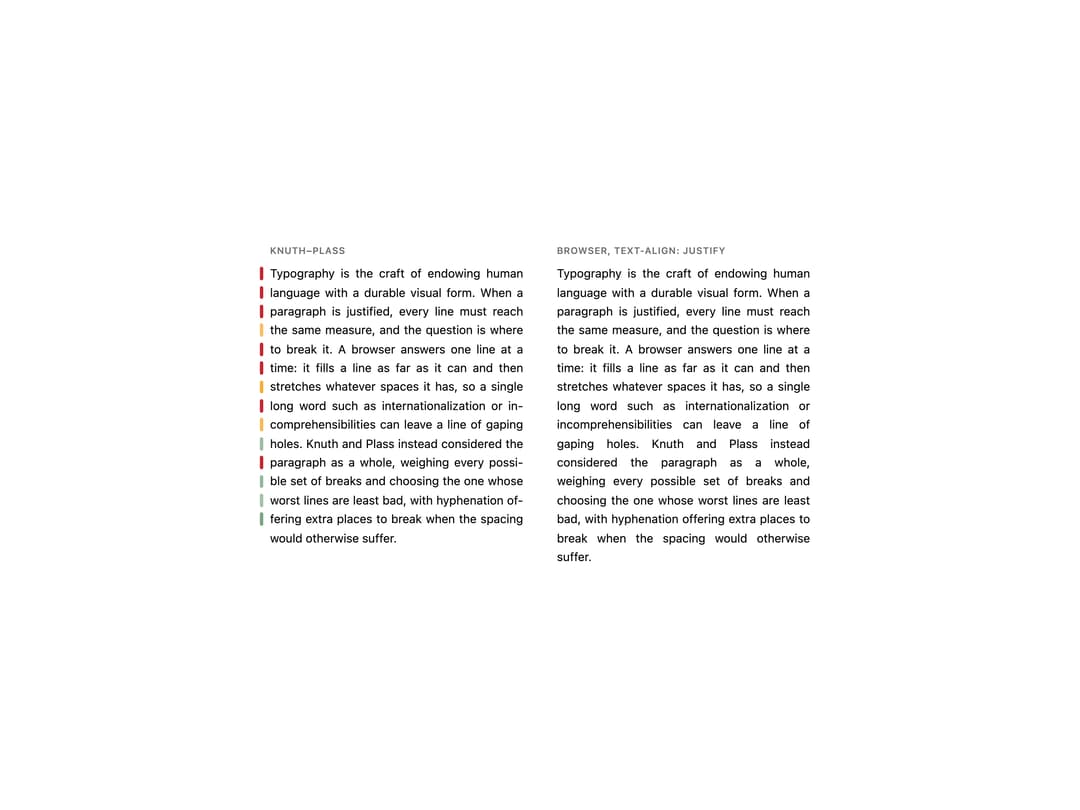
A paragraph component that justifies text with the Knuth–Plass line-breaking algorithm and Liang hyphenation, avoiding the gappy "rivers" that CSS text-align: justify produces on narrow columns.
Built with React and Tailwind. Copy the prompt and paste it into Claude Code, Cursor or Lovable: your agent adds Justified Text to your project and fits it to your theme.
Code
How Justified Text is used: the demo's code. The component's own source comes with a free account.
Usage.tsx
import { JustifiedText } from "@/components/ui/justified-text";

const PARAGRAPH =
  "Typography is the craft of endowing human language with a durable visual form. When a paragraph is justified, every line must reach the same measure, and the question is where to break it. A browser answers one line at a time: it fills a line as far as it can and then stretches whatever spaces it has, so a single long word such as internationalization or incomprehensibilities can leave a line of gaping holes. Knuth and Plass instead considered the paragraph as a whole, weighing every possible set of breaks and choosing the one whose worst lines are least bad, with hyphenation offering extra places to break when the spacing would otherwise suffer.";

export default function JustifiedTextDemo() {
  return (
    <div className="flex w-full flex-wrap items-start justify-center gap-10 bg-background p-8 text-foreground">
      <div className="flex w-[300px] flex-col gap-2">
        <p className="text-[11px] font-semibold uppercase tracking-wider text-muted-foreground">
          Knuth–Plass
        </p>
        <JustifiedText showRatios>{PARAGRAPH}</JustifiedText>
      </div>
      <div className="flex w-[300px] flex-col gap-2">
        <p className="text-[11px] font-semibold uppercase tracking-wider text-muted-foreground">
          Browser, text-align: justify
        </p>
        <p className="text-justify font-sans text-[14px] leading-[1.6] text-ink">
          {PARAGRAPH}
        </p>
      </div>
    </div>
  );
}
More by klyv-ui
View all
Gantt Chart
68
Klyv Animated Beam
55
Shader Canvas
54
Pareto Chart
49
Sunburst Chart
28
Gooey Loader
26
Fluid Canvas
26
Morphing Text
23