
About
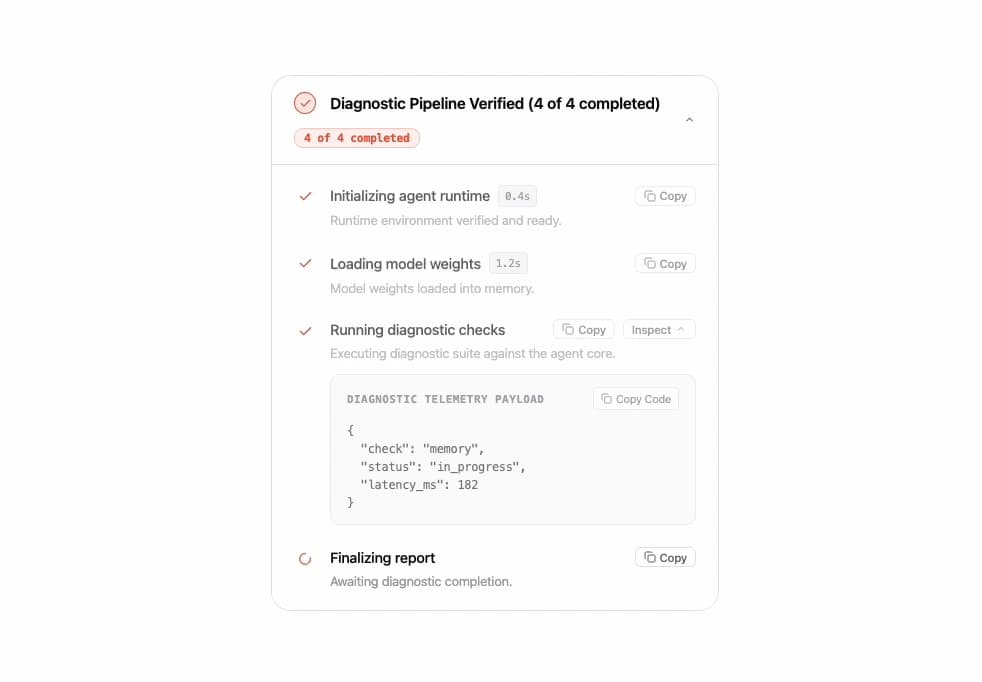
A collapsible, auto-advancing step-by-step pipeline tracker that shows each step's status (pending, running, completed, failed) with duration, a summary, and an optional inspectable JSON payload drawer — useful for visualizing AI agent or multi-stage task progress.
Built with React and Tailwind. Copy the prompt and paste it into Claude Code, Cursor or Lovable: your agent adds Agent Diagnostic Steps to your project and fits it to your theme.
Code
How Agent Diagnostic Steps is used: the demo's code. The component's own source comes with a free account.
Usage.tsx
import Steps, { type StepItem } from "@/components/ui/steps";

const demoSteps: StepItem[] = [
  {
    id: "1",
    title: "Initializing agent runtime",
    status: "completed",
    duration: "0.4s",
    summary: "Runtime environment verified and ready.",
  },
  {
    id: "2",
    title: "Loading model weights",
    status: "completed",
    duration: "1.2s",
    summary: "Model weights loaded into memory.",
  },
  {
    id: "3",
    title: "Running diagnostic checks",
    status: "running",
    summary: "Executing diagnostic suite against the agent core.",
    details:
      '{\n  "check": "memory",\n  "status": "in_progress",\n  "latency_ms": 182\n}',
  },
  {
    id: "4",
    title: "Finalizing report",
    status: "pending",
    summary: "Awaiting diagnostic completion.",
  },
];

export default function StepsDemo() {
  return (
    <div className="flex w-full items-center justify-center p-8 bg-white">
      <div className="w-full max-w-md">
        <Steps steps={demoSteps} />
      </div>
    </div>
  );
}
More by michaelvereb
View all
Feedback Bar
8
AI Loader
3
Toaster
Suggestions