
About
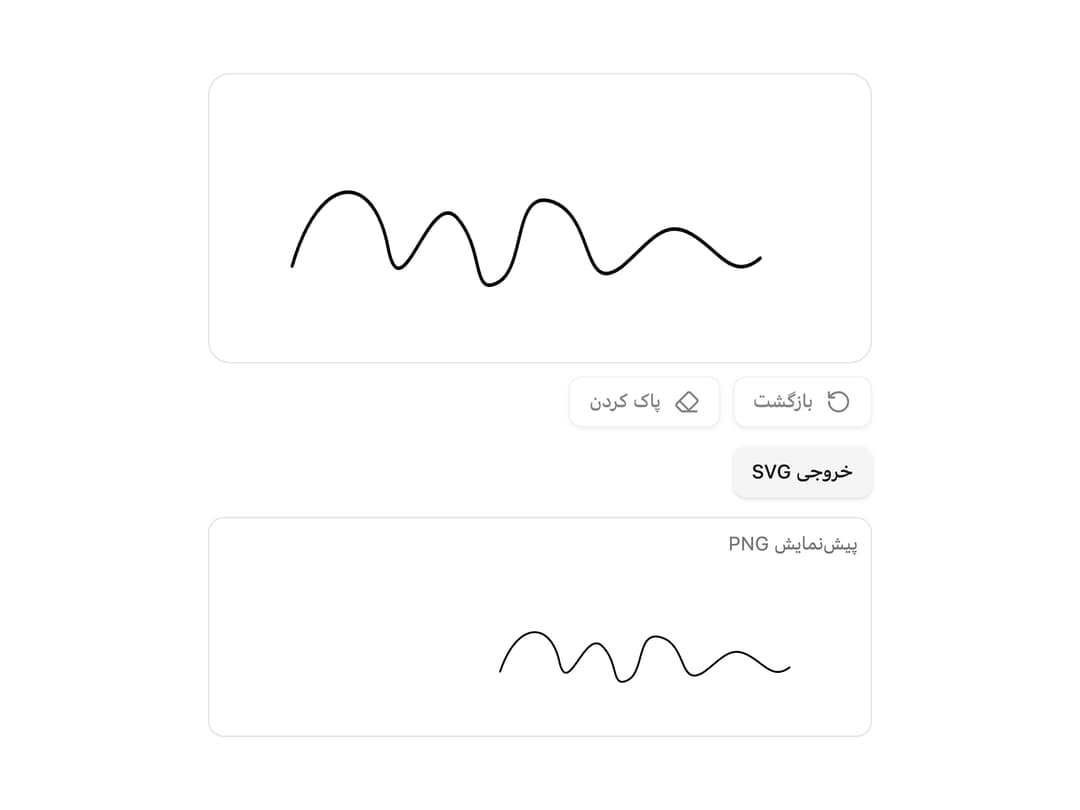
A canvas-based signature capture pad for drawing a handwritten signature with mouse or touch, with undo/clear controls and PNG or SVG export.
Built with React and Tailwind. Copy the prompt and paste it into Claude Code, Cursor or Lovable: your agent adds Signature Pad to your project and fits it to your theme.
Code
How Signature Pad is used: the demo's code. The component's own source comes with a free account.
Usage.tsx
"use client";
import * as React from "react";
import {
SignaturePad,
type SignaturePadHandle,
} from "@/components/ui/signature-pad";
import { Button } from "@/components/ui/button";
export default function SignaturePadDemo() {
const ref = React.useRef<SignaturePadHandle>(null);
const [preview, setPreview] = React.useState<string | null>(null);
return (
<div className="w-full max-w-md space-y-3 p-4" dir="rtl" lang="fa">
<SignaturePad
ref={ref}
height={180}
onEnd={(dataUrl) => setPreview(dataUrl)}
/>
<div className="flex gap-2">
<Button
type="button"
size="sm"
variant="secondary"
onClick={() => {
const svg = ref.current?.toSvg();
if (svg) {
// eslint-disable-next-line no-alert
alert("SVG آماده شد (" + svg.length + " کاراکتر)");
}
}}
>
خروجی SVG
</Button>
</div>
{preview ? (
<div className="rounded-lg border p-2">
<p className="mb-2 text-xs text-muted-foreground">پیشنمایش PNG</p>
{/* eslint-disable-next-line @next/next/no-img-element */}
<img src={preview} alt="امضا" className="max-h-24 w-auto" />
</div>
) : null}
</div>
);
}
Dependencies
More by miladjoodi
View all
Image Diff Slider
32
Empty State
Hover Card

File Upload
Card
Drag Scroll

Native Select
Context Menu