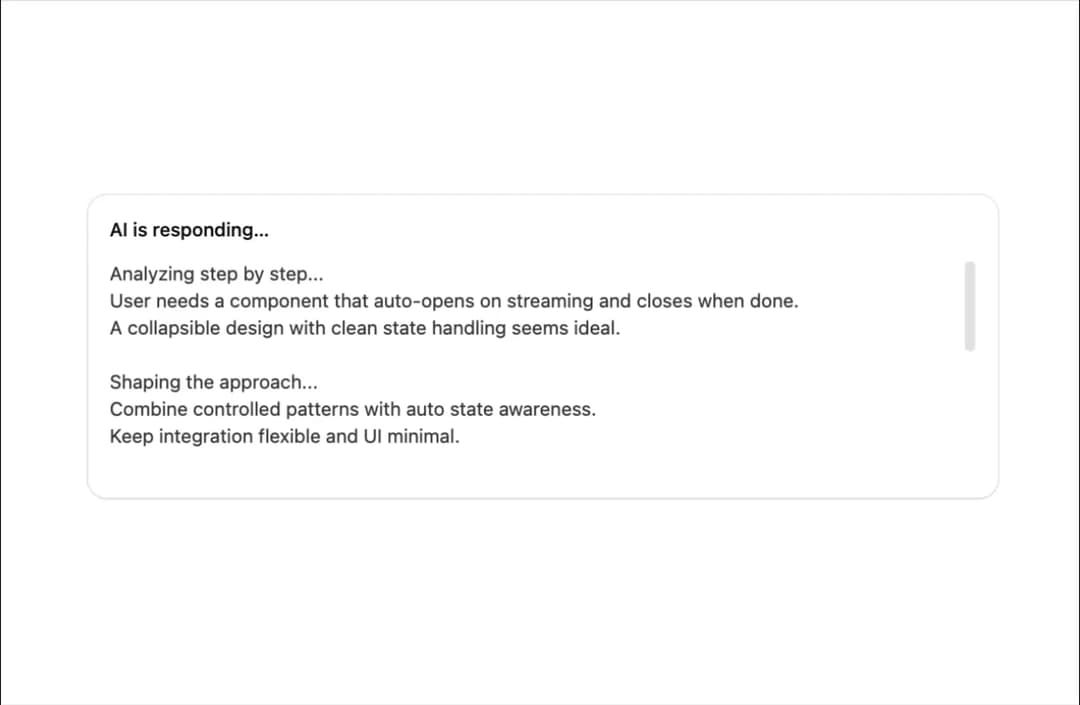
About
An auto-scrolling text display that smoothly keeps the latest streamed AI response always visible as new text arrives.
Built with React and Tailwind. Copy the prompt and paste it into Claude Code, Cursor or Lovable: your agent adds AI Response Writer to your project and fits it to your theme.
Code
How AI Response Writer is used: the demo's code. The component's own source comes with a free account.
Usage.tsx
"use client";

import * as React from "react";

import { AiResponseWriter } from "@/components/ui/ai-response-writer";

const responses = [
  "Analyzing step by step...\nUser needs a component that auto-opens on streaming and closes when done.\nA collapsible design with clean state handling seems ideal.",
  "Shaping the approach...\nCombine controlled patterns with auto state awareness.\nKeep integration flexible and UI minimal.",
  "Outlining structure...\nDefine props, state flow, and basic interactions.\nSketch the logic for seamless behavior.",
  "Polishing details...\nSimplify interactions and adjust for smooth transitions.\nFocus on clarity and consistency in UI flow.",
  "Building the solution...\nAuto-open with streaming, close gracefully after.\nEnsure clean design and align with codebase conventions.",
];

export default function Demo() {
  const [text, setText] = React.useState("");
  const wordsRef = React.useRef<string[]>(responses.join("\n\n").split(" "));

  React.useEffect(() => {
    let index = 0;
    setText("");
    const id = setInterval(() => {
      index += 1;
      setText(wordsRef.current.slice(0, index).join(" "));
      if (index >= wordsRef.current.length) {
        clearInterval(id);
      }
    }, 120);
    return () => clearInterval(id);
  }, []);

  return (
    <div className="text-card-foreground bg-card ring-foreground/10 w-full max-w-2xl rounded-xl p-4 text-sm shadow-xs ring-1">
      <p className="mb-3 font-medium">AI is responding…</p>
      <AiResponseWriter text={text} className="h-40" />
    </div>
  );
}
More by pacekit
View all

Mouse Wave Text
17
Bouncing Text
16
Gradient Shadow
13
Scramble Text
11
AI Suggestions
6
Squash Text
5
GitHub Star Counter
Form Input
More in AI chats
View all

AI Actions
326
Agent Chat
18

AI Task List
169
Inline Citation
9
Message Thread
49
Attachments
24
Prompt with Model Picker
2
Color Picker
121


