About
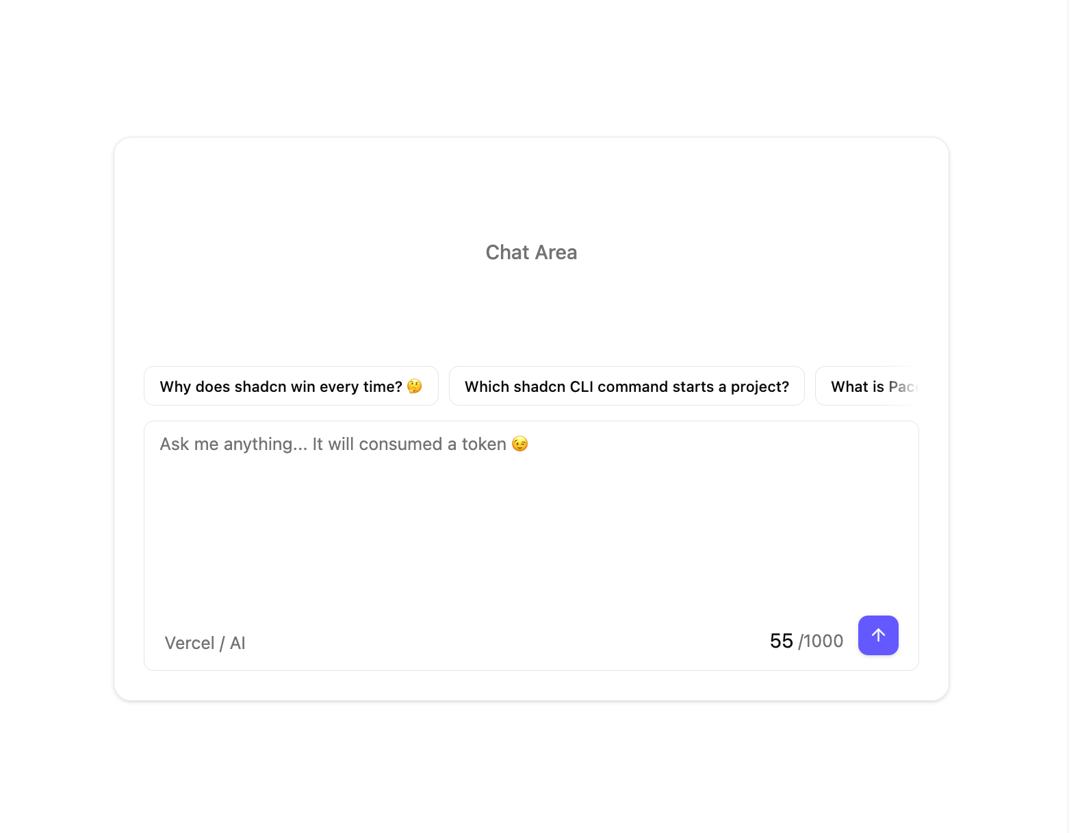
A horizontally scrollable row of AI prompt suggestion chips that animate in and out, for chat and prompt input interfaces.
Built with React and Tailwind. Copy the prompt and paste it into Claude Code, Cursor or Lovable: your agent adds AI Suggestions to your project and fits it to your theme.
Code
How AI Suggestions is used: the demo's code. The component's own source comes with a free account.
Usage.tsx
"use client";

import { AISuggestion, AISuggestions } from "@/components/ui/ai-suggestions";
import * as React from "react";
import { ArrowUpIcon } from "lucide-react";
import { Button } from "@/components/ui/button";
import { Card, CardContent } from "@/components/ui/card";
import { Textarea } from "@/components/ui/textarea";

const suggestions = [
  "Why does shadcn win every time? 🤔",
  "Which shadcn CLI command starts a project?",
  "What is PaceKit used for exactly?",
  "How to add PaceKit components in React?",
  "Top AI trends shaping the future",
  "Why TypeScript powers scalable applications",
  "How self-learning systems actually work",
];

export default function Demo() {
  const [showSuggestions, setShowSuggestions] = React.useState(true);
  const [input, setInput] = React.useState("");
  const textAreaRef = React.useRef<HTMLTextAreaElement>(null);

  const onSuggestion = (suggestion: string) => {
    textAreaRef.current?.focus();
    setInput(suggestion);
    setShowSuggestions(false);
  };

  const onChangeInput = (value: string) => {
    setInput(value);

    if (value.trim().length == 0) {
      setShowSuggestions(true);
    }
  };

  return (
    <Card className="max-w-2xl grow" size="sm">
      <CardContent>
        <div className="text-muted-foreground flex grow justify-center py-20 font-medium">
          Chat Area
        </div>
        <AISuggestions className="me-3 mt-auto pb-1" show={showSuggestions}>
          {suggestions.map((suggestion) => (
            <AISuggestion
              className="cursor-pointer shadow-none"
              key={suggestion}
              onClick={() => onSuggestion(suggestion)}
              suggestion={suggestion}
            />
          ))}
        </AISuggestions>
        <div className="bg-card mt-2 rounded-md border">
          <Textarea
            ref={textAreaRef}
            value={input}
            onChange={(e) => onChangeInput(e.target.value)}
            className="bg-card! h-36 resize-none appearance-none border-none shadow-none ring-0!"
            placeholder="Ask me anything... It will consumed a token 😉"
          />
          <div className="flex items-end justify-between px-4 py-3">
            <p className="text-muted-foreground text-sm">Vercel / AI</p>
            <div className="flex items-end gap-3">
              <div className="flex items-center gap-1">
                55
                <p className="text-muted-foreground text-sm">/1000</p>
              </div>
              <Button className="text-primary-foreground size-8 cursor-pointer">
                <ArrowUpIcon />
              </Button>
            </div>
          </div>
        </div>
      </CardContent>
    </Card>
  );
}
Dependencies
More by pacekit
View all

AI Response Writer
357
Mouse Wave Text
16
Bouncing Text
14
Gradient Shadow
12
Scramble Text
10
Squash Text
5
GitHub Star Counter
Form Input
More in AI chats
View all

AI Actions
320

System Message
56
Message Thread
38

AI Task List
161
Chat Bubble
185
Color Picker
89

Message With Header And Delivery Status
38
Code Block
8


