
About
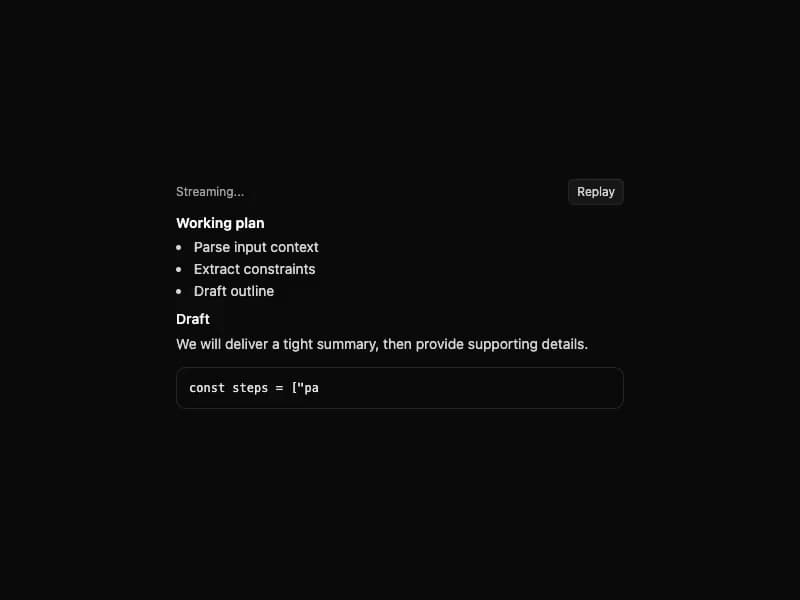
Render markdown with headings, lists, tables, blockquotes, code fences, and safe external links. State-friendly for streaming text. Self-contained port from 21st.dev Agent Elements (uses react-markdown + remark-gfm in place of streamdown + @streamdown/code).
Built with React and Tailwind. Copy the prompt and paste it into Claude Code, Cursor or Lovable: your agent adds Markdown to your project and fits it to your theme.
Code
How Markdown is used: the demo's code. The component's own source comes with a free account.
Usage.tsx
import { useEffect, useState } from "react";
import { Markdown } from "@/components/ui/markdown";

const fullContent = [
  "### Working plan",
  "",
  "- Parse input context",
  "- Extract constraints",
  "- Draft outline",
  "",
  "#### Draft",
  "We will deliver a tight summary, then provide supporting details.",
  "",
  "```ts",
  'const steps = ["parse", "outline", "draft"];',
  "```",
  "",
  "| Step | Status |",
  "| --- | --- |",
  "| Parse | Done |",
  "| Outline | Done |",
  "| Draft | Running |",
  "",
  "Final answer coming next...",
].join("\n");

export default function StreamingDemo() {
  const [content, setContent] = useState("");
  const [isStreaming, setIsStreaming] = useState(false);

  const runStream = () => {
    setContent("");
    setIsStreaming(true);
    let i = 0;
    const tick = () => {
      i += 1;
      setContent(fullContent.slice(0, i));
      if (i >= fullContent.length) {
        setIsStreaming(false);
        return;
      }
      setTimeout(tick, 18);
    };
    setTimeout(tick, 120);
  };

  useEffect(() => {
    runStream();
  }, []);

  return (
    <div className="min-h-screen w-full flex items-center justify-center p-6 bg-white dark:bg-neutral-950">
      <div className="w-full max-w-md space-y-2">
        <div className="flex items-center justify-between">
          <div className="text-xs text-neutral-500 dark:text-neutral-400">
            {isStreaming ? "Streaming..." : "Idle"}
          </div>
          <button
            type="button"
            onClick={runStream}
            className="text-xs px-2 py-1 rounded-md border border-neutral-200 dark:border-neutral-800 bg-white dark:bg-neutral-900 hover:bg-neutral-100 dark:hover:bg-neutral-800 transition-colors text-neutral-700 dark:text-neutral-300"
          >
            Replay
          </button>
        </div>
        <Markdown content={content} />
      </div>
    </div>
  );
}
Dependencies
More by 21st
View all
Spline Scene
9.4K
Testimonials with Marquee
2.3K
Gradient Button
1.9K
Pixel Canvas
899
Animated Blur Number
830
Empty State
773
Balloons
753
Status Badge
639

More in Text
View all

Vertical Cut Reveal Characters
103
Motion Blur Text
34
Text Reveal
313

Rainbow Text Effect
46

Blur Reveal
296

Shine Border
947

NeonRGBTextEffect
144
Blur Reveal
65
