
About
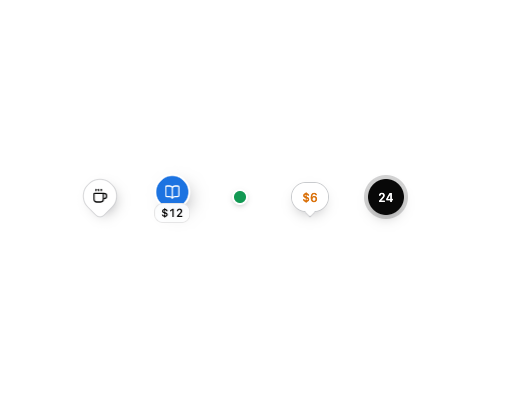
A selectable map pin, dot, or price-label button for marking places on a map, with color tones, captions, and a cluster-count variant for grouped places.
Built with React and Tailwind. Copy the prompt and paste it into Claude Code, Cursor or Lovable: your agent adds Map Marker to your project and fits it to your theme.
Code
How Map Marker is used: the demo's code. The component's own source comes with a free account.
Usage.tsx
"use client";

import {
  MapMarker,
  MapMarkerCluster,
  MapMarkerIcon,
  MapMarkerLabel,
} from "@/components/ui/map-marker";
import * as LucideIcons from "lucide-react";
import * as React from "react";

export default function MapMarkerDemo() {
  const [selected, setSelected] = React.useState("lume");
  const CoffeeIcon = LucideIcons.Coffee;
  const BookIcon = LucideIcons.BookOpen;

  return (
    <div className="flex min-h-[220px] w-full items-center justify-center gap-10 bg-background p-10">
      <MapMarker
        variant="pin"
        tone="default"
        label="Tidewater Coffee, $4"
        selected={selected === "tidewater"}
        onClick={() => setSelected("tidewater")}
      >
        <MapMarkerIcon>
          <CoffeeIcon />
        </MapMarkerIcon>
        {selected === "tidewater" && <MapMarkerLabel>$4</MapMarkerLabel>}
      </MapMarker>

      <MapMarker
        variant="pin"
        tone="primary"
        label="Folio Books, $12"
        selected={selected === "lume"}
        onClick={() => setSelected("lume")}
      >
        <MapMarkerIcon>
          <BookIcon />
        </MapMarkerIcon>
        {selected === "lume" && <MapMarkerLabel>$12</MapMarkerLabel>}
      </MapMarker>

      <MapMarker variant="dot" tone="success" label="Pier Park, free" />

      <MapMarker variant="label" tone="warning" label="Lume Bakery, $6">
        <MapMarkerLabel>$6</MapMarkerLabel>
      </MapMarker>

      <MapMarkerCluster count={24} />
    </div>
  );
}
Dependencies
More by Victor Mesquita
View all
Data Table Toolbar
10
Uai Blocks Community Feed
5
Cart Drawer
App Sidebar

Filter Bar
Author Card
Contact Section
Audit Log