import * as React from "react";
import { Combobox, Field } from "@/components/ui/combobox-multi-create";
import { Bell, FileText } from "lucide-react";

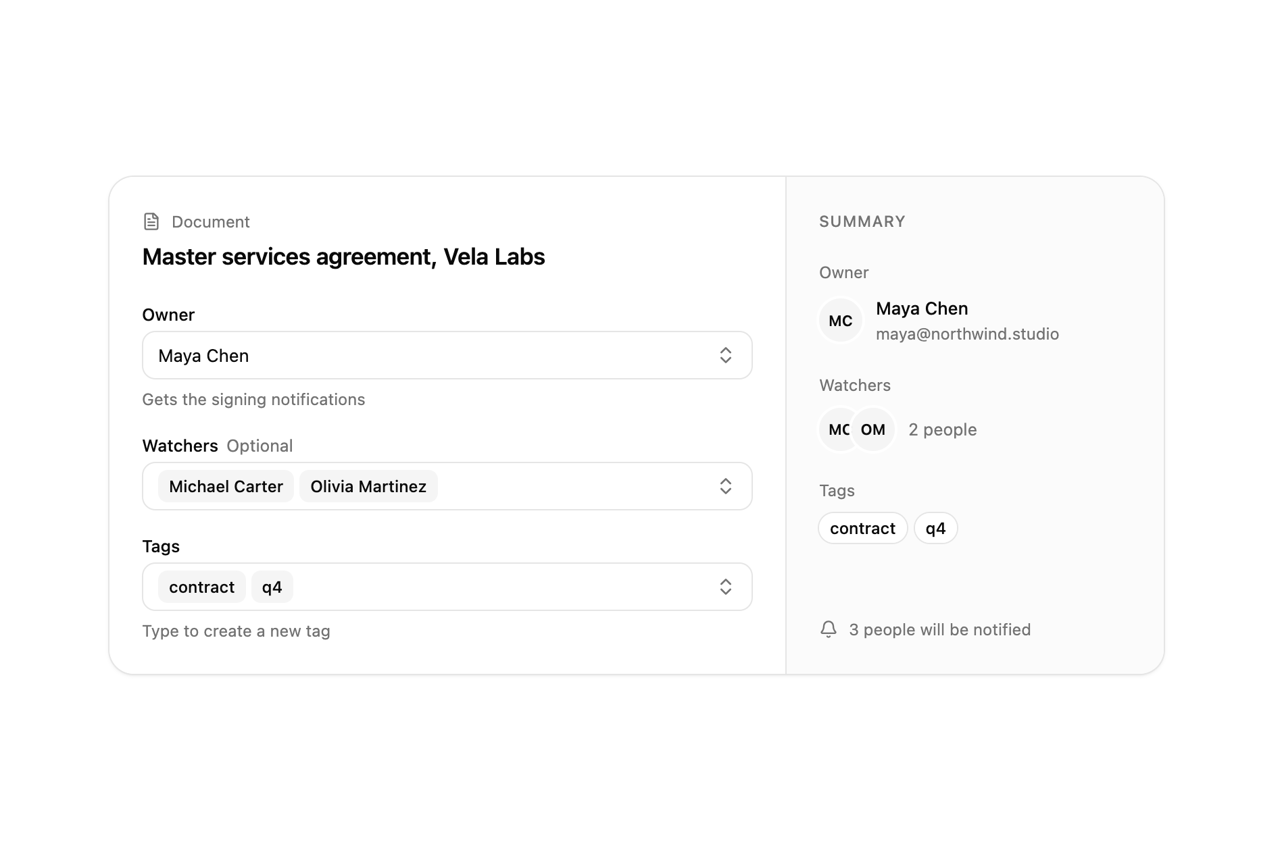
/* Assigning a contract. Owner is a single choice from a searchable list
   (Tom's invite is still pending, so he cannot own it yet). Watchers is a
   multi-select of the same people. Tags take several values and create new
   ones: type "renewal" and press Enter. The summary on the right follows. */

const PEOPLE = [
  { value: "michael", label: "Michael Carter", hint: "michael@northwind.studio" },
  { value: "maya", label: "Maya Chen", hint: "maya@northwind.studio" },
  { value: "olivia", label: "Olivia Martinez", hint: "olivia@northwind.studio" },
  { value: "sarah", label: "Sarah Anderson", hint: "sarah@northwind.studio" },
  { value: "daniel", label: "Daniel Wilson", hint: "daniel@velalabs.com" },
  { value: "tom", label: "Tom Okafor", hint: "Invite pending", disabled: true },
];
const person = (v?: string) => PEOPLE.find((p) => p.value === v);
const initials = (name: string) => name.split(" ").map((w) => w[0]).join("");

function Avatar({ name, className = "" }: { name: string; className?: string }) {
  return (
    <span title={name} className={"grid size-8 shrink-0 place-items-center rounded-full bg-muted text-[11px] font-semibold ring-2 ring-background " + className}>
      {initials(name)}
    </span>
  );
}

export default function ComboboxDemo() {
  const [owner, setOwner] = React.useState<string | undefined>("maya");
  const [watchers, setWatchers] = React.useState<string[]>(["michael", "olivia"]);
  const [tags, setTags] = React.useState<string[]>(["contract", "q4"]);
  const [tagOptions, setTagOptions] = React.useState(
    ["contract", "q4", "legal", "urgent", "vela-labs"].map((t) => ({ value: t, label: t })),
  );
  const own = person(owner);
  const notified = (own ? 1 : 0) + watchers.filter((w) => w !== owner).length;

  return (
    <div className="flex min-h-screen w-full items-center justify-center bg-background p-6">
      <div className="grid w-full max-w-[780px] min-w-0 overflow-hidden rounded-[18px] [corner-shape:squircle] bg-card shadow-sm ring-1 ring-border sm:grid-cols-[minmax(0,1fr)_280px]">
        <div className="p-6">
          <p className="flex items-center gap-2 text-[12px] text-muted-foreground">
            <FileText className="size-3.5" aria-hidden /> Document
          </p>
          <h2 className="mt-1 text-[17px] font-semibold tracking-[-0.01em]">Master services agreement, Vela Labs</h2>
          <div className="mt-6 grid gap-5">
            <Field label="Owner" hint="Gets the signing notifications">
              <Combobox options={PEOPLE} value={owner} onValueChange={setOwner} placeholder="Assign an owner" searchPlaceholder="Search people" />
            </Field>
            <Field label="Watchers" optional>
              <Combobox multiple options={PEOPLE} value={watchers} onValueChange={setWatchers} placeholder="Add watchers" searchPlaceholder="Search people" />
            </Field>
            <Field label="Tags" hint="Type to create a new tag">
              <Combobox
                multiple
                options={tagOptions}
                value={tags}
                onValueChange={setTags}
                placeholder="Add tags"
                searchPlaceholder="Find or create a tag"
                onCreate={(t) => {
                  setTagOptions((o) => [...o, { value: t, label: t }]);
                  setTags((v) => [...v, t]);
                }}
              />
            </Field>
          </div>
        </div>

        <aside className="hidden flex-col border-l border-border bg-muted/40 p-6 sm:flex" aria-label="Summary" aria-live="polite">
          <p className="text-[11.5px] font-medium tracking-[0.06em] text-muted-foreground uppercase">Summary</p>

          <p className="mt-5 text-[12px] text-muted-foreground">Owner</p>
          {own ? (
            <div className="mt-2 flex items-center gap-2.5">
              <Avatar name={own.label} />
              <span className="min-w-0">
                <span className="block truncate text-[13px] font-medium">{own.label}</span>
                <span className="block truncate text-[12px] text-muted-foreground">{own.hint}</span>
              </span>
            </div>
          ) : (
            <p className="mt-2 text-[13px] text-muted-foreground">No owner yet</p>
          )}

          <p className="mt-5 text-[12px] text-muted-foreground">Watchers</p>
          {watchers.length ? (
            <div className="mt-2 flex items-center">
              <span className="flex -space-x-2">
                {watchers.slice(0, 4).map((w) => <Avatar key={w} name={person(w)!.label} />)}
              </span>
              <span className="ml-2.5 text-[12.5px] text-muted-foreground">
                {watchers.length} {watchers.length === 1 ? "person" : "people"}
              </span>
            </div>
          ) : (
            <p className="mt-2 text-[13px] text-muted-foreground">Nobody is watching</p>
          )}

          <p className="mt-5 text-[12px] text-muted-foreground">Tags</p>
          <div className="mt-2 flex flex-wrap gap-1.5">
            {tags.length ? (
              tags.map((t) => (
                <span key={t} className="rounded-full bg-background px-2 py-0.5 text-[12px] font-medium ring-1 ring-border">
                  {t}
                </span>
              ))
            ) : (
              <span className="text-[13px] text-muted-foreground">No tags</span>
            )}
          </div>

          <p className="mt-auto flex items-center gap-2 pt-6 text-[12px] text-muted-foreground">
            <Bell className="size-3.5" aria-hidden /> {notified} {notified === 1 ? "person" : "people"} will be notified
          </p>
        </aside>
      </div>
    </div>
  );
}