
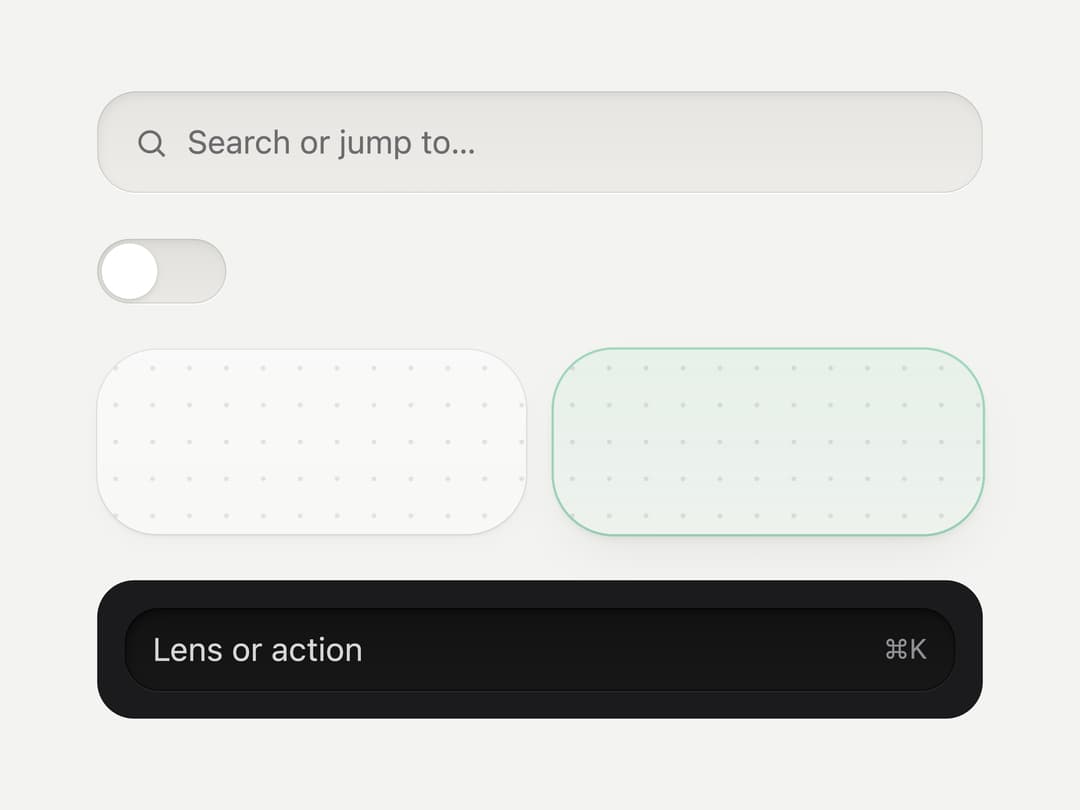
About
A sunk/inset surface primitive for building input fields, slider or switch tracks, drop-target regions, and dark toolbar search wells with a soft recessed hardware look.
Built with React and Tailwind. Copy the prompt and paste it into Claude Code, Cursor or Lovable: your agent adds Well to your project and fits it to your theme.
Code
How Well is used: the demo's code. The component's own source comes with a free account.
Usage.tsx
"use client";

import Well from "@/components/ui/well";

export default function WellDemo() {
  return (
    <div
      className="flex min-h-screen w-full items-center justify-center p-10"
      style={{ background: "var(--mu-page)" }}
    >
      <div className="flex w-full max-w-sm flex-col gap-5">
        <Well
          as="label"
          variant="field"
          radius="field"
          className="flex h-11 items-center gap-2 px-4"
        >
          <svg
            width="15"
            height="15"
            viewBox="0 0 24 24"
            fill="none"
            stroke="currentColor"
            strokeWidth="2"
            style={{ color: "var(--mu-ink3)" }}
          >
            <circle cx="11" cy="11" r="7" />
            <path d="M21 21l-4.3-4.3" />
          </svg>
          <span className="text-sm" style={{ color: "var(--mu-ink3)" }}>
            Search or jump to…
          </span>
        </Well>

        <Well variant="track" radius="pill" className="relative h-7 w-14">
          <span className="absolute left-0.5 top-0.5 size-6 rounded-full bg-white shadow-sm" />
        </Well>

        <div className="grid grid-cols-2 gap-3">
          <Well variant="region" radius="region" className="h-20" />
          <Well variant="region" radius="region" over className="h-20" />
        </div>

        <div className="rounded-2xl p-3" style={{ background: "#1b1b1d" }}>
          <Well
            variant="graphite"
            radius="strip"
            className="flex h-9 items-center justify-between px-3"
          >
            <span className="text-sm" style={{ color: "#D6D6D8" }}>
              Lens or action
            </span>
            <span className="text-xs" style={{ color: "#8E8E93" }}>
              ⌘K
            </span>
          </Well>
        </div>
      </div>
    </div>
  );
}
More by vijayksingh
View all
Weather Widget
74
Meter
10
Skeleton Loader
9
Textarea
2
Soft Hardware Spinner
1
Settings List
Perfect Preview
Line Handles