
About
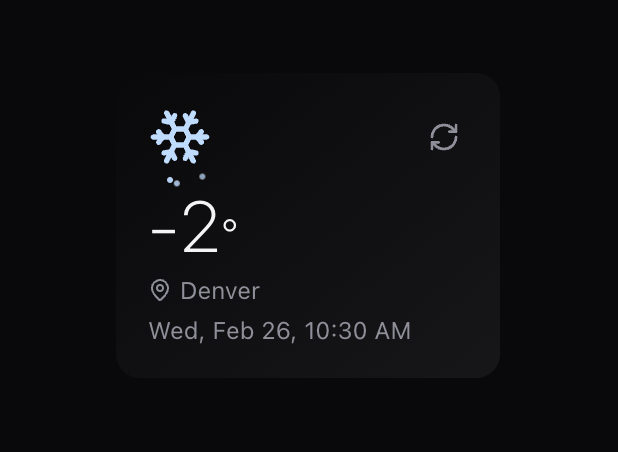
A beautiful, customizable animated weather widget component that integrates seamlessly with shadcn/ui & modern web frameworks. It displays current weather information along with current location , date & time based on the user's location using the OpenWeatherMap API.
Built with React and Tailwind. Copy the prompt and paste it into Claude Code, Cursor or Lovable: your agent adds Weather Widget to your project and fits it to your theme.
Code
How Weather Widget is used: the demo's code. The component's own source comes with a free account.
Usage.tsx
'use client'

import * as React from "react"
import { Button } from "@/components/ui/button"
import { Toggle } from "@/components/ui/toggle"
import { WeatherData, WeatherWidget } from "@/components/ui/weather-widget"
import { Lightbulb, Thermometer } from "lucide-react"

// Mock data for demonstration
const mockWeatherData = {
 sunny: {
    city: "Los Angeles",
    temperature: 28,
    weatherType: "clear",
    dateTime: "Wed, Feb 26, 10:30 AM",
    isDay: true
  },
  rainy: {
    city: "Seattle",
    temperature: 14,
    weatherType: "rain",
    dateTime: "Wed, Feb 26, 10:30 AM",
    isDay: true
  },
  snowy: {
    city: "Denver",
    temperature: -2,
    weatherType: "snow",
    dateTime: "Wed, Feb 26, 10:30 AM",
    isDay: true
  },
  cloudy: {
    city: "London",
    temperature: 18,
    weatherType: "clouds",
    dateTime: "Wed, Feb 26, 6:30 PM",
    isDay: false
  },
  nightClear: {
    city: "Tokyo",
    temperature: 22,
    weatherType: "clear",
    dateTime: "Thu, Feb 27, 1:30 AM",
    isDay: false
  },
  thunderstorm: {
    city: "Miami",
    temperature: 30,
    weatherType: "thunderstorm",
    dateTime: "Wed, Feb 26, 10:30 AM",
    isDay: true
  },
  mist: {
    city: "San Francisco",
    temperature: 15,
    weatherType: "mist",
    dateTime: "Wed, Feb 26, 10:30 AM",
    isDay: true
  }
}

// Basic Demo
export function BasicDemo() {
  return (
    <div className="flex justify-center p-8">
      <WeatherWidget
        apiKey="602eb8e0d8f46c939889cdc2c5ad67ff"
        width="16rem"
        className="shadow-md"
        fallbackLocation={{
          latitude: 40.7128,
          longitude: -74.0060 }} />
    </div>
  )
}

// Advanced Demo with Controls
export function AdvancedDemo() {
  const [useMockData, setUseMockData] = React.useState(true)
  const [selectedWeather, setSelectedWeather] = React.useState<string>("sunny")
  const [animated, setAnimated] = React.useState(true)

  // Custom fetch function that returns mock data
  const mockFetch = async (): Promise<WeatherData> => {
    return mockWeatherData[selectedWeather as keyof typeof mockWeatherData]
  }

  return (
    <div className="flex flex-col items-center gap-6 p-8">
      <div className="w-full max-w-md bg-card rounded-lg shadow-sm p-4">
      <h1 className="text-2xl font-bold mb-4 text-center">Weather Widget</h1>

        <div className="flex flex-col gap-4">
          <div className="flex justify-between items-center">
            <span className="text-sm font-medium">Use Mock Data</span>
            <Toggle
              pressed={useMockData}
              onPressedChange={setUseMockData}
              aria-label="Toggle mock data"
            >
              <Thermometer className="w-4 h-4 text-green-600" />
            </Toggle>
          </div>

          <div className="flex justify-between items-center">
            <span className="text-sm font-medium">Enable Animations</span>
            <Toggle
              pressed={animated}
              onPressedChange={setAnimated}
              aria-label="Toggle animations"
            >
              <Lightbulb className="w-4 h-4 text-yellow-600" />
            </Toggle>
          </div>

          {useMockData && (
            <div className="grid grid-cols-2 gap-2 mt-2">
              {Object.keys(mockWeatherData).map(weather => (
                <Button
                  key={weather}
                  size="sm"
                  variant={selectedWeather === weather ? "default" : "outline"}
                  onClick={() => setSelectedWeather(weather)}
                  className="text-xs capitalize"
                >
                  {weather}
                </Button>
              ))}
            </div>
          )}
        </div>
      </div>

      <WeatherWidget
        apiKey="602eb8e0d8f46c939889cdc2c5ad67ff"
        width="16rem"
        className="shadow-md"
        onFetchWeather={useMockData ? mockFetch : undefined}
        animated={animated}
          fallbackLocation={{
          latitude: 40.7128,
          longitude: -74.0060  // Example: New York City
          }}/>

      <div className="text-sm text-muted-foreground text-center max-w-md">
        <p>
          Toggle the options above to see different weather conditions and animation settings.
        </p>
      </div>
    </div>
  )
}

// Compact Size Demo
export function CompactDemo() {
  const mockFetch = async (): Promise<WeatherData> => mockWeatherData.snowy

  return (
    <div className="flex justify-center p-4">
      <WeatherWidget
        width="12rem"
        className="shadow-sm"
        onFetchWeather={mockFetch}
        fallbackLocation={{
          latitude: 40.7128,
          longitude: -74.0060}}/>
    </div>
  )
}
Dependencies
More in Cards
View all

Course Design Cards
1.1K

Statistics Card 2
269
Statistics Card 7
295
Card
56
Stats cards with links
85

Interactive Tech Stack Bento Grid with Hover Effects
93
The Item one
3

Card Studio
36
