
About
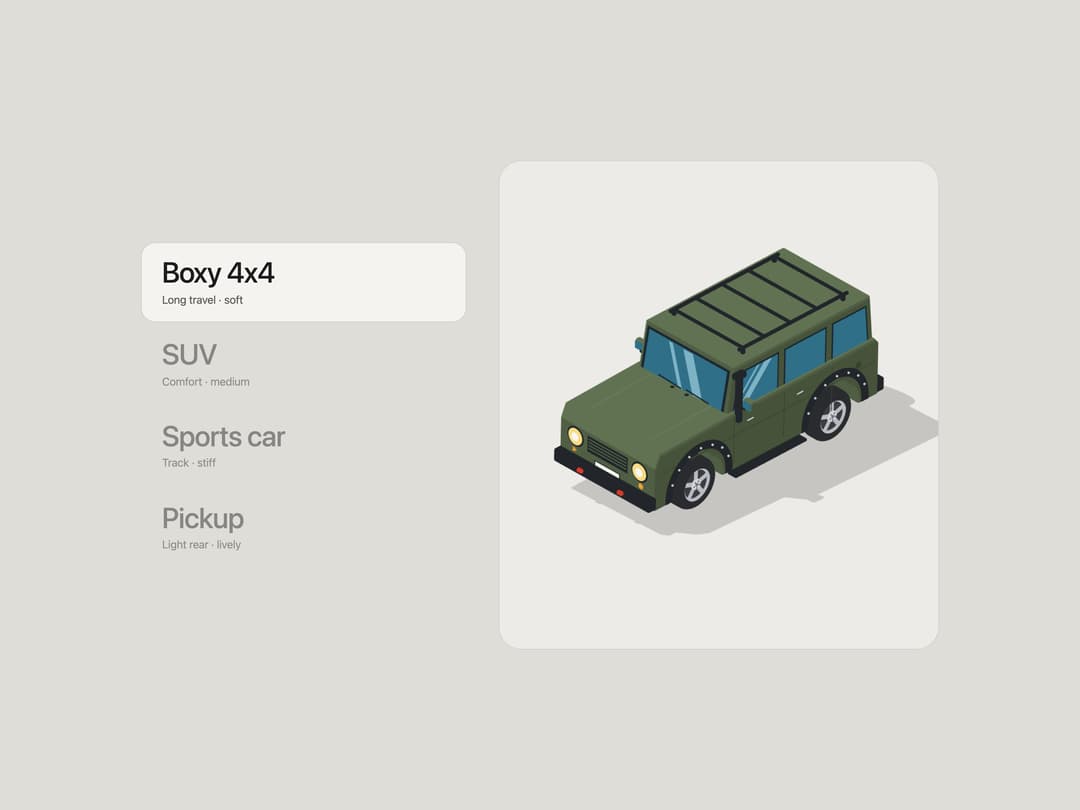
A menu of cars beside an isometric three.js stage. Hover a name and the current car falls through the floor while the next one drops in from the top and lands on four independently sprung wheels: coil springs, dampers, bump stops, anti-roll bars and squashy tyres, so every landing bounces differently. Includes a boxy 4x4, an SUV, a sports car and a pickup, drawn in a flat toon illustration style.
Built with React and Tailwind. Copy the prompt and paste it into Claude Code, Cursor or Lovable: your agent adds Car Drop Menu to your project and fits it to your theme.
Code
How Car Drop Menu is used: the demo's code. The component's own source comes with a free account.
Usage.tsx
"use client";

import { CarDropMenu, type CarItem } from "@/components/ui/car-drop-menu";

const cars: CarItem[] = [
  {
    id: "boxy",
    name: "Boxy 4x4",
    subtitle: "Long travel · soft",
    description: "an upright off-roader on soft, long-travel springs",
    body: "boxy",
  },
  {
    id: "suv",
    name: "SUV",
    subtitle: "Comfort · medium",
    description: "a rounded family SUV with a comfort tune",
    body: "suv",
  },
  {
    id: "sports",
    name: "Sports car",
    subtitle: "Track · stiff",
    description: "a low, wide coupe on stiff track springs",
    body: "sports",
  },
  {
    id: "pickup",
    name: "Pickup",
    subtitle: "Light rear · lively",
    description: "a crew cab pickup with a light, bouncy tail",
    body: "pickup",
  },
];

export default function CarDropMenuDemo() {
  return (
    <div className="flex w-full flex-col items-center bg-[#dfddd7] p-2 sm:p-6">
      <CarDropMenu items={cars} defaultValue="boxy" className="max-w-5xl" />
    </div>
  );
}
Dependencies
More by Aakash
View all
Skincare Product Shelf
936
Coffee Pour Menu
550
Holographic Business Card
254
Scroll Stacking Cards
247
Disc Reveal List
86
Nearby Walk Menu
80
Foggy Window Wipe
69
Receipt Printer
65