
About
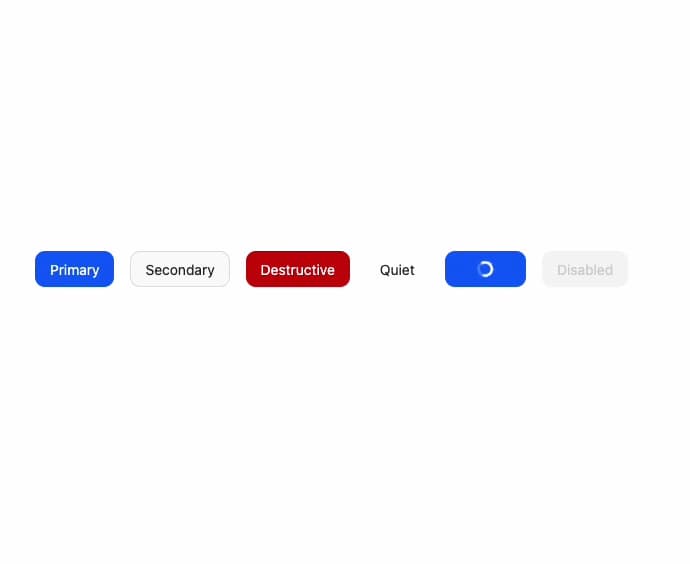
An accessible button built on React Aria Components with primary, secondary, destructive and quiet variants plus a built-in pending/loading spinner state.
Built with React and Tailwind. Copy the prompt and paste it into Claude Code, Cursor or Lovable: your agent adds Button to your project and fits it to your theme.
Code
How Button is used: the demo's code. The component's own source comes with a free account.
Usage.tsx
import { Button } from "@/components/ui/tailwind-button";

export default function ButtonDemo() {
  return (
    <div className="flex flex-wrap items-center justify-center gap-4 p-10">
      <Button variant="primary">Primary</Button>
      <Button variant="secondary">Secondary</Button>
      <Button variant="destructive">Destructive</Button>
      <Button variant="quiet">Quiet</Button>
      <Button variant="primary" isPending>
        Loading
      </Button>
      <Button variant="primary" isDisabled>
        Disabled
      </Button>
    </div>
  );
}
Dependencies
More by py_ets
View all
Alert Dialog
10
React Aria CheckboxGroup
9
Command Palette
7
React Aria DatePicker
5
Progress Bar
5
React Aria Tree
4
React Aria Switch
4
React Aria ColorArea
4
More in Buttons
View all
Texture Button
95

Eclipse Button
6

App Store Button
457

Button Group


Button
14

Button
32
Button
65

HeroUI Button Group
9
