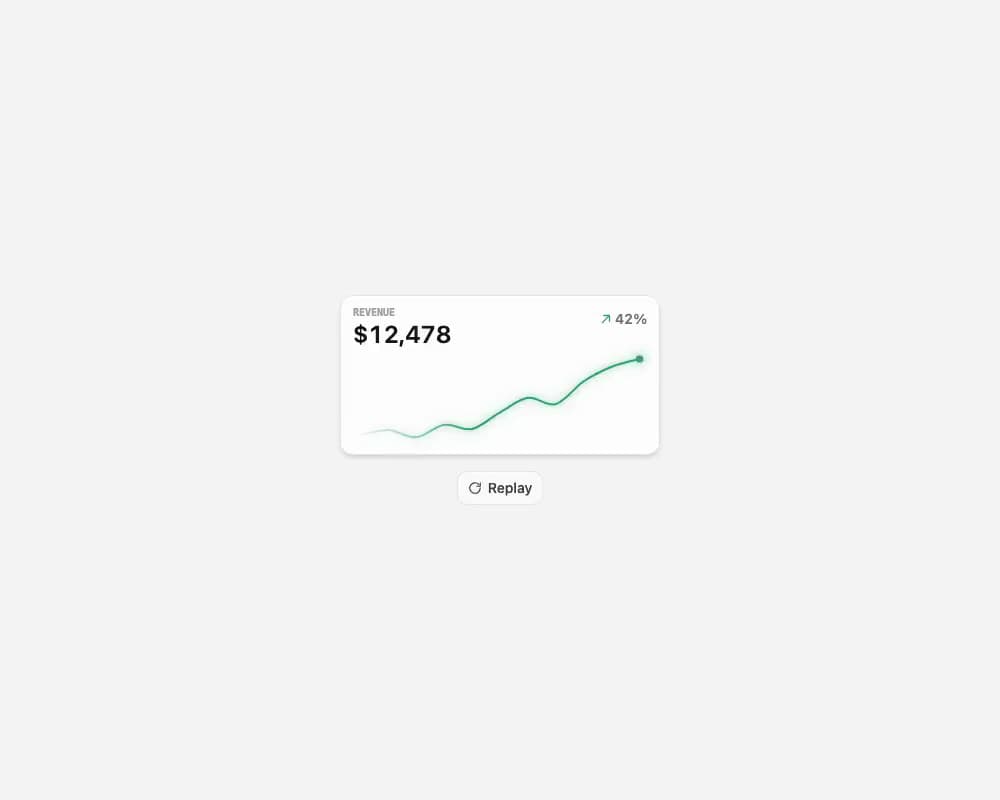
A compact SVG sparkline that draws itself, morphs between trend states, and shifts color for positive or negative movement. The exported AnimatedSparkline wraps it in a card with a label, an animated headline value, and a trend percentage (green up / red down); the underlying Sparkline is a standalone primitive with smooth or sharp curves, an optional soft glow, a fading left edge, an animated endpoint dot, and a replayable self-drawing reveal. Built with @number-flow/react for the value spin.
Built with React and Tailwind. Copy the prompt and paste it into Claude Code, Cursor or Lovable: your agent adds Animated Sparkline to your project and fits it to your theme.
Code
How Animated Sparkline is used: the demo's code. The component's own source comes with a free account.
Usage.tsx
"use client";

import { useMemo, useState } from "react";
import {
  AnimatedSparkline,
  type SparkCurve,
} from "@/components/ui/animated-sparkline";

// Generate a wavy revenue series whose slope follows the trend %, so the line
// morphs up (green) for positive movement and down (red) for negative.
function makeData(trend: number) {
  const points = 11;
  const first = 8787;
  const last = first * (1 + trend / 100);
  const wobble = Math.abs(last - first) * 0.12 + first * 0.015;
  return Array.from({ length: points }, (_, index) => {
    const t = index / (points - 1);
    const linear = first + (last - first) * t;
    const envelope = Math.sin(t * Math.PI); // 0 at both ends → clean endpoints
    const value = linear + Math.sin(t * Math.PI * 3) * wobble * envelope;
    return { label: `${index}`, value: Math.round(value) };
  });
}

export default function Default() {
  const [curve, setCurve] = useState<SparkCurve>("smooth");
  const [trend, setTrend] = useState(42);
  const [replayKey, setReplayKey] = useState(0);

  const data = useMemo(() => makeData(trend), [trend]);

  return (
    <div className="flex min-h-screen w-full items-center justify-center bg-neutral-100 p-8">
      <div className="flex w-full max-w-xl flex-col gap-3">
        <div className="relative rounded-2xl border border-neutral-200 bg-white">
          <button
            className="absolute right-3 top-3 inline-flex items-center gap-1.5 rounded-lg border border-neutral-200 bg-white px-2.5 py-1.5 text-sm font-medium text-neutral-700 transition-colors hover:bg-neutral-50"
            onClick={() => setReplayKey((key) => key + 1)}
            type="button"
          >
            <svg
              aria-hidden="true"
              className="size-3.5"
              fill="none"
              stroke="currentColor"
              strokeWidth="2"
              viewBox="0 0 24 24"
            >
              <path
                d="M21 12a9 9 0 1 1-2.64-6.36M21 3v6h-6"
                strokeLinecap="round"
                strokeLinejoin="round"
              />
            </svg>
            Replay
          </button>
          <div className="flex justify-center px-6 py-16">
            <AnimatedSparkline
              curve={curve}
              data={data}
              label="Revenue"
              replayKey={replayKey}
              trendPercent={trend}
              valuePrefix="$"
              width={240}
            />
          </div>
        </div>

        <div className="grid gap-4 rounded-xl border border-neutral-200 bg-white p-3 md:grid-cols-[auto_1fr] md:items-center">
          <div className="grid gap-2">
            <p className="px-1 font-mono font-semibold text-[10px] text-neutral-400 uppercase leading-none">
              Curve
            </p>
            <div className="flex gap-0.5" role="tablist">
              {(["smooth", "sharp"] as const).map((option) => {
                const active = option === curve;
                return (
                  <button
                    aria-selected={active}
                    className={
                      active
                        ? "rounded-md bg-neutral-100 px-2.5 py-1 text-sm font-medium text-neutral-900 capitalize"
                        : "rounded-md px-2.5 py-1 text-sm font-medium text-neutral-500 capitalize transition-colors hover:text-neutral-900"
                    }
                    key={option}
                    onClick={() => setCurve(option)}
                    role="tab"
                    type="button"
                  >
                    {option}
                  </button>
                );
              })}
            </div>
          </div>

          <div className="grid min-w-0 gap-2 md:px-3">
            <div className="flex items-center justify-between gap-3">
              <span className="font-mono font-semibold text-[10px] text-neutral-400 uppercase leading-none">
                Trend
              </span>
              <span className="font-semibold text-neutral-500 text-xs tabular-nums">
                {trend >= 0 ? "+" : ""}
                {trend}%
              </span>
            </div>
            <input
              aria-label="Trend percent"
              className="h-2 w-full cursor-pointer appearance-none rounded-full bg-neutral-200 accent-neutral-900"
              max={200}
              min={-200}
              onChange={(event) => setTrend(Number(event.target.value))}
              type="range"
              value={trend}
            />
          </div>
        </div>
      </div>
    </div>
  );
}
Dependencies
More by dqnamo
View all

Agent Dock
531
Animated Banner
335
Scroll Fade List
296
Model Selector Prompt
154
Game of Life Loader
126
Animated Signature
54
Iridescent Foil
52
Dynamic Button
44
More in Cards
View all

Course Design Cards
1.1K
Stats cards with links
119

Statistics Card 2
258
Card
54
Statistics Card 7
288
The Item one
3

Card Studio
9

Weather Card
52
