
About
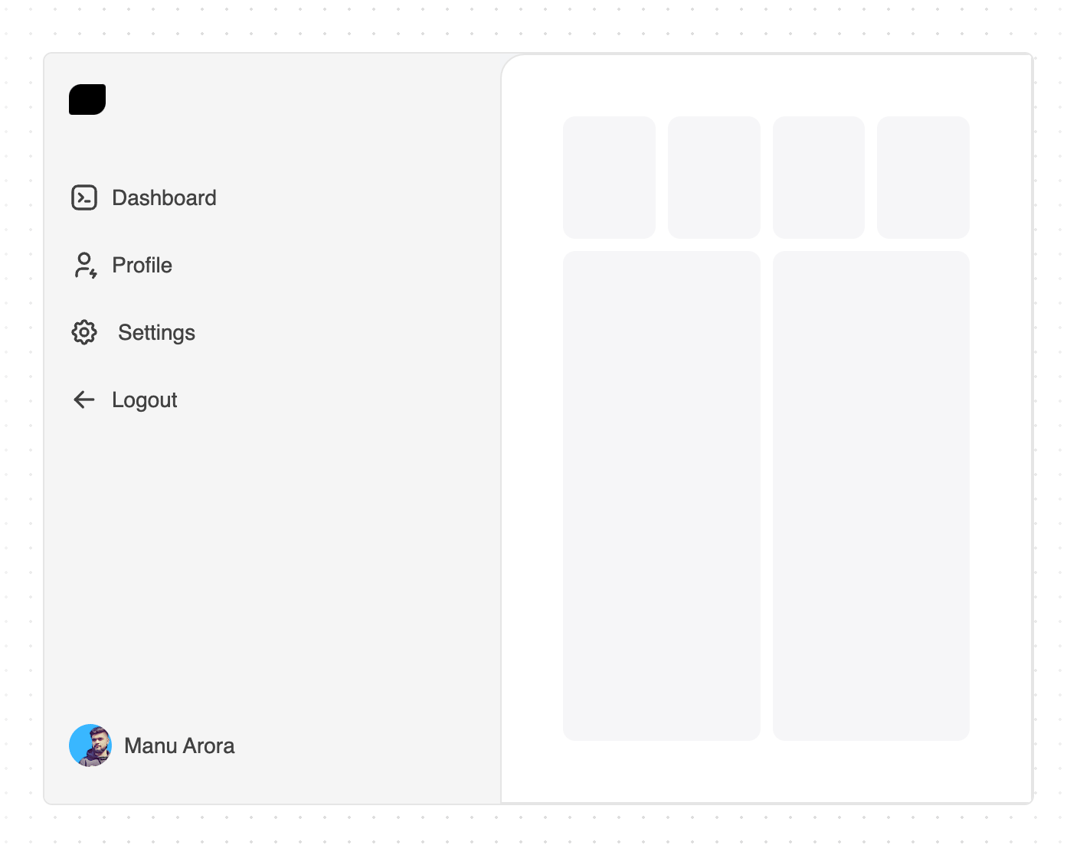
Expandable sidebar that expands on hover, mobile responsive and dark mode support
Built with React and Tailwind. Copy the prompt and paste it into Claude Code, Cursor or Lovable: your agent adds Sidebar to your project and fits it to your theme.
Code
How Sidebar is used: the demo's code. The component's own source comes with a free account.
Usage.tsx
"use client";
import React, { useState } from "react";
import { Sidebar, SidebarBody, SidebarLink } from "@/components/ui/sidebar";
import { LayoutDashboard, UserCog, Settings, LogOut } from "lucide-react";
import Link from "next/link";
import { motion } from "framer-motion";
import Image from "next/image";
import { cn } from "@/lib/utils";

export function SidebarDemo() {
  const links = [
    {
      label: "Dashboard",
      href: "#",
      icon: (
        <LayoutDashboard className="text-neutral-700 dark:text-neutral-200 h-5 w-5 flex-shrink-0" />
      ),
    },
    {
      label: "Profile",
      href: "#",
      icon: (
        <UserCog className="text-neutral-700 dark:text-neutral-200 h-5 w-5 flex-shrink-0" />
      ),
    },
    {
      label: "Settings",
      href: "#",
      icon: (
        <Settings className="text-neutral-700 dark:text-neutral-200 h-5 w-5 flex-shrink-0" />
      ),
    },
    {
      label: "Logout",
      href: "#",
      icon: (
        <LogOut className="text-neutral-700 dark:text-neutral-200 h-5 w-5 flex-shrink-0" />
      ),
    },
  ];
  const [open, setOpen] = useState(false);
  return (
    <div
      className={cn(
        "rounded-md flex flex-col md:flex-row bg-gray-100 dark:bg-neutral-800 w-full flex-1 max-w-7xl mx-auto border border-neutral-200 dark:border-neutral-700 overflow-hidden",
        "h-[60vh]" // for your use case, use `h-screen` instead of `h-[60vh]`
      )}
    >
      <Sidebar open={open} setOpen={setOpen}>
        <SidebarBody className="justify-between gap-10">
          <div className="flex flex-col flex-1 overflow-y-auto overflow-x-hidden">
            {open ? <Logo /> : <LogoIcon />}
            <div className="mt-8 flex flex-col gap-2">
              {links.map((link, idx) => (
                <SidebarLink key={idx} link={link} />
              ))}
            </div>
          </div>
          <div>
            <SidebarLink
              link={{
                label: "Manu Arora",
                href: "#",
                icon: (
                  <Image
                    src="https://cdn.21st.dev/assets/mirror/33/331a939508e8101f1fd59b640315921d90ae78d59f1682ff49a4c9538935a182.png"
                    className="h-7 w-7 flex-shrink-0 rounded-full"
                    width={50}
                    height={50}
                    alt="Avatar"
                  />
                ),
              }}
            />
          </div>
        </SidebarBody>
      </Sidebar>
      <Dashboard />
    </div>
  );
}

export const Logo = () => {
  return (
    <Link
      href="#"
      className="font-normal flex space-x-2 items-center text-sm text-black py-1 relative z-20"
    >
      <div className="h-5 w-6 bg-black dark:bg-white rounded-br-lg rounded-tr-sm rounded-tl-lg rounded-bl-sm flex-shrink-0" />
      <motion.span
        initial={{ opacity: 0 }}
        animate={{ opacity: 1 }}
        className="font-medium text-black dark:text-white whitespace-pre"
      >
        Acet Labs
      </motion.span>
    </Link>
  );
};

export const LogoIcon = () => {
  return (
    <Link
      href="#"
      className="font-normal flex space-x-2 items-center text-sm text-black py-1 relative z-20"
    >
      <div className="h-5 w-6 bg-black dark:bg-white rounded-br-lg rounded-tr-sm rounded-tl-lg rounded-bl-sm flex-shrink-0" />
    </Link>
  );
};

// Dummy dashboard component with content
const Dashboard = () => {
  return (
    <div className="flex flex-1">
      <div className="p-2 md:p-10 rounded-tl-2xl border border-neutral-200 dark:border-neutral-700 bg-white dark:bg-neutral-900 flex flex-col gap-2 flex-1 w-full h-full">
        <div className="flex gap-2">
          {[...new Array(4)].map((i) => (
            <div
              key={"first-array" + i}
              className="h-20 w-full rounded-lg  bg-gray-100 dark:bg-neutral-800 animate-pulse"
            ></div>
          ))}
        </div>
        <div className="flex gap-2 flex-1">
          {[...new Array(2)].map((i) => (
            <div
              key={"second-array" + i}
              className="h-full w-full rounded-lg  bg-gray-100 dark:bg-neutral-800 animate-pulse"
            ></div>
          ))}
        </div>
      </div>
    </div>
  );
};
Dependencies
More by Manu Arora
View all
Container Scroll Animation
10.2K
Glowing Effect
4.4K
Aurora Background
4.4K
Timeline
4.3K
Sparkles
4.1K
Lamp
3.7K
Bento Grid
2.7K
Link Preview
2.1K
More in Navigation
View all

Sidebar
222

Tabs
51
Navbar with Theme Toggle
40
Nav List Card
29

Breadcrumb
12
Pagination Ant
3

Pagination
85
Pagination
9


