
About
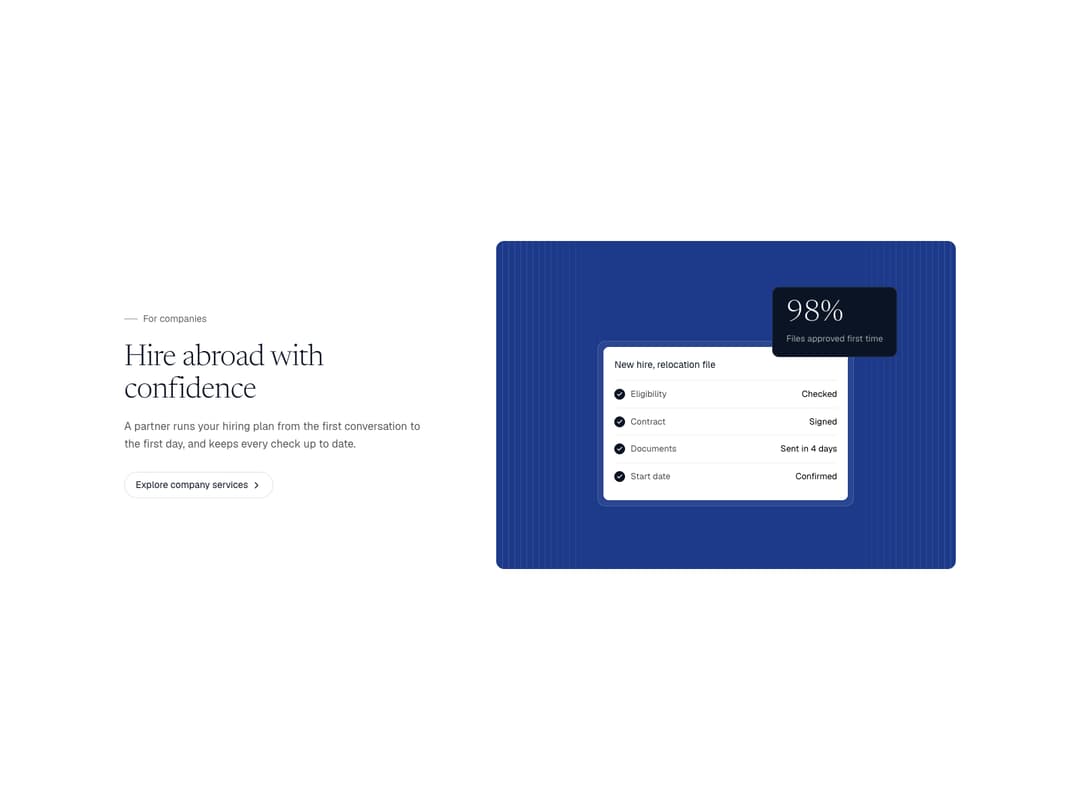
A feature row pairing copy with a small live UI on a coloured panel. Comes with two visuals: a checklist that ticks itself off beside a rolling stat card, and a timeline bar that fills stage by stage. Flip the side with reverse and switch the panel tone.
Built with React and Tailwind. Copy the prompt and paste it into Claude Code, Cursor or Lovable: your agent adds Feature UI Row to your project and fits it to your theme.
Code
How Feature UI Row is used: the demo's code. The component's own source comes with a free account.
Usage.tsx
import { FeatureUIRow, ChecklistVisual, TimelineVisual } from "@/components/ui/feature-ui-row"

const IMG = "https://cdn.jsdelivr.net/gh/rm-sjent/21st-assets@v1/img/"

export default function FeatureUIRowDemo() {
  return (
    <div className="w-full bg-white" style={{ fontFamily: "Geist, ui-sans-serif, system-ui, sans-serif" }}>
      <link rel="stylesheet" href="https://fonts.googleapis.com/css2?family=Geist:wght@300..600&family=Newsreader:ital,opsz,wght@0,6..72,300..500;1,6..72,300..400&display=swap" precedence="default" />
      <style>{`.font-serif{font-family:"Newsreader","Iowan Old Style","Palatino Linotype",Georgia,serif}`}</style>
      <div className="mx-auto flex max-w-[1312px] flex-col gap-24 px-6 py-20 md:px-10 md:py-24">
        <FeatureUIRow
          eyebrow="For companies"
          title="Hire abroad with confidence"
          body="A partner runs your hiring plan from the first conversation to the first day, and keeps every check up to date."
          cta={{ label: "Explore company services", href: "#" }}
          visual={
            <ChecklistVisual
              title="New hire, relocation file"
              rows={[
                { label: "Eligibility", value: "Checked" },
                { label: "Contract", value: "Signed" },
                { label: "Documents", value: "Sent in 4 days" },
                { label: "Start date", value: "Confirmed" },
              ]}
              stat={{ value: 98, suffix: "%", label: "Files approved first time" }}
            />
          }
        />
        <FeatureUIRow
          reverse
          tone="night"
          eyebrow="For families"
          title="Move, stay or settle"
          body="We map the whole journey for your family, so you always know what comes next and when."
          cta={{ label: "Explore family services", href: "#" }}
          visual={
            <TimelineVisual
              title="Your route to settling"
              stages={[
                { label: "First stay", years: 3 },
                { label: "Extension", years: 2 },
              ]}
              total={5}
              note="Apply to settle after five years"
            />
          }
        />
      </div>
    </div>
  )
}
Dependencies
More by Sajad Entesari
View all

Sector Wheel
5
Torn Portrait Scroll
3
Timeline Scrubber
2
Slat Shutter Hero
2
Scattered About
1
Scroll Fill Headline
1
Bento Mini UI
1
Morph Island
1
More in Features
View all

Grid Feature Cards
1.9K

Feature Sections
114
Feature with advantages
296

Features 8
3.2K
Features Card
262
Feature with image
155

Feature 72
137
Feature Section with card gradient
174


