
About
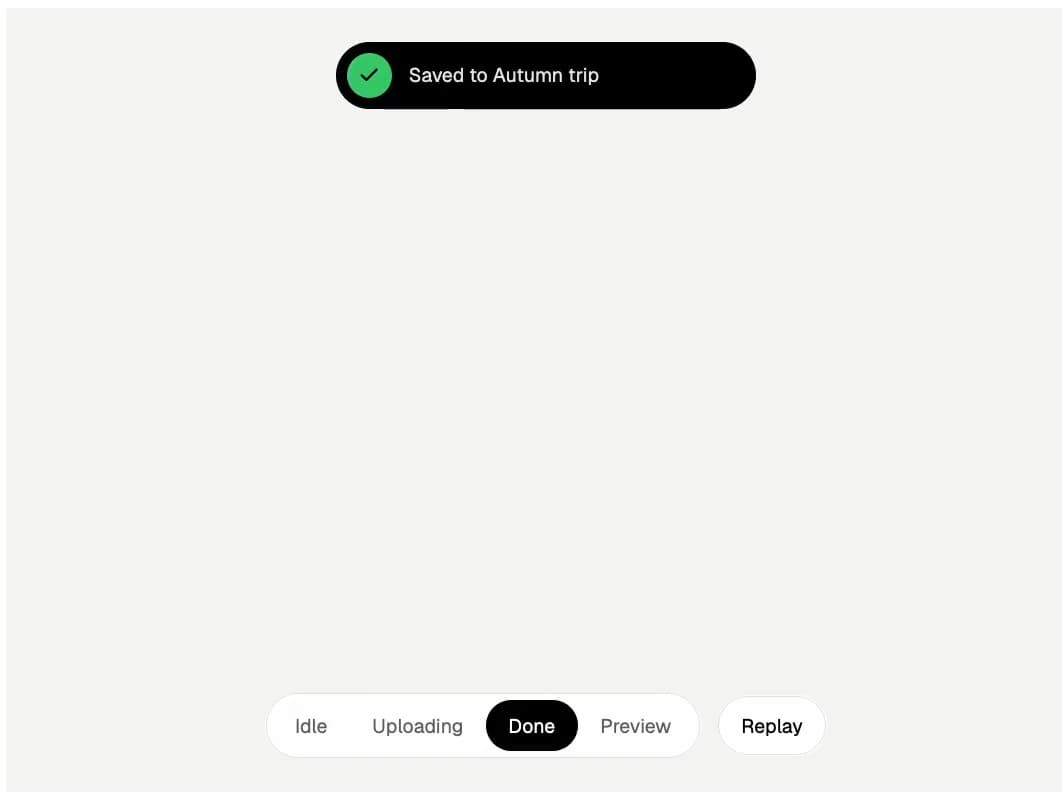
A dynamic island style status pill that morphs between idle, uploading with a rolling percentage, done and a full photo preview. One state prop drives it, so it drops into any upload, export or background task flow. The demo plays the whole sequence when it scrolls into view.
Built with React and Tailwind. Copy the prompt and paste it into Claude Code, Cursor or Lovable: your agent adds Morph Island to your project and fits it to your theme.
Code
How Morph Island is used: the demo's code. The component's own source comes with a free account.
Usage.tsx
import * as React from "react"
import { useInView } from "motion/react"
import { MorphIsland, type IslandState } from "@/components/ui/morph-island"

const IMG = "https://cdn.jsdelivr.net/gh/rm-sjent/21st-assets@v1/img/"
const files = [
  { name: "Gion, Kyoto", src: `${IMG}deck-kyoto.jpg`, album: "Autumn trip" },
  { name: "Alfama, Lisbon", src: `${IMG}deck-lisbon.jpg`, album: "Autumn trip" },
  { name: "Reine, Lofoten", src: `${IMG}deck-lofoten.jpg`, album: "Autumn trip" },
]
const STATES: { id: IslandState; label: string }[] = [
  { id: "idle", label: "Idle" },
  { id: "uploading", label: "Uploading" },
  { id: "done", label: "Done" },
  { id: "preview", label: "Preview" },
]

export default function MorphIslandDemo() {
  const [state, setState] = React.useState<IslandState>("idle")
  const [progress, setProgress] = React.useState(0)
  const [current, setCurrent] = React.useState(0)
  const run = React.useRef(0)
  const timers = React.useRef<number[]>([])

  const stop = () => {
    run.current++
    timers.current.forEach((t) => {
      window.clearTimeout(t)
      window.clearInterval(t)
    })
    timers.current = []
  }

  const play = React.useCallback(() => {
    stop()
    const id = run.current
    const later = (fn: () => void, ms: number) => timers.current.push(window.setTimeout(() => id === run.current && fn(), ms))
    setState("idle")
    setProgress(0)
    setCurrent(0)
    let p = 0
    later(() => {
      setState("uploading")
      const iv = window.setInterval(() => {
        if (id !== run.current) return window.clearInterval(iv)
        p = Math.min(100, p + 3 + Math.random() * 9)
        setProgress(p)
        if (p >= 100) {
          window.clearInterval(iv)
          later(() => setState("done"), 450)
          later(() => setState("preview"), 2400)
        }
      }, 220)
      timers.current.push(iv)
    }, 1400)
  }, [])

  const box = React.useRef<HTMLDivElement>(null)
  const inView = useInView(box, { amount: 0.6 })

  // run the sequence each time the demo scrolls into view
  React.useEffect(() => {
    if (inView) play()
    else stop()
    return stop
  }, [inView, play])

  return (
    <div ref={box} className="relative flex h-[560px] w-full flex-col overflow-hidden bg-[#f6f6f4]" style={{ fontFamily: "Geist, ui-sans-serif, system-ui, sans-serif" }}>
      <link rel="stylesheet" href="https://fonts.googleapis.com/css2?family=Geist:wght@300..600&family=Newsreader:ital,opsz,wght@0,6..72,300..500;1,6..72,300..400&display=swap" precedence="default" />
      <div className="flex justify-center pt-6">
        <MorphIsland state={state} files={files} progress={progress} current={current} />
      </div>
      <div className="mt-auto flex flex-wrap items-center justify-center gap-3 pb-6">
        <div role="tablist" className="flex rounded-full border border-black/10 bg-white p-1">
          {STATES.map((s) => (
            <button
              key={s.id}
              role="tab"
              aria-selected={state === s.id}
              onClick={() => {
                stop()
                if (s.id === "uploading") setProgress(64)
                setCurrent(0)
                setState(s.id)
              }}
              className={"rounded-full px-4 py-2 text-[14px] transition-colors duration-300 " + (state === s.id ? "bg-black text-white" : "text-black/60")}
            >
              {s.label}
            </button>
          ))}
        </div>
        <button onClick={play} className="rounded-full border border-black/10 bg-white px-4 py-2.5 text-[14px] text-black">
          Replay
        </button>
      </div>
    </div>
  )
}
Dependencies
More by Sajad Entesari
View all

Sector Wheel
5
Torn Portrait Scroll
3
Slat Shutter Hero
2
Scattered About
1
Scroll Fill Headline
1
Bento Mini UI
1
Timeline Scrubber
1
Feature UI Row