About
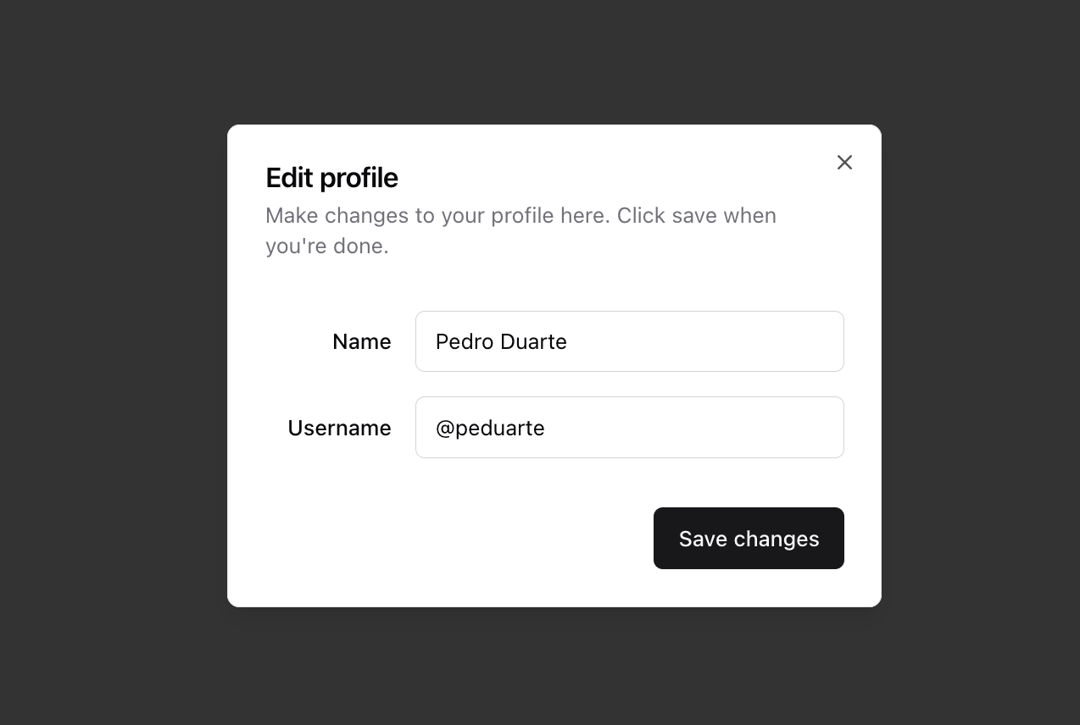
A window overlaid on either the primary window or another dialog window, rendering the content underneath inert.
Built with React and Tailwind. Copy the prompt and paste it into Claude Code, Cursor or Lovable: your agent adds Dialog to your project and fits it to your theme.
Code
How Dialog is used: the demo's code. The component's own source comes with a free account.
Usage.tsx
import { Copy } from "lucide-react"

import { Button } from "@/components/ui/button"
import {
  Dialog,
  DialogContent,
  DialogDescription,
  DialogFooter,
  DialogHeader,
  DialogTitle,
  DialogTrigger,
  DialogClose,
} from "@/components/ui/dialog"
import { Input } from "@/components/ui/input"
import { Label } from "@/components/ui/label"

function DialogDemo() {
  return (
    <Dialog>
      <DialogTrigger asChild>
        <Button variant="outline">Edit Profile</Button>
      </DialogTrigger>
      <DialogContent className="sm:max-w-[425px]">
        <DialogHeader>
          <DialogTitle>Edit profile</DialogTitle>
          <DialogDescription>
            Make changes to your profile here. Click save when you're done.
          </DialogDescription>
        </DialogHeader>
        <div className="grid gap-4 py-4">
          <div className="grid grid-cols-4 items-center gap-4">
            <Label htmlFor="name" className="text-right">
              Name
            </Label>
            <Input
              id="name"
              defaultValue="Pedro Duarte"
              className="col-span-3"
            />
          </div>
          <div className="grid grid-cols-4 items-center gap-4">
            <Label htmlFor="username" className="text-right">
              Username
            </Label>
            <Input
              id="username"
              defaultValue="@peduarte"
              className="col-span-3"
            />
          </div>
        </div>
        <DialogFooter>
          <Button type="submit">Save changes</Button>
        </DialogFooter>
      </DialogContent>
    </Dialog>
  )
}

function DialogWithCloseButton() {
  return (
    <Dialog>
      <DialogTrigger asChild>
        <Button variant="outline">Share</Button>
      </DialogTrigger>
      <DialogContent className="sm:max-w-md">
        <DialogHeader>
          <DialogTitle>Share link</DialogTitle>
          <DialogDescription>
            Anyone who has this link will be able to view this.
          </DialogDescription>
        </DialogHeader>
        <div className="flex items-center space-x-2">
          <div className="grid flex-1 gap-2">
            <Label htmlFor="link" className="sr-only">
              Link
            </Label>
            <Input
              id="link"
              defaultValue="https://ui.shadcn.com/docs/installation"
              readOnly
            />
          </div>
          <Button type="submit" size="sm" className="px-3">
            <span className="sr-only">Copy</span>
            <Copy className="h-4 w-4" />
          </Button>
        </div>
        <DialogFooter className="sm:justify-start">
          <DialogClose asChild>
            <Button type="button" variant="secondary">
              Close
            </Button>
          </DialogClose>
        </DialogFooter>
      </DialogContent>
    </Dialog>
  )
}

export default {
  DialogDemo,
  DialogWithCloseButton,
}
Dependencies
More by shadcn
View all

Navigation menu
777
Calendar with time pressets
507
Sidebar
344
Sonner
235
Chart
220
Icons
187
Dropdown Menu
153
Calendar with event slots
117
More in Buttons
View all
Texture Button
95

Eclipse Button
6

App Store Button
457
Button Group


Button
14

Button
32
Button
65

HeroUI Button Group
9
