
About
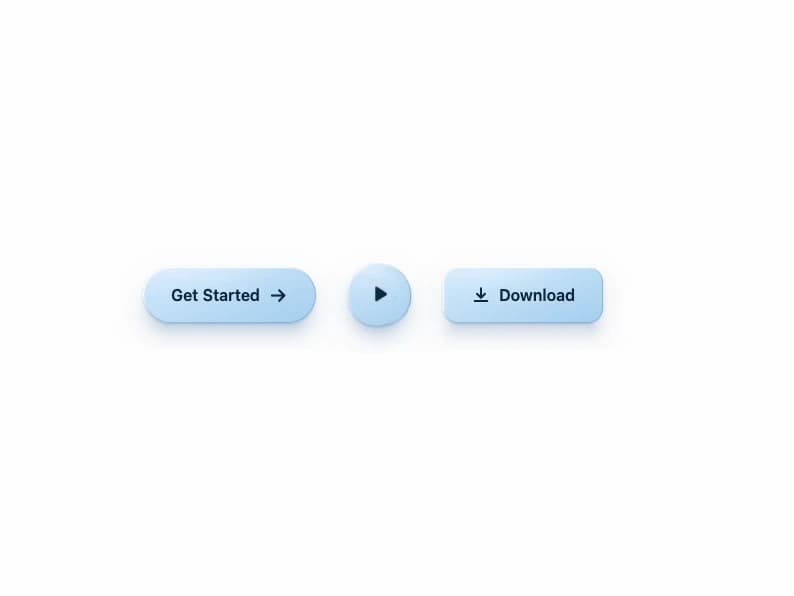
A button that feels like a small pool of water. Press anywhere and ripples spread from your finger, gently bending the label beneath the surface. The whole button squashes like a water balloon and springs back. WebGL with a CSS fallback, zero dependencies, respects reduced motion
Built with React and Tailwind. Copy the prompt and paste it into Claude Code, Cursor or Lovable: your agent adds Water Ripple Button to your project and fits it to your theme.
Code
How Water Ripple Button is used: the demo's code. The component's own source comes with a free account.
Usage.tsx
import { WaterRippleButton } from "@/components/ui/waterripplebutton";

const ArrowIcon = () => (
  <svg viewBox="0 0 16 16" fill="none" stroke="currentColor" strokeWidth="1.6" strokeLinecap="round" strokeLinejoin="round" aria-hidden="true">
    <path d="M3 8h9.5M8.5 4l4 4-4 4" />
  </svg>
);

const PlayIcon = () => (
  <svg viewBox="0 0 24 24" fill="currentColor" aria-hidden="true">
    <path d="M8.2 5.3c0-.9 1-1.5 1.8-1l9.4 5.8c.8.5.8 1.6 0 2.1L10 18c-.8.5-1.8-.1-1.8-1V5.3Z" />
  </svg>
);

const DownloadIcon = () => (
  <svg viewBox="0 0 16 16" fill="none" stroke="currentColor" strokeWidth="1.6" strokeLinecap="round" strokeLinejoin="round" aria-hidden="true">
    <path d="M8 2.5v7.5M4.8 7 8 10.2 11.2 7M3 12.8h10" />
  </svg>
);

export default function WaterRippleButtonDemo() {
  return (
    <div className="flex min-h-[320px] w-full flex-wrap items-center justify-center gap-8 p-10">
      <WaterRippleButton size="lg">
        Get Started
        <ArrowIcon />
      </WaterRippleButton>
      <WaterRippleButton shape="circle" size="lg" aria-label="Play">
        <PlayIcon />
      </WaterRippleButton>
      <WaterRippleButton shape="rounded" size="lg">
        <DownloadIcon />
        Download
      </WaterRippleButton>
    </div>
  );
}More in Buttons
View all
Hero Button
21

Button
141

Eclipse Button
9
Button
19
Texture Button
110

Random Letter Swap CTA Buttons
64

HeroUI Toggle Button


Icon Label Subtext Button
65


